
AI Writing Assistance: The Practical Guide
45% of Americans now use AI tools to help them write at least sometimes, including 17% who use them at least weekly. AI writing assistance has become a mainstream work habit, but the results depend less on access to a model than on how much structure a person gives it.
That distinction matters. A vague request can produce fluent filler, inconsistent reasoning, or text that sounds unlike the person who needs to publish it. A well-scaffolded workflow can help a marketer draft faster, help a support agent stay within policy, or help a product manager turn scattered notes into a decision-ready document without handing accountability to a machine.
Table of Contents
- Why AI Writing Assistance Is No Longer Niche
- How AI Writing Assistance Actually Works
- The Productivity-Quality Tradeoff Explained
- Prompt Workflows for Different Professional Roles
- When AI Writing Assistance Crosses Into Policy Territory
- Building Team Workflows With Prompt Builder
- Making AI Writing Assistance a Reliable System
Why AI Writing Assistance Is No Longer Niche
The September 2026 YouGov poll on who uses AI to write found that 45% of U.S. adults use AI to help them write at least sometimes, while 17% use it at least weekly. Weekly use rose from 12% to 17%, and the share who never use AI to write fell from 60% to 51%.
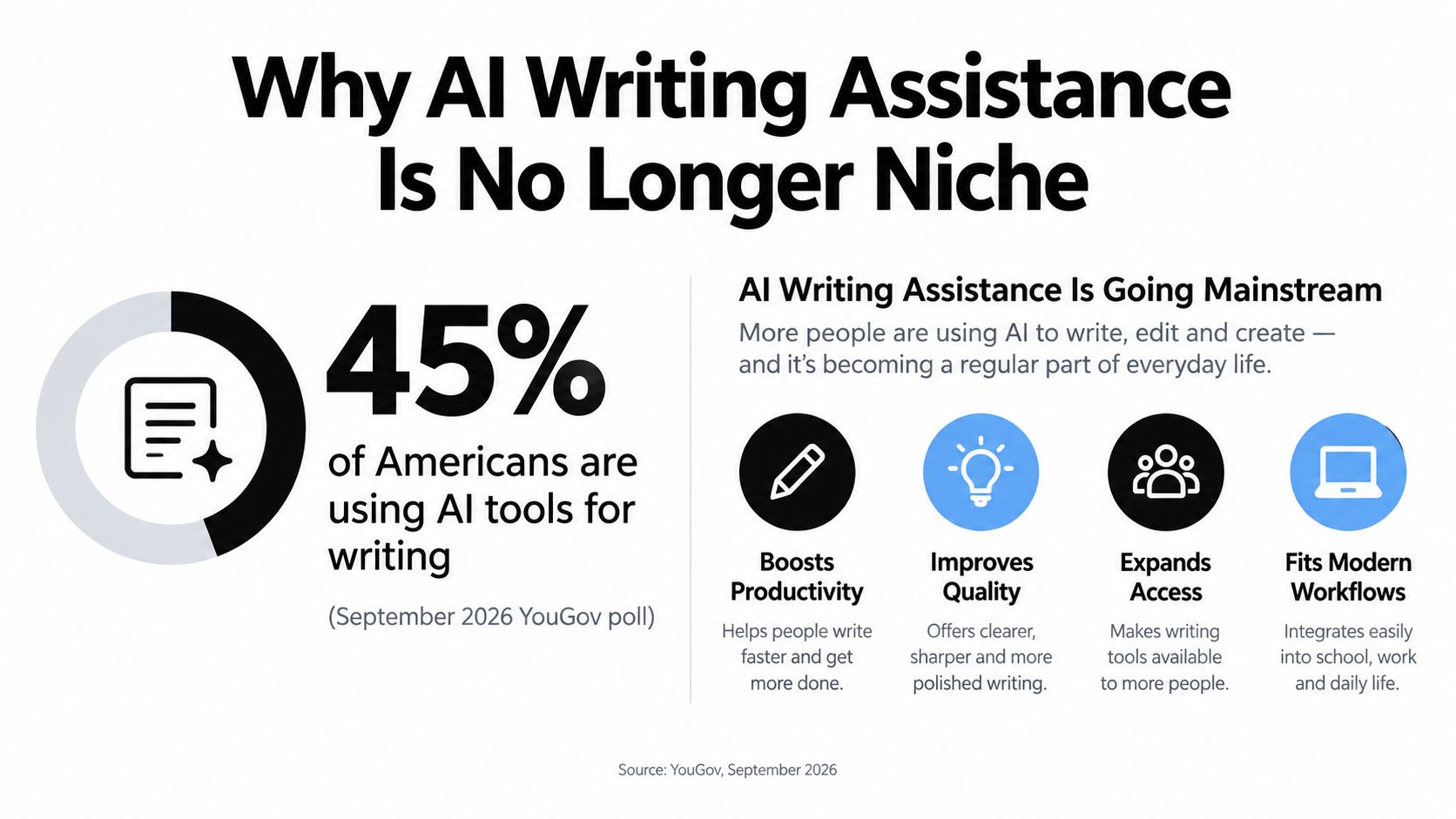
The adoption pattern is uneven, but it isn't confined to a small group of enthusiasts. Monthly use reaches 36% among adults aged 18–29 and 39% among those aged 30–44, compared with 19% among adults aged 45–64 and 8% among those 65 and older, according to the same YouGov data. Younger workers may have adopted these tools earlier, but the professional question now reaches nearly every age group.
The practical shift is from “Should I use AI?” to “Where should AI enter my workflow?” That means separating ideation, outlining, drafting, editing, fact checking, and final approval instead of treating writing as one undifferentiated task.
AI writing assistance also has a longer history than current chatbots. A 2025 peer-reviewed review describes computer-based grammar analysis dating to 1959, early AI writing tools in the 1980s, Grammarly's introduction in 2009, and ChatGPT's public launch in November 2022. The recent change isn't that machines suddenly began helping with language. It's that conversational access made assistance available to ordinary writers inside everyday work.
Practical rule: Use AI to remove blank-page friction and repetitive revision, not to remove human judgment.
For readers building a workflow from scratch, this practical guide to AI writing is a useful companion for connecting prompts to content production. The important standard is simple: preserve the writer's intent, verify factual claims, and make the approval step explicit.
How AI Writing Assistance Actually Works
Most weak outputs begin with a weak interaction. The user pastes a topic and asks for an article, email, or explanation, then judges the result as if the model had access to the audience, source material, brand voice, business objective, and acceptable level of risk.
That is low-scaffolding prompting. It gives the model a destination without a route.
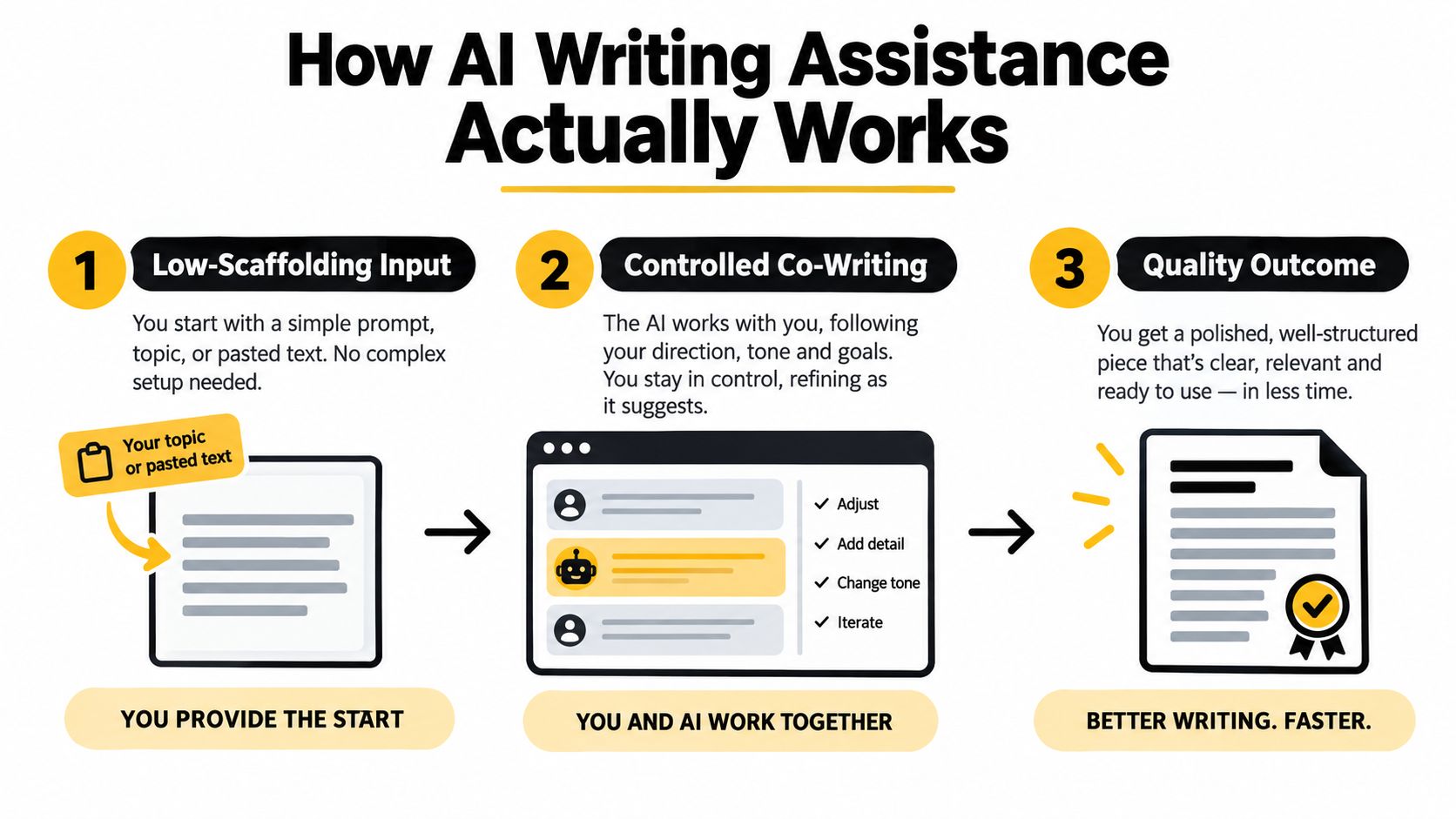
A controlled co-writing study found that sentence-level suggestions with low scaffolding reduced writing quality by 0.29 quality points, while paragraph-level suggestions with high scaffolding increased quality by 0.18 points and improved productivity by 0.07 words per unit time. The findings are reported in the University of Michigan co-writing study.
The prompt contract
A dependable prompt behaves like a short contract between the writer and the model. It defines:
- Role and audience: Tell the model who is writing and who will read the output.
- Task: State the action precisely, such as “turn these interview notes into a customer FAQ.”
- Source boundaries: Identify which material the model may use and what it must not assume.
- Output format: Specify headings, bullets, length range, table fields, or response structure.
- Quality bar: Define what success means, such as factual fidelity, plain language, or policy compliance.
- Review behavior: Ask the model to flag uncertainty instead of inventing a detail.
This structure changes the model's job from guessing what you mean to operating within visible constraints. Paragraph-level assistance is more useful than isolated next-word completion because it can preserve context, relationships, and the purpose of the passage.
A practical drafting sequence is to ask for an outline first, challenge the outline, supply examples of acceptable voice, request a draft, and then run a separate critique. That separation helps prevent the model from approving its own first attempt without scrutiny.
The strongest gains in the cited co-writing study appeared among non-regular writers, whose quality improved by 0.53 points, reinforcing a useful operational lesson: scaffolding can compensate for uncertainty, but it can't compensate for missing source material.
The Productivity-Quality Tradeoff Explained
AI writing assistance often delivers its clearest benefit through speed. In a study of professional writing workflows, adding ChatGPT reduced average time spent by 40% and increased output quality by 18%, as reported in this study of LLM-assisted writing.

That doesn't mean every AI-assisted document becomes better. A separate essay-writing experiment with 24 participants found that overall essay quality was statistically indistinguishable across access levels, although writing behavior, cognitive engagement, and perceptions of authorship changed materially, according to the same research review.
The difference comes down to task design.
Where speed creates value
AI is particularly useful when the writer already has material to transform:
- Drafting from notes: Convert interviews, meeting notes, or a rough argument into a first structure.
- Revision: Offer alternative openings, shorten dense passages, or identify repetition.
- Repurposing: Adapt a long-form piece into channel-specific formats while preserving the core message.
- Variation: Produce several subject lines, calls to action, or explanations for different audiences.
- Critique: Test whether a document answers the reader's likely questions.
These uses reduce mechanical effort while leaving judgment with the person who owns the work.
Where speed creates risk
The same tool can encourage premature acceptance. A polished paragraph may conceal an unsupported claim, flatten an important distinction, or introduce a tone that feels professionally inappropriate. Faster drafting can also mean faster production of errors if nobody checks sources, logic, names, dates, and policy requirements.
For that reason, quality should be measured at the workflow level rather than inferred from fluent sentences. Ask whether the process gives the writer more time to think, more useful alternatives to compare, and a clear method for approving the final version.
The useful question isn't whether AI writes better. It's whether the workflow helps a human make better decisions with less repetitive effort.
Prompt Workflows for Different Professional Roles
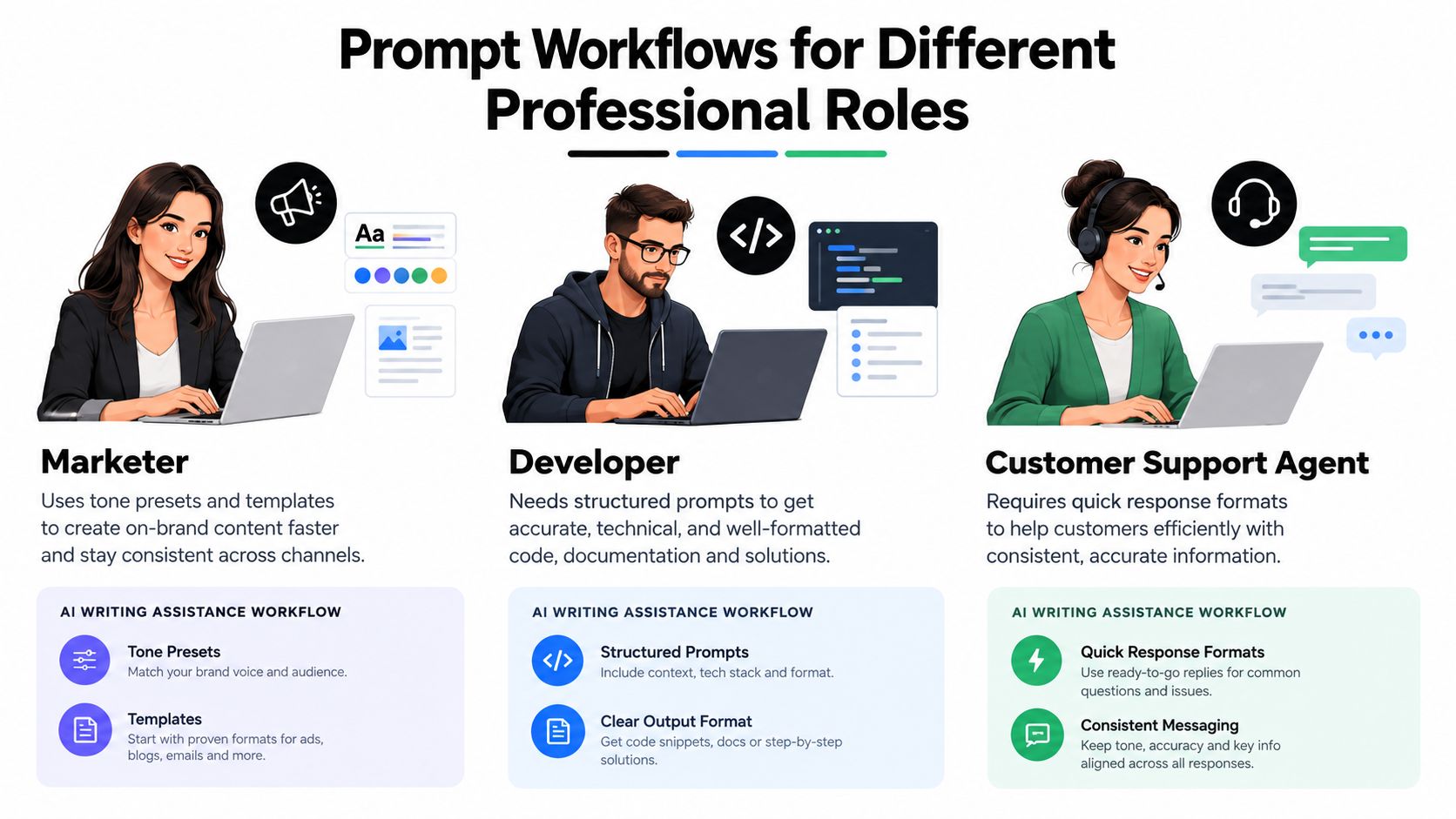
Different roles need different forms of assistance. A marketer wants controlled variation and channel fit. A developer needs technical precision and transparent assumptions. A support agent needs speed, consistency, and policy alignment. One generic “write this better” prompt can't serve all three.
Workplace adoption data cited by the NBER Digest found that 39.4% of respondents reported using generative AI, while 28% of employed respondents used it for their job. Writing was among the common work uses, but the workflow still has to reflect the job's risk and output requirements.
Marketers need controlled expression
A marketing prompt should include the audience, offer, channel, desired action, brand voice, prohibited claims, and examples of approved language. The output format should match the destination. A LinkedIn post, landing-page section, email, and short video script need different pacing and information density.
A useful workflow asks the model to create several angles, explain the strategic distinction between them, and then rewrite the selected angle in the brand's voice. The marketer still checks positioning, evidence, legal sensitivity, and whether the copy says something meaningful rather than merely sounding energetic.
For routine email work, a resource such as this guide to the Best ChatGPT email signature can help teams think about structure and consistency without treating generated copy as final by default.
Developers need inspectable output
A developer's prompt should define the language, runtime assumptions, input and output shape, edge cases, and explanation depth. For SQL, include the schema and state whether the model should prioritize readability, performance, or portability. For code explanations, ask for a short summary, the relevant assumptions, and a list of failure modes.
The quality bar isn't “does this look plausible?” It is “can another developer inspect, test, and maintain it?”
Support teams need policy gates
A support prompt should provide the approved policy, escalation conditions, product terminology, tone rules, and response template. Ask the model to separate a customer-facing answer from an internal escalation note when both are needed. If the source policy doesn't answer the question, the model should say that escalation is required rather than improvise.
This role benefits from structured response fields such as acknowledgment, answer, next step, and escalation flag. That format makes review faster and gives supervisors something consistent to audit.
When AI Writing Assistance Crosses Into Policy Territory
“Is AI writing allowed?” is usually the wrong first question. The more useful question is what did the system contribute, and what rules govern that context?
Routine grammar correction and sentence refinement may not require disclosure in academic publishing, while substantive text generation, table creation, or analytical assistance should be disclosed. Human authors remain responsible for the work, and AI cannot be listed as an author, according to the academic publishing guidance discussed in recent research.
The boundary isn't always obvious. Light editing preserves the author's ideas and decisions. Substantive drafting can introduce the structure, argument, examples, or interpretation that readers may reasonably associate with the named author. Institutional rules, client contracts, examination policies, and publication requirements can also differ.
A practical disclosure test
Before using AI, record the intended role:
- Copy editing: The system corrects grammar, spelling, clarity, or surface style while preserving meaning.
- Transformation: The system reorganizes supplied material into a new format, such as notes into a FAQ.
- Substantive generation: The system creates arguments, analysis, tables, or original passages that require meaningful human verification.
- Decision support: The system influences recommendations, classifications, or conclusions.
The further the use moves from surface editing toward substantive creation or analysis, the stronger the case for disclosure and documented review. Teams should also protect confidential information and define which materials may enter external tools.
By late 2024, 10% to 24% of text in consumer complaints, corporate communications, job postings, and UN press releases was found to be LLM-assisted, according to the study on AI-assisted professional communication. That level of use makes policy clarity operational rather than theoretical.
Teams developing controls can pair disclosure rules with prompt guardrails, while readers tracking the broader debate may find AI Frontiers on real AI control useful. The aim isn't to ban assistance. It's to make contribution, responsibility, and review visible.
Building Team Workflows With Prompt Builder
Individual experimentation becomes a team asset only when people can find, test, and reuse the prompts that work. Prompt Builder lets users describe an idea, select a target model, and receive a model-tuned prompt that can be iterated in a built-in chat. Its workflow includes a Prompt Assistant for testing and follow-ups, a Prompt Optimizer for improving clarity and constraints, and a searchable Library for saving, pinning, and organizing versions.
A practical team process looks like this:
- Describe the job: Start with the outcome, audience, source material, and constraints rather than trying to write the perfect prompt immediately.
- Choose the target model: Model-specific structure matters because teams shouldn't assume that one prompt behaves identically everywhere.
- Test with representative inputs: Use a normal example, an awkward example, and an incomplete example. The last one reveals whether the prompt handles uncertainty safely.
- Refine the quality bar: Add output fields, examples, exclusions, and escalation instructions when the result misses the mark.
- Save the approved version: Store the prompt with a useful name, owner, purpose, and notes about when it should or shouldn't be used.
The Prompt Builder walkthroughs provide a practical way to see that workflow in action. The value of a shared library isn't just convenience. It reduces prompt drift, gives new team members a tested starting point, and makes improvements reusable instead of trapping them in one person's chat history.
For social teams, the SMM Bot can generate platform-ready posts for X, LinkedIn, Instagram, TikTok, and Reddit using tone and audience presets. A content team might save one prompt for adapting a research note into a LinkedIn post, another for turning an approved article into social variations, and a third for checking claims before publication.
Governance doesn't require bureaucracy around every sentence. It requires clear ownership for high-risk outputs, a review step for factual or customer-facing content, and a library that preserves the prompts behind repeatable work.
Making AI Writing Assistance a Reliable System
AI writing assistance becomes dependable when teams replace vague requests with high-scaffolding prompts, model-specific tuning, deliberate testing, and shared libraries. The practical difference is fewer retry loops and clearer human review, not just more generated text.
A writer can use a structured workflow to turn notes into a draft, a support lead can test policy edge cases, and a marketer can preserve channel-specific voice without rebuilding the prompt every time. The prompt testing framework helps teams treat prompts as working assets that need evaluation, not disposable instructions.
Prompt Builder helps you generate, refine, test, and organize model-tuned prompts for marketing, support, coding, SEO, research, and other daily workflows. Visit Prompt Builder to turn your next rough request into a reusable, structured workflow your team can improve over time.
Related Posts
AI Content Creation for Marketing: The 2026 Workflow
August 9, 2026
Prompt and Circumstance: How Context Shapes AI Output
August 6, 2026
What Is Chain of Thought Prompting: A 2026 Guide
August 4, 2026