
Social Media Content Generation Playbook
By April 2026, 5.79 billion social media user identities existed worldwide, representing 69.9% of the global population, and the total had risen by 294 million in 12 months. The average user actively uses 6.5 social platforms each month and spends 18 hours and 36 minutes per week on social media, according to Hootsuite's current social media statistics. Your content isn't competing with a single feed. It's competing across formats, devices, communities, and search surfaces.
That scale changes the job. Social media content generation can't mean asking an AI tool for another caption whenever a calendar slot appears. It needs to function as a controlled production system, one that turns a useful idea into platform-native assets, searchable language, publishable formats, and learning signals for the next batch.
Table of Contents
- Why Modern Social Content Workflows Fail
- Engineering Prompts for Platform-Ready Outputs
- Adapting Core Ideas Across Native Formats
- Optimizing for Social Search and Discoverability
- Closing the Loop with Benchmark-Driven Analytics
- Building a Sustainable Weekly Batching System
Why Modern Social Content Workflows Fail
Manual, one-off creation breaks down at the first decision: what should the team publish today? A B2B team may have customer questions, product updates, expert insight, and long-form material, yet still spend hours turning each input into usable assets. For example, five marketers can rewrite the same product update five times for five platforms, then discover that none of the versions fits the intended format or audience. The blank page becomes a daily operating model.
The audience is distributed across multiple environments. People spend more than 15 billion hours consuming social content every day, and users move between an average of 6.5 platforms each month. That scale favors frequent, platform-native publishing over occasional updates adapted from one channel. It also changes what AI must produce. A useful workflow needs model instructions tuned to each platform's feed behavior, format limits, audience expectations, and emerging social search surfaces.
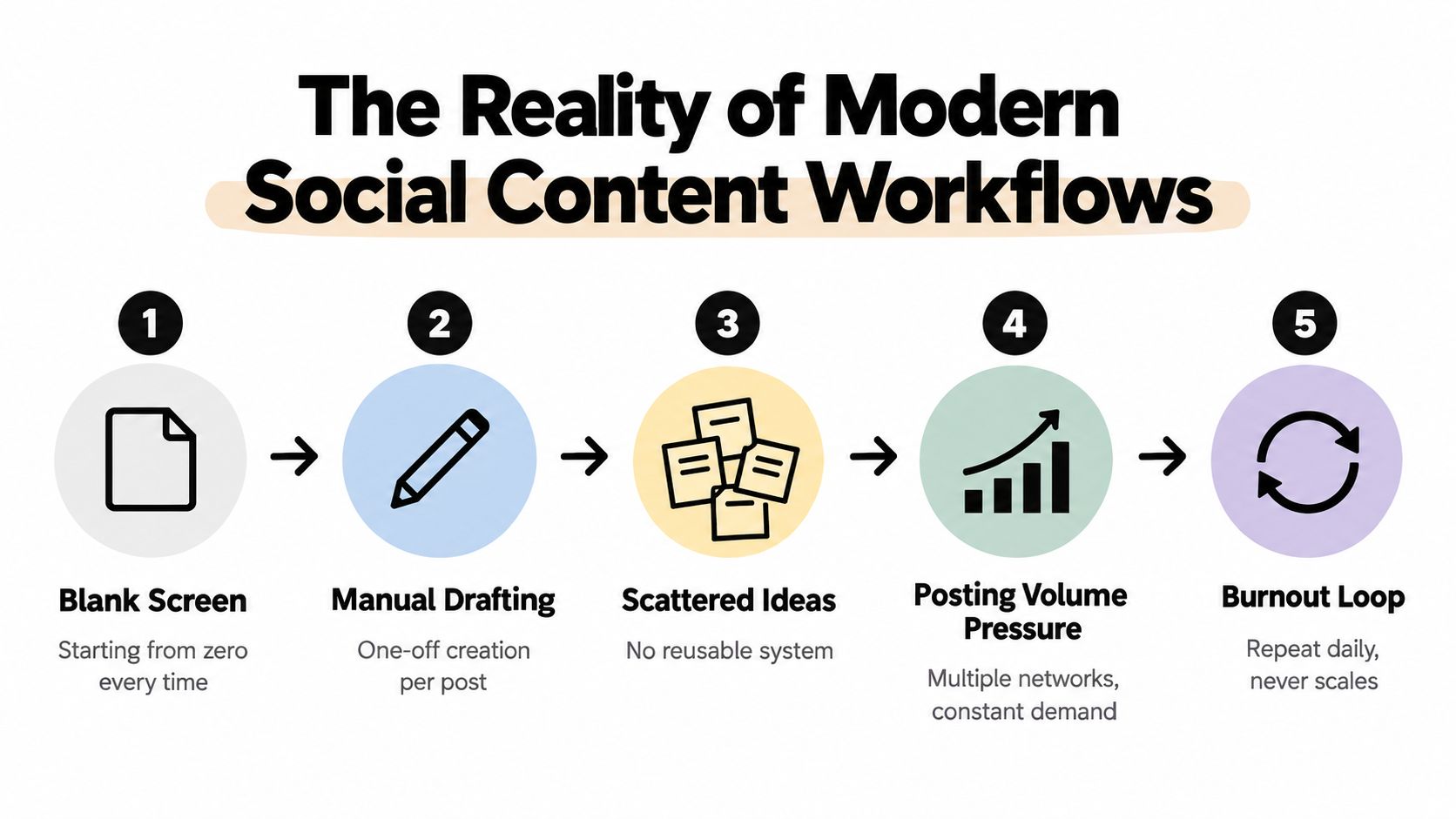
The five operational stages
A scalable workflow connects five stages:
- Research and ideation: Gather audience questions, customer language, product evidence, competitor gaps, and timely themes.
- Strategy and planning: Assign each idea a business purpose, audience segment, platform, format, and intended action.
- Content creation: Generate copy, scripts, visual directions, captions, and variations in batches.
- Publishing: Review, format, tag, schedule, and release each asset for its destination platform.
- Analysis and optimization: Examine post-level results, identify patterns, and adjust the next production brief.
AI works mainly in the third stage, but its output depends on the first two. A model cannot reliably invent a customer's exact objection, product limitation, or differentiated point of view. Given a verified source brief, it can turn those inputs into multiple drafts while preserving constraints and adapting the language for feeds and social search.
Why batching protects quality
Batching does more than save production time. It gives related assets shared context, helping the team maintain terminology, campaign priorities, visual direction, and calls to action. Build the source ideas and supporting facts first, then generate a family of platform-specific outputs instead of isolated posts.
Practical rule: Generate variations from a verified brief, not a blank prompt. Review time should go toward judgment, accuracy, and relevance, not repetitive drafting.
Analysis completes the system. Publishing without post-level review removes the evidence needed to improve hooks, formats, topics, and prompts. The workflow then produces volume without learning, leaving the team to repeat the same decisions in the next batch.
Engineering Prompts for Platform-Ready Outputs
Weak social outputs usually begin with weak instructions. “Write an engaging LinkedIn post about our product” gives the model no useful definition of audience, evidence, tone, structure, or acceptable claims. The result may sound polished while remaining generic, overlong, or unusable.
Treat a production prompt like a contract. It should tell the model what to make, who it's for, what information it can use, what it must avoid, and exactly how the answer should be formatted.
Build the prompt in layers
Start with the objective. Define the job of the asset, such as explaining a workflow, earning qualified discussion, answering a recurring question, or directing readers to a resource. Don't combine several competing objectives unless the post requires them.
Add the audience context next. Include the audience's role, experience level, problem, desired outcome, objections, and vocabulary. “Marketing managers” is a label. “Small marketing teams responsible for several channels, short on production time, and skeptical of generic AI copy” is usable context.
Then provide the source material. Paste the product facts, approved positioning, customer question, research notes, or article summary the model should rely on. State clearly that it must not create statistics, testimonials, guarantees, or claims absent from that material.
Finally, specify the output contract:
- Format: Give the exact asset type, such as a six-panel carousel script, a short video script, or a post with a defined opening and closing.
- Voice: Describe sentence rhythm, level of formality, vocabulary, and brand personality.
- Constraints: Set the platform, length requirement, forbidden phrases, compliance rules, and required terms.
- Quality bar: Require a concrete insight, a clear reader benefit, one meaningful action, and language that sounds native to the platform.
- Validation: Ask the model to check its own draft against the constraints before returning it.
A model-tuned prompt can also account for differences in instruction handling and formatting behavior across tools. Prompt Builder's guide to prompt engineering for marketing is useful when you need to turn a rough request into a structured instruction, adapt it for a selected model, and retain versions that produce reliable results.

Refine the instruction, not just the draft
If the output misses the tone, don't only edit the sentence. Diagnose the instruction. Did you define the intended reader? Did you provide examples of acceptable language? Did you distinguish an informed opinion from a factual claim? Did you tell the model what to leave out?
Save prompts that consistently work in a searchable library, with notes about their use case and target platform. Over time, this creates an operating asset. New team members can start from approved structures, while experienced writers can focus on improving the brief and editorial judgment.
Adapting Core Ideas Across Native Formats
One source idea shouldn't produce one identical post everywhere. Cross-posting preserves the same wording and media, but platforms reward different modes of attention. A professional explanation, a conversational thread, a visual sequence, and a spoken video hook may all express the same insight without sharing the same structure.
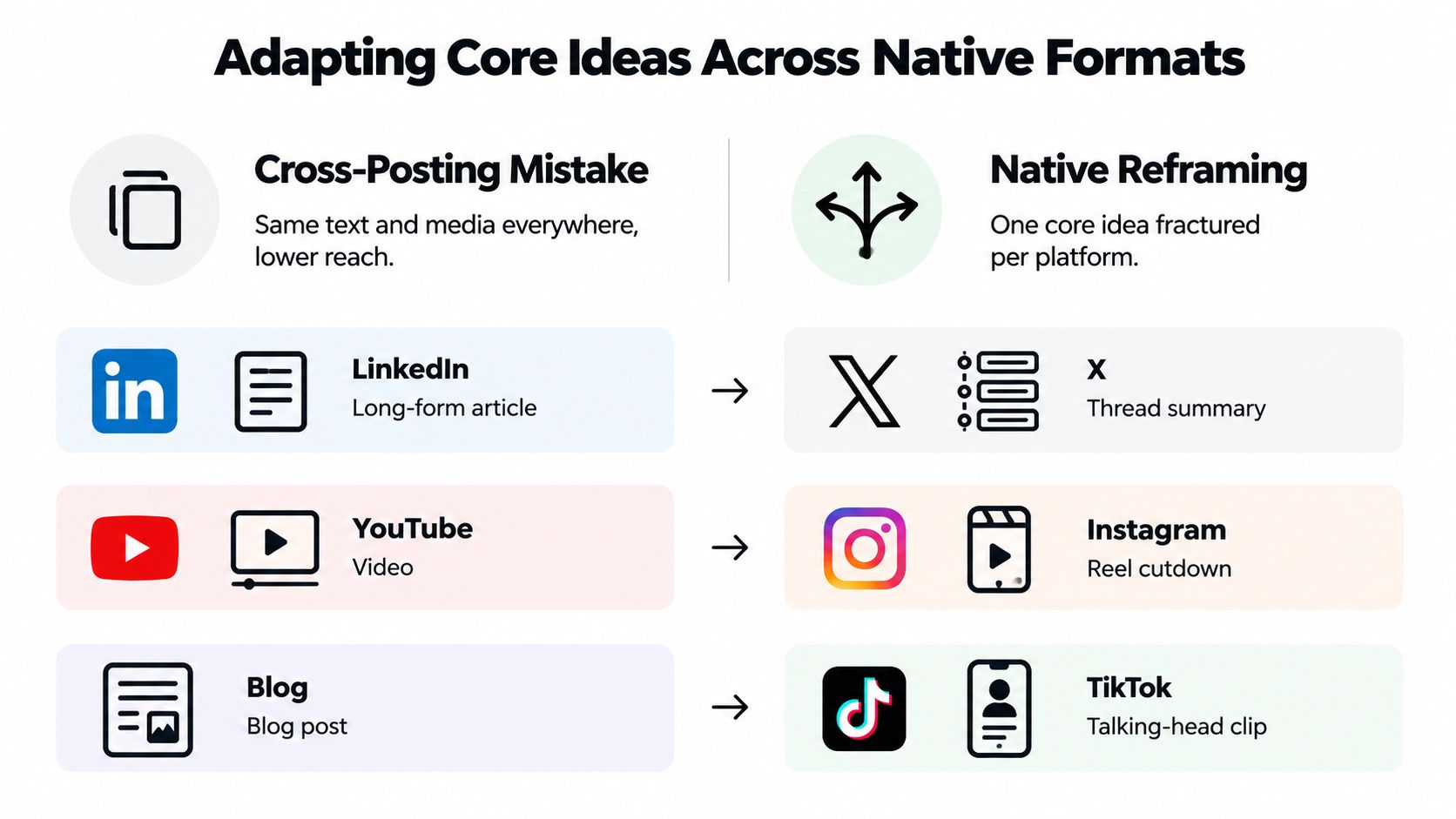
Start with a core idea brief that contains the problem, the audience, the useful insight, supporting evidence, and desired action. Ask the model to preserve those elements while changing the delivery system.
| Platform | Native job | Useful instruction |
|---|---|---|
| Develop an informed professional point of view | Use a clear tension, practical explanation, and discussion prompt. Avoid empty leadership language. | |
| X | Create a fast sequence of connected ideas | Lead with the claim, keep each post focused, and make the progression understandable without external context. |
| Make the idea easy to scan and save | Turn the insight into a visual sequence, concise caption, and text that remains clear without relying on audio. | |
| TikTok | Earn attention through spoken relevance | Write a direct opening, conversational script, visual actions, and a clear payoff for the viewer. |
One brief, four transformations
For LinkedIn, prompt for a carousel script with one idea per panel, a strong first panel, and a final panel that gives the reader a practical next step. The model should avoid filling panels with dense paragraphs. The visual sequence needs to carry part of the explanation.
For X, ask for a thread that begins with the conclusion and then earns it through connected observations. A thread isn't a LinkedIn post split into fragments. Each entry should advance the argument or create a reason to continue.
For Instagram, request a caption and visual direction separately. Tell the model which words belong on the image, which belong in the caption, and what a user should understand after a quick scan. A carousel can support depth, but every panel still needs a distinct function.
For TikTok or Reels, specify the speaker, viewer, setting, duration goal, spoken words, on-screen text, and suggested cut points. A strong written caption won't automatically become a strong video. The script must sound natural aloud and give the editor an obvious visual rhythm. A TikTok script generator workflow can help structure that conversion when the source material starts as an article or static brief.
The same principle applies when adapting a long-form video into a short clip or a blog post into a talking-head explanation. Preserve the insight, not the original packaging.
A native adaptation should feel as though it was conceived for the destination, even when the underlying idea came from somewhere else.
Optimizing for Social Search and Discoverability
A feed-first strategy assumes that a post has one brief opportunity to earn attention. That assumption is incomplete. Platforms increasingly act as discovery engines, and recent trend coverage identifies social search and answer-style optimization as important parts of content strategy (NU.edu).
This changes the prompt. Instead of asking only for a clever hook, ask what question the post answers, which phrase a user might search, and how the content can remain understandable after the original trend has passed.
Start with search intent
Collect the language people use in comments, customer calls, community discussions, site searches, and platform autocomplete suggestions. Group those phrases by intent:
- Definition intent: “What is social media content generation?”
- Process intent: “How do I batch social posts?”
- Comparison intent: “Which format works for LinkedIn versus TikTok?”
- Problem intent: “Why does AI social copy sound generic?”
- Decision intent: “What should a social content workflow include?”
Give the model the actual phrase group and ask it to use natural variants without stuffing keywords. The output should answer the user's question directly, then add a useful qualification, example, or next step.
Design for both surfaces
A search-optimized social post needs clear signals in more than one place:
- Opening language: State the topic or problem early enough that both people and platform systems can classify it.
- On-screen text: Put the central question or answer into the visual layer, especially for short-form video.
- Caption structure: Use descriptive wording rather than relying on vague curiosity.
- Spoken phrasing: Say the key concept naturally in the video script.
- Evergreen utility: Explain a process, decision, or principle that remains useful beyond a single trend.
That doesn't mean abandoning timely formats or creative hooks. It means pairing them with explicit context. A trend may earn the first view, while searchable wording gives the asset a better chance of being understood later.
Prompt for reusable answers
A practical instruction might read: “Create three platform-native versions answering the supplied question. Use the exact audience vocabulary where natural, place the main answer near the opening, include one concrete example from the brief, avoid unsupported claims, and identify the search phrase each version targets.”
Review the result for human usefulness. If the keyword appears awkwardly, rewrite the sentence. Search optimization should make the content easier to find and understand, not make it sound like a database entry.
Closing the Loop with Benchmark-Driven Analytics
Production volume can conceal weak decisions. A team may celebrate a full publishing queue while repeating a format that attracts attention but earns no meaningful response. Analytics should therefore evaluate content against a relevant baseline, not against the emotional impression created by raw activity.
The metrics that matter depend on the platform and objective, but a practical dashboard can include reach, impressions, follower count, audience growth rate, engagement rate, video plays, posting frequency, clicks, and shares. Hootsuite's social media benchmarks guide explains why industry comparisons help teams interpret these measures instead of judging performance in isolation.
Read metrics as production signals
Each metric should trigger a question about the next brief:
- Reach and impressions: Did the topic and opening earn distribution, or did the post remain difficult for the platform to classify?
- Engagement rate: Did the idea invite a meaningful response from the audience that saw it?
- Video plays: Did the first moments create enough relevance to keep viewers watching?
- Shares and clicks: Did the content provide utility or a reason to continue the journey?
- Audience growth rate: Did the post attract people who fit the intended audience rather than temporary attention?
- Posting frequency: Did the team publish consistently enough to generate a useful sample for comparison?
Engagement rate is commonly calculated from interactions relative to followers or impressions, but the denominator must remain consistent inside your reporting system. A metric without its calculation context can create false comparisons.
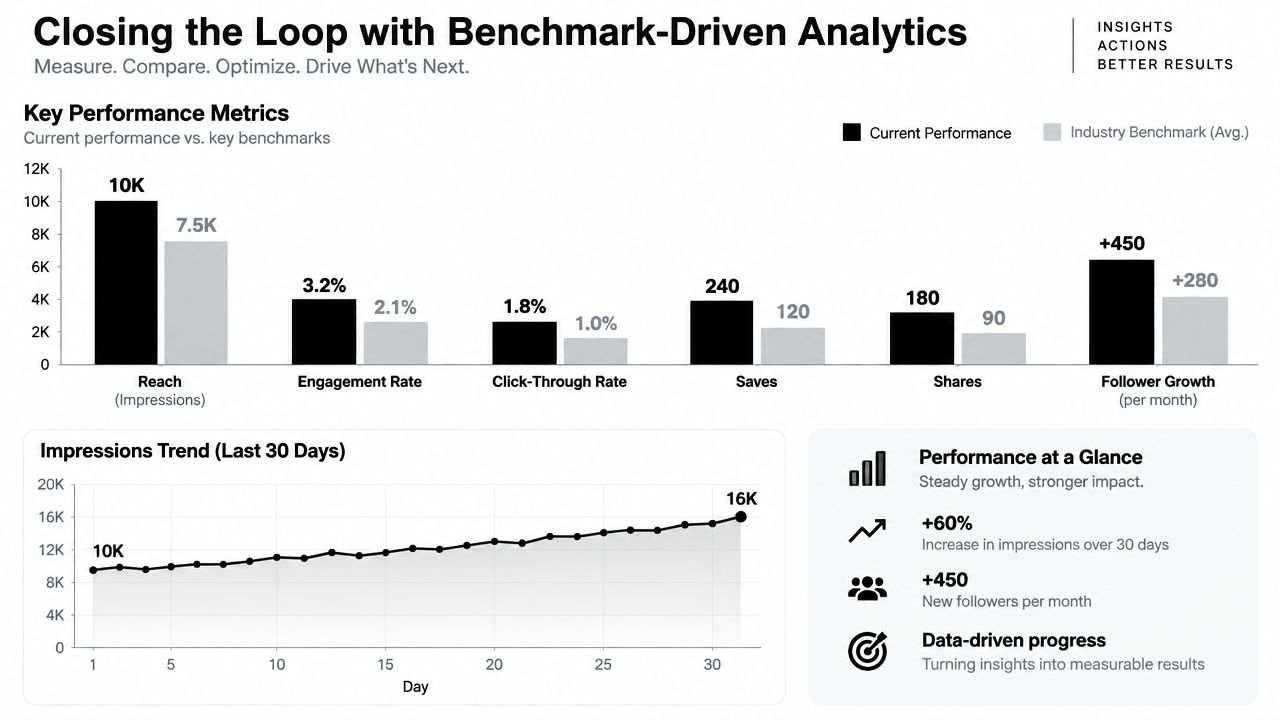
Turn results into prompt changes
Don't report that a post underperformed and stop there. Classify the failure. Perhaps the hook promised a benefit the body didn't deliver. Perhaps the format hid the main point. Perhaps the audience targeting was too broad, or the call to action asked for effort without offering a clear reason.
Record the observation beside the prompt version and source idea. Then change one instruction at a time:
- Replace “write an engaging opening” with “state the audience's specific problem in the first sentence.”
- Replace “make it concise” with a defined structure and removal rules.
- Add a requirement for one example when abstract explanations receive weak saves.
- Ask for a spoken rewrite when the script reads naturally but sounds stiff aloud.
- Require a direct answer when search-oriented posts bury the topic.
Measurement rule: Analytics should change what the model is asked to produce. If reporting never reaches the prompt library, it isn't improving the production system.
This loop also protects against overreacting to a single result. Compare like-for-like content, use industry benchmarks where available, and look for repeatable patterns across batches. The purpose isn't to make every post identical. It's to learn which editorial choices deserve repetition and which should be removed.
Building a Sustainable Weekly Batching System
A weekly system should separate thinking, production, approval, and community work. When all four happen in the same daily scramble, urgent publishing decisions crowd out strategy and review quality falls.
Use a recurring rhythm that fits the team's capacity:
- Research block: Gather audience questions, product updates, customer language, search themes, and performance observations from the previous batch.
- Planning block: Select the strongest ideas, assign objectives and platforms, and create one source brief per idea.
- Generation block: Run the approved prompt structures to produce captions, scripts, carousel copy, visual directions, and platform variations.
- Review block: Check facts, brand voice, legal or compliance requirements, accessibility, links, and native formatting.
- Scheduling block: Prepare mobile-first assets, vertical video versions, captions, tags, and publishing details in the relevant tools.
- Engagement block: Respond to comments, collect new questions, and capture language that can improve future briefs.
- Analysis block: Compare post-level results with the relevant industry baseline and record prompt changes.
The creation block should produce families of assets, not disconnected drafts. Keep the source brief, model instruction, output, editor notes, approval status, and performance result together. That record makes successful patterns reusable and makes failures diagnosable.
Mobile-first execution deserves a place in the routine. The workflow guidance from Hootsuite's social media content creation process recommends vertical formats, short videos, and interactive elements such as polls for contemporary engagement, while also emphasizing that analysis and optimization must feed the next iteration. Build those requirements into the brief before generation, rather than trying to retrofit them at publishing time.
A repeatable social media content workflow gives teams a useful operating model for connecting research, creation, review, scheduling, and measurement. The exact calendar can vary, but the handoffs shouldn't be improvised.
Protect quality with a final human gate. AI can draft and transform source material quickly, but a person still needs to verify claims, inspect tone, confirm the audience fit, and decide whether the post deserves publication. That balance lets automation remove repetitive work without outsourcing editorial responsibility.
Prompt Builder helps marketers generate, refine, test, and organize model-tuned prompts for platform-ready social content, with presets for channels including X, LinkedIn, Instagram, TikTok, and Reddit. Visit Prompt Builder to turn your social media content generation process into a reusable workflow with fewer retries and clearer output standards.