
10 Social Media Posts for Business That Convert
The surprising part of social media marketing isn't how many people use these platforms. It's how quickly a post can become a business asset when its job is clear. Global social media usage is projected to cross 5.79 billion people in 2026, with the average person spending about 18 hours and 36 minutes per week on social platforms, according to Forbes Advisor's social media statistics. That reach creates opportunity, but reach alone won't fix a post that nobody finds relevant.
Effective social media posts for business start with four decisions: the objective, the audience problem, the tone, and the next step. The ten patterns below cover awareness, engagement, education, trust, consideration, and lead generation. Each one includes an adaptable example, a platform recommendation, the reason the pattern works, a CTA direction, and practical notes for changing one core idea into channel-specific content. If you want help with that adaptation, Prompt Builder's SMM Bot can generate variations for X, LinkedIn, Instagram, TikTok, and Reddit, while its model-tuned prompts and saved Library help you refine and reuse the versions that fit your brand.
Table of Contents
- 1. Educational Tutorial Posts
- 2. Use Case Spotlight Posts
- 3. Problem-Solution Storytelling Posts
- 4. Quick Win and Tip Posts
- 5. Interactive and Engagement-First Posts
- 6. Community User-Generated Content Posts
- 7. Comparison and Competitive Advantage Posts
- 8. Behind-the-Scenes Development Posts
- 9. Industry Trend and Thought Leadership Posts
- 10. Success Metrics and ROI Posts
- 10-Point Comparison of Business Social Media Post Types
- Turn One Idea Into a Repeatable Content System
1. Educational Tutorial Posts
Tutorials work because they let a business demonstrate value before asking for attention, contact details, or a purchase. A strong tutorial removes one point of confusion and gives the audience a visible path from problem to result. For a Prompt Builder audience, that might mean explaining how to create a prompt, improve an existing instruction, or organize useful versions in the Library.
A LinkedIn carousel could open with “How to improve an AI prompt in five practical steps”. Each slide would handle one action, such as defining the audience, adding constraints, specifying the output format, and testing the result. A TikTok version could show the same transformation on screen, while an X thread could explain why each change affects the output.

Match the teaching style to the channel
Use a carousel when the audience needs to pause, compare, or save steps. Use short-form video when showing a before-and-after workflow is more persuasive than explaining it. For longer videos, add timestamps or chapters so viewers can jump directly to the relevant stage.
Practical rule: Teach one workflow per post. If the audience needs a separate explanation for every step, turn the topic into a series rather than shrinking everything into one crowded graphic.
The CTA should continue the lesson. Invite readers to copy a framework, try the workflow, or explore a related template from Community Prompts. Prompt Builder's SMM Bot can turn the same tutorial outline into a concise LinkedIn carousel script, a spoken TikTok sequence, and an X thread without forcing identical wording onto every platform.
A tutorial series also creates a repeatable publishing habit. The format can stay consistent while the subject changes, from marketing prompts to SQL instructions, support documentation, or research workflows.
For a visual demonstration, use this short tutorial video as a separate asset rather than placing it beside the image:
2. Use Case Spotlight Posts
A use case spotlight answers the audience's quiet question, “Is this relevant to work like mine?” Instead of describing a product in broad terms, it places the workflow inside a specific role, industry, or recurring task. That specificity makes the post easier to recognize and gives the reader a reason to continue.
For LinkedIn, write about how an SEO team uses Prompt Builder to move from a vague campaign brief to a structured content prompt. On X, address developers with a post about generating clearer SQL instructions for a selected model. On Instagram, show a marketing team turning one campaign concept into platform-specific captions, visual directions, and CTA options.
The strongest version uses verified evidence from a real customer or internal workflow. Ask the user what problem existed before the tool, which steps changed, and what they can document afterward. Don't publish an invented efficiency claim just because a precise number sounds persuasive. A transparent qualitative account is more credible than an unsupported metric.
Build the spotlight around the role
Change the vocabulary for each audience:
- SEO teams: Focus on briefs, search intent, content structure, and revision cycles.
- Developers: Explain inputs, constraints, model selection, testing, and output consistency.
- Support teams: Show how reusable instructions help standardize drafts and escalation notes.
- Researchers: Emphasize source handling, structured outputs, and repeatable analysis prompts.
The CTA should invite the reader to see their own workflow in the example. Ask, “Which part of your process would you standardize first?” For a higher-intent audience, link to a role-specific template or prompt collection.
Prompt Builder's SMM Bot can adapt one use case into professional, technical, or conversational language. Keep the central fact unchanged, then adjust the opening, examples, format, and CTA for each community.
3. Problem-Solution Storytelling Posts
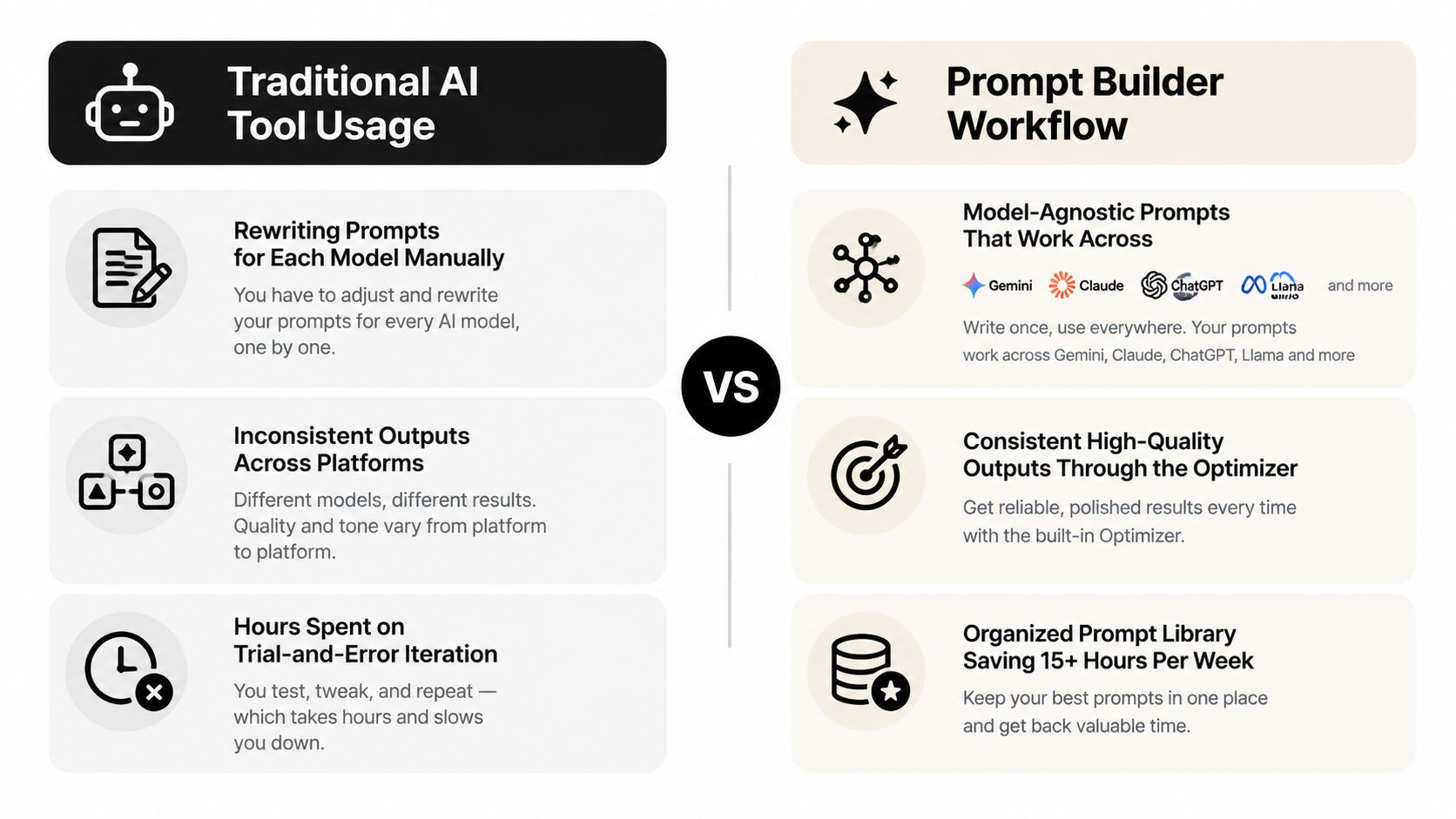
A strong problem-solution post makes the workflow recognizable before it presents a tool. The reader should see a specific task, the friction it creates, and the decision that changes the process. Rewriting instructions for different AI models, correcting inconsistent outputs, and repeating trial and error are useful starting points because they connect the product to a work problem.
Lead with the situation, then match the format to the channel. A LinkedIn post can open with, “I used to rebuild the same prompt every time the task changed.” Follow with the old routine, the point at which it became inefficient, and the principle behind the revised workflow. An Instagram Reel can show the same progression through messy drafts, repeated edits, and a cleaner final prompt. LinkedIn supports explanation and professional context. Instagram makes the friction visible quickly.
Build the story around a decision
Specific details give the narrative credibility. A content manager may need consistent tone across social channels, then introduce a prompt that sets the audience, format, and platform constraints. A product team may compare outputs across models while preserving the original objective. These examples support different CTAs: invite a workflow review for a higher-intent audience, or ask for a comment about a repetitive AI task when discussion matters more than immediate conversion.
Use this sequence as a working template:
- Name the old routine: Identify what the person repeated, repaired, or compared manually.
- Show the consequence: Explain how the work became slow, inconsistent, or difficult to hand off.
- Describe the change: State which feature, template, or prompt structure altered the workflow.
- Offer the next action: Give readers one step they can test immediately.
“Start with the frustration your audience can describe in their own words.”
First-person language fits only when the speaker genuinely experienced the process. Otherwise, write from a customer or role perspective without fabricating a quotation or result. Prompt Builder can help adapt one core story into a professional LinkedIn post, a visual Instagram script, or a concise channel-specific version. Keep the underlying workflow unchanged, and have a person verify that the process and outcome are real.
4. Quick Win and Tip Posts
Quick-win posts earn attention by solving one narrow problem the audience can act on immediately. Their repeatable format also supports a series with a clear business objective, such as teaching prompt quality, reducing content friction, or moving readers toward a template. A weekly Prompt Friday post could focus on one improvement to prompt clarity, output structure, or model selection.
Start with the working example, then explain why it helps. A LinkedIn carousel titled “Three common prompt problems and how to correct them” can show a weak instruction, identify the missing detail, and present a revised version. X suits a single correction with a concise CTA, while Instagram can turn the same framework into a visual checklist. The trade-off is depth: a carousel can teach the reasoning, but a short post is faster to scan and reuse.
Give readers enough of the method to apply it before asking for a click. The internal resource 10 AI prompts for social media posts can provide additional templates for people who want more examples. The conversion path should match intent, such as saving the post for later, opening the resource, or commenting with a prompt problem.
Make the tip copyable
Build each post around one practical component:
- A prompt structure: Role, audience, context, constraints, and output format.
- A correction: Replace a vague instruction with a specific one.
- A test: Compare two versions and ask which output better fits the task.
- A limitation: Explain when the technique is unsuitable.
Use a specific opening instead of a broad promise. “Your prompt may be missing an output format” creates a useful reason to continue without claiming that one trick solves every task.
Prompt Builder's SMM Bot can adapt one tip for different audiences and formats. Review each variation for accuracy, then test the same principle in a carousel, short video, and text post. Save the strongest version in the Library so the series stays efficient while each channel receives an appropriate treatment.
5. Interactive and Engagement-First Posts
Interactive posts should produce a usable business signal, not only reactions. A LinkedIn poll asking, “What makes AI prompts hardest to use consistently?” can reveal the language and obstacles that shape future tutorials, landing pages, and product messaging. The content pattern is simple: identify a decision, ask one focused question, then publish what the responses changed.
Choose the format according to the audience and research goal. LinkedIn polls fit professional workflow questions. X replies support an open prompt challenge and follow-up discussion. Instagram Stories can use a poll sticker to compare priorities such as faster iteration and more predictable outputs. Each format trades depth for response speed, so keep the question narrow enough for the platform.
Turn participation into a decision
A useful question connects directly to planned work:
- Workflow research: Ask which step consumes the most manual effort.
- Content planning: Ask which tutorial the audience wants next.
- Product feedback: Ask which feature would remove the most friction.
- Community building: Ask followers to share a prompt they're proud of.
Close the loop after collecting answers. Summarize the result in a follow-up post, explain what the team will do with it, and link the response to the original question. This shows participants that their input affects content, product decisions, or community activity rather than ending in an analytics dashboard.
Keep the CTA easy to complete. Request one word, one choice, or one example. Prompt Builder's SMM Bot can adapt the same research question to a poll, reply prompt, or Story sticker. Review each version against the business objective before publishing. High comment volume has limited value when responses do not clarify audience needs or support a relevant next step.
6. Community User-Generated Content Posts
Community content works when it demonstrates a real task, audience role, and usable outcome. A member's prompt, workflow, or finished result can make a product relevant without relying on company-written description. It also gives contributors recognition and creates a clear reason for others to participate.
Build each post around the contribution's conversion path:
- Practical education: Feature a community prompt for an SEO brief generator on LinkedIn, then explain its structure and intended user.
- Workflow proof: Show on Instagram how a marketing team used Prompt Builder while planning a campaign. The visual format suits a concise sequence from task to output.
- Recurring participation: Use an X roundup to group useful submissions under #PromptBuilderCommunity, then invite a related contribution for the next edition.
Give contributors context and credit
Ask permission before reposting someone's work. Credit the original creator in the caption and visual, and explain what the prompt does, who could use it, and which structural choices make it useful. Keep the contributor's meaning intact. Do not turn an individual result into a broader claim they did not make.
Choose the format based on the material:
- Prompt feature: Display the prompt and explain its structure.
- Workflow story: Show the task, process, and final output.
- Challenge roundup: Group submissions around one practical theme.
- Member interview: Ask how the contributor uses AI in their role.
End with a comparable action, such as sharing a prompt, submitting a workflow, or answering the next community theme. Recognition can encourage participation, but genuine appreciation should remain the point. Prompt Builder's SMM Bot can adapt a celebratory caption for each channel while preserving the contributor's credit and original context.
7. Comparison and Competitive Advantage Posts
Comparison posts help prospects choose a workflow by making trade-offs visible. They are most useful when organized around a decision, such as whether someone needs a one-off prompt, an exploratory chat, or a repeatable process for a team. Avoid attacking named competitors. Give readers criteria they can apply to their own work.
Start with the decision a prospect is trying to make. A LinkedIn graphic might compare manual prompt iteration, general-purpose AI conversations, and a managed prompt workflow across setup, model selection, testing, organization, and reuse. An X post can answer, “Why use a prompt platform if you already use ChatGPT?” Explain the operational difference: Prompt Builder generates model-tuned prompts, supports iteration in a built-in chat, and stores reusable versions in a searchable Library.
Turn the comparison into a decision tool
Prompt Builder supports work across Gemini, Claude, ChatGPT or GPT, Llama, Mistral, DeepSeek, Perplexity, Grok, and Cohere. Use that range to explain when model choice affects the task, then connect Prompt Optimizer, Prompt Assistant, SMM Bot, Library, and Community Prompts to specific workflow stages.
Frame each option by fit:
- Manual writing: Suitable for an experienced user creating a one-off instruction.
- General AI chat: Suitable for exploration and conversational iteration.
- Prompt management: Suitable when a team needs repeatability, testing, and reuse.
The format should match the objective. Use a chart for side-by-side evaluation, a short X thread for one objection, or a LinkedIn carousel for a staged decision. Prompt Builder's tools can adapt one comparison into channel-specific versions, but the criteria and trade-offs should remain consistent.
End with a practical CTA: ask readers to assess their current process, inspect a relevant template, or adapt one prompt for multiple models. Objective criteria keep the post useful before a purchase decision.
8. Behind-the-Scenes Development Posts
Behind-the-scenes content turns product work into useful business social media posts. It shows the people, constraints, and decisions behind an evolving product, giving technical audiences context that a polished feature announcement cannot. A roadmap update, for example, can invite more informed discussion about priorities.
Start with the decision that matters to users. On LinkedIn, explain which prompt-quality problem a Prompt Optimizer update addresses and why the team chose that approach. On X, pair a concise shipping note with a short technical explanation. TikTok or Instagram can show a developer testing an interface, reviewing feedback, or explaining a feature in plain language. The platform changes the format and tone, while the core idea stays consistent.
A useful post answers three questions: What problem appeared? Which trade-off did the team consider? What changed in the workflow?
Use verified details only. If the post refers to beta testing or user feedback, omit tester counts or adoption figures unless the company can substantiate them. Suitable material includes:
- Product decisions: Why one interaction was chosen over another.
- Testing moments: What the team checked before release.
- Roadmap context: Which user problem affected prioritization.
- Team perspective: How an engineer, designer, or support specialist approaches the work.
Prompt Builder can adapt one development story into a LinkedIn explanation, an X update, or a short-form video script. Keep the decision and evidence consistent, then adjust the opening, detail level, and CTA for each channel.
Ask for specific feedback, such as what would make the feature easier to use or which model integration matters most. That CTA creates a focused conversation and gives the team language for future product education.
9. Industry Trend and Thought Leadership Posts
A trend post earns attention when it helps a specific audience make a better decision. Repeating news about AI, automation, or a new model gives readers little to act on. A stronger post states the change, takes a defensible position, and connects it to work the audience already handles.
Organize the idea by business objective first. A marketing team may need to reassess prompt standards, a development team may review testing, and a support team may update documentation. The same trend can serve different audiences, but each version needs its own operational question and CTA.
Use the platform to match the depth of the argument:
- LinkedIn: Explain why prompt literacy affects a team's workflow, then ask readers which process they would review first. The guidance from Busylike supports building a professional point of view around interpretation rather than promotion.
- X: Turn a model release into a concise thread covering what users should reassess in prompts, tests, and documentation.
- Long-form content: Examine how teams manage model differences without rebuilding every workflow.
- Instagram: Reduce one practical implication to a caption or visual sequence, with a question that invites a specific response.
A reliable working pattern is change, implication, tension, action. Identify what changed, explain why it matters to the target audience, challenge an assumption, and recommend one test or documentation update. Tie current claims to verifiable announcements or published evidence. Label forecasts as opinions rather than presenting them as facts.
The article How to write LinkedIn posts can shape the LinkedIn version. Prompt Builder's SMM Bot can then adapt the same position into an X thread or short Instagram caption. Keep the evidence and argument fixed while changing the opening, detail level, tone, and CTA. The writer remains responsible for judgment and accuracy.
10. Success Metrics and ROI Posts
ROI posts work when readers can inspect the measurement, not just the outcome. A time-saving claim needs a defined task, a traceable method, and limits that prevent readers from treating one team's result as a universal promise. Vague or unsupported numbers can weaken trust and create compliance concerns.
Build the post around the audience's job and its decision. Marketing teams may track production time, support teams may assess response preparation, while developers may measure prompt testing and reuse. The conversion path should match that concern: review a workflow, try a template, or calculate the current iteration burden.
Show how the result was measured
Use this evidence map as a compact case-study brief:
- Baseline: Which task or process is being measured?
- Change: What workflow, feature, or behavior changed?
- Method: Did the evidence come from usage analytics, an interview, a survey, or an internal comparison?
- Scope: Which team, task, or period does the result represent?
- Limitation: What does the evidence leave unproven?
A LinkedIn post can show how a team stores prompts in the Library, tests revisions with Prompt Assistant, and compares output quality with its existing process. That format suits a professional audience evaluating workflow changes. An X post can compress the method into a short thread, while a blog graphic can reveal the manual work behind prompt iteration without assigning unsupported costs.
Prompt Builder can adapt one evidence-based concept for each channel. Keep the method and qualification fixed, then change the opening, detail level, format, and CTA. The success metrics definition resource can help readers select metrics that match the outcome they want to improve. Let the evidence set the claim's boundaries.
10-Point Comparison of Business Social Media Post Types
| Post Type | Implementation Complexity 🔄 | Resource Requirements ⚡ | Expected Outcomes 📊 ⭐ | Ideal Use Cases | Key Advantages 💡 |
|---|---|---|---|---|---|
| Educational Tutorial Posts | Moderate–High: stepwise scripts, recordings, sequenced visuals | Medium–High: screen capture, editing, templates | Teaches features; strong engagement from learners; steady organic reach | LinkedIn carousel, TikTok series, YouTube Shorts | Demonstrates product value; builds authority; reusable assets |
| Use Case Spotlight Posts | Medium: tailor narratives and metrics per vertical | Medium: user interviews, case data, design assets | High relevance; drives conversions by showing ROI | LinkedIn case posts, Twitter dev snippets, Instagram marketing reels | Shows concrete ROI; easy to personalize for segments |
| Problem‑Solution Storytelling Posts | Medium: craft authentic narrative and transformation | Low–Medium: writing, supportive visuals or short video | High emotional engagement; clear value proposition; strong CTAs | LinkedIn long posts, Twitter threads, Instagram Reels | Resonant storytelling; quick comprehension of value |
| Quick Win and Tip Posts | Low: single-tip formats, short visuals or text | Low: minimal production, frequent ideation | High shareability and saves; frequent, consistent engagement | Twitter/X tips, LinkedIn carousels, Instagram posts | Low effort, high ROI on engagement; algorithm-friendly |
| Interactive & Engagement‑First Posts | Low–Medium: design polls/challenges and moderate responses | Low: platform-native tools; requires moderation time | Very high engagement; actionable audience insights | LinkedIn polls, Twitter threads, Instagram stories | Builds community; generates feedback and virality |
| Community UGC Posts | Low–Medium: curate and verify user content; manage rights | Low: sourcing, curation, incentives, moderation | High authenticity and trust; steady content stream | Instagram features, LinkedIn shout-outs, Twitter highlights | Social proof; cost-effective content; boosts loyalty |
| Comparison & Competitive Advantage Posts | Medium: accurate research and objective comparison | Medium–High: competitive data, visuals, validation | Clarifies differentiation; converts comparison shoppers | LinkedIn comparisons, blog graphics, Twitter posts | Positions product leadership; addresses buyer objections |
| Behind‑the‑Scenes Development Posts | Low–Medium: capture candid moments and release notes | Medium: consistent cadence, internal coordination | Builds trust and loyalty; pre-launch buzz for features | LinkedIn updates, Twitter dev posts, TikTok culture clips | Humanizes brand; promotes roadmap transparency |
| Industry Trend & Thought Leadership Posts | High: requires expertise, research, timely commentary | High: data, interviews, long-form writing | Establishes authority; attracts forward‑thinking audience | LinkedIn articles, Medium essays, Twitter analysis | Long-term credibility; positions brand as innovator |
| Success Metrics & ROI Posts | High: gather validated metrics, build defensible claims | High: analytics, customer studies, methodology notes | Highly persuasive to decision-makers; drives high-intent leads | LinkedIn case studies, blog reports, sales collateral | Quantifiable proof of value; strong sales enablement |
Turn One Idea Into a Repeatable Content System
The ten patterns become more useful when they work as a sequence rather than a random collection. Start with quick wins and tutorials to build awareness and demonstrate competence. Use interactive posts and community features to learn how the audience thinks and to create participation. Move interested prospects toward use case spotlights and problem-solution stories, where they can recognize their own workflow. Reserve comparison and verified ROI posts for conversion, when readers need evidence and decision criteria.
A practical system begins with one core idea. Suppose the idea is, “A clear output format makes AI responses easier to use.” The tutorial version can show the prompt before and after. The quick-win version can provide a reusable format instruction. The interactive version can ask followers which output format they use most. The use case version can show how an SEO or support team applies the structure. The thought leadership version can discuss why prompt design affects the handoff between people and AI tools.
Adapt each version deliberately
Before publishing, check six elements:
- Audience: Which role has the problem, and what language does that role use?
- Platform format: Would the idea work better as a carousel, video, poll, thread, or text post?
- Tone: Should the post sound instructional, technical, conversational, or analytical?
- Proof: Which examples, user contributions, product details, or verified findings support the point?
- CTA: Is the next step a comment, save, template download, trial, demo, or workflow review?
- Repurposing: Which part can become a second format without copying the first post word for word?
Platform choice affects expectations. Global social media ad spend is projected to reach about $317.33 billion in 2026, and social commerce sales are projected to reach $1.3 trillion, according to recent social media marketing statistics from NewMedia. Posts therefore need a conversion path, even when the immediate objective is awareness.
Don't use one engagement target for every channel. Benchmark data reported by Quid's 2026 social media industry report shows substantial differences among platforms, with TikTok's median engagement rate at 27.6% in Q4 2025, compared with 0.48% for Instagram, 0.15% for Facebook, and 0.12% for X or Twitter. Those figures aren't promises. They're a reminder to define channel-specific KPIs based on the format, audience, and business objective.
Frequency deserves the same caution. Sprout Social's benchmark report found APAC brands averaged 20 posts per day, compared with 12 in EMEA and 9.5 in North America, while engagement on Facebook and Instagram increased by 9% and 28%, respectively, in the cited comparison. Read that as a reason to test regional and platform-specific publishing, not as an instruction to flood every feed. Hootsuite's coverage of posting frequency also highlights the tension between volume and quality, particularly for teams using AI to accelerate production.
Prompt Builder can support the system by turning a brief into platform-specific drafts with the SMM Bot, refining the underlying prompt with Prompt Optimizer, and saving useful variants in the Library. The final review still belongs to the team. Check the facts, preserve the brand voice, confirm permissions for community content, and make sure the CTA matches the post's actual job.
For further visual inspiration, review Secta's actors portfolio inspiration blog and pay attention to how presentation, context, and audience fit shape the way an idea is perceived. A polished asset helps, but a clear promise and a relevant next step do more of the strategic work.
Prompt Builder helps you generate, refine, test, and manage prompts for social content across leading AI models, with an SMM Bot for platform-ready posts and a Library for reusable versions. Start with one business objective, adapt the idea for your audience and channel, then visit Prompt Builder to turn that workflow into a repeatable content process.