
Software Release Versioning Best Practices for 2026
Most advice on release versioning is too shallow to survive real production pressure. “Use SemVer, automate the bump, publish release notes” sounds fine until your minor release breaks authentication, your patch changes defaults, and your on-call engineer is diffing tags at 2 a.m. because nobody can tell what shipped.
That's why software release versioning best practices start in a place many teams skip. Versioning is communication, not decoration. The number matters, but only because people and tools use it to decide whether to upgrade, whether to trust the change, and whether to blame your release when something goes sideways.
Semantic versioning earned its place for good reason. It was formalized in 2013 by Tom Preston-Werner as MAJOR.MINOR.PATCH, and by 2020 researchers described it as a widely adopted versioning system across software ecosystems (research summary on SemVer adoption). But broad adoption doesn't mean teams use it well. A large-scale study of library upgrades found that 83.4% of all upgrades complied with SemVer principles, while also showing that discipline improved over time and that breaking behavior still leaked into non-major releases often enough to matter (study on SemVer compliance and breaking changes).
If you want version numbers people can trust, stop treating them like a release ritual. Treat them like a promise.
Table of Contents
- Why Versioning Is a Communication Problem First
- Choosing Between SemVer and CalVer
- MAJOR MINOR PATCH in Real Releases
- Branching Strategies That Support Predictable Releases
- Changelogs Pre-Releases and Build Metadata
- CI CD Integration and Immutable Artifacts
- Governance and Migrating Versioning Schemes
Why Versioning Is a Communication Problem First
A version number only answers one useful question on its own. “What artifact am I looking at?” It does not answer the harder questions your users care about.
They want to know three things:
- What changed
- Who is affected
- Whether upgrading is safe
If your release process can't answer those three clearly, your versioning policy is broken even if your numbering scheme looks tidy.
SemVer doesn't remove ambiguity
Teams love to act like adopting Semantic Versioning solves release communication. It doesn't. It gives you a vocabulary. Semantic Versioning 2.0.0 defines MAJOR as incompatible API changes, MINOR as backward-compatible feature additions, and PATCH as backward-compatible bug fixes. It also allows pre-release and build metadata labels so unstable builds are clearly separated from release-ready artifacts (SemVer 2.0.0 specification).
That's useful. It's not enough.
The failure mode is obvious if you've shipped enough software. One team releases 4.0 because marketing wants a big launch, even though nothing breaks. Another ships 3.2 with a “small internal cleanup” that changes backup behavior and burns customers. The number didn't communicate. The release team didn't do its job.
Practical rule: A version bump is a contract with downstream users, not a celebration of internal effort.
Different audiences read versions differently
Your consumers aren't one group. They include:
- Integrators deciding whether code will still compile or API calls will still work
- Security teams checking whether a fix is present in the deployed artifact
- Support teams trying to reproduce customer issues
- Your own on-call rotation trying to map an incident back to a release
Those people need different signals, but they all need a trustworthy one. That's why versioning can't live only in package metadata. It has to show up in changelogs, docs, build records, deployment tooling, and incident response.
Good versioning reduces decision friction
The best release teams make upgrade decisions easier. They don't make users reverse-engineer intent from commit history. They don't hide breaking changes under “misc improvements.” They don't bury rollout risk in vague release notes written after the tag is already live.
Good software release versioning best practices force clarity before publishing:
- State the compatibility impact
- Name the affected audience
- Document the migration path or confirm none is needed
If your team can't do those three things cleanly, the problem isn't the numbering format. The problem is release discipline.
Choosing Between SemVer and CalVer
Most teams don't need a philosophical debate here. They need a decision rule.
If machines consume your artifact and need to make upgrade decisions programmatically, use SemVer. If humans mainly consume the version and ask “is this the release from April?” or “is this the version support mentioned on the call?”, use CalVer.
That's the shortest honest answer I can give.
SemVer is for compatibility signaling
SemVer is strongest when the version itself needs to communicate upgrade risk. Libraries, SDKs, APIs, CLIs, plugins, and shared internal packages fit this model. Dependency managers, automation, and downstream code all benefit when the major, minor, and patch fields mean something stable.
A lot of public guidance gets stuck on the basic rule set and stops there. The more useful operational question is how to choose a scheme when release models differ across products and over time. That gap is real. Guidance increasingly warns teams not to mix schemes midstream, recommends tagging alpha, beta, and release candidate builds correctly, and stresses including build metadata for traceability, yet many articles never explain how to govern that in CI/CD or across distributed systems (WorkOS guide on software versioning).
CalVer is for release cadence signaling
CalVer wins when time is the most honest signal. End-user products, internal platforms with release trains, regulated software, and support-heavy environments often care more about when a release happened than whether a code-facing contract changed.
If your support team constantly asks customers for “the October release” and nobody remembers whether that was 5.7 or 5.8, your numbering scheme is working against your actual operating model.
SemVer vs CalVer when each scheme wins
| Dimension | SemVer | CalVer |
|---|---|---|
| Primary signal | Compatibility risk | Release date or train |
| Best for | Libraries, SDKs, APIs, shared packages | End-user apps, regulated releases, scheduled trains |
| Best consumer | Machines and developers | Humans, support, sales, customer success |
| Upgrade question answered | “Will this break me?” | “How current is this?” |
| Weakness | Teams argue over what counts as breaking | Date tells you little about compatibility |
Don't build a vanity scheme
Hybrid schemes can work. Ubuntu-style date-first versions with a suffix can work. A release train with 2026.04 and a hotfix marker can work. But don't encode five layers of information no one reads. If developers need a wiki page to decode your version string, the scheme is already too clever.
A version should answer a question your users actually ask. If it doesn't, it's noise.
How to switch schemes without creating a mess
Don't hard cut from SemVer to CalVer in one release and hope everyone figures it out. That's how you orphan automation and confuse every integrator who pinned constraints.
Use these rules instead:
- Freeze the old contract: Existing SemVer artifacts keep their identifiers and support policy.
- Introduce the new scheme explicitly: Publish new artifacts or tags under the new naming convention with a migration note.
- Document equivalence once: Make it clear which old release line maps to the first new release line.
- Update tooling before policy: Dependency rules, dashboards, release scripts, and docs must understand the new scheme before your users are forced to.
If you're documenting internal engineering conventions around releases and model-specific automation, this kind of explicit mapping discipline matters just as much in AI workflows as it does in package delivery, which is why version-aware process docs like this guide on creating a Gem are more useful than generic “just tag things consistently” advice.
MAJOR MINOR PATCH in Real Releases
MAJOR, MINOR, and PATCH. Fewer teams can apply it correctly under pressure.
The core rule is simple. MAJOR for backward-incompatible changes. MINOR for backward-compatible feature additions. PATCH for backward-compatible bug fixes. The structure became a foundational best practice because it lets users and tooling infer release risk directly from the version string (overview of SemVer history and interpretation).
Simple rule. Messy reality.
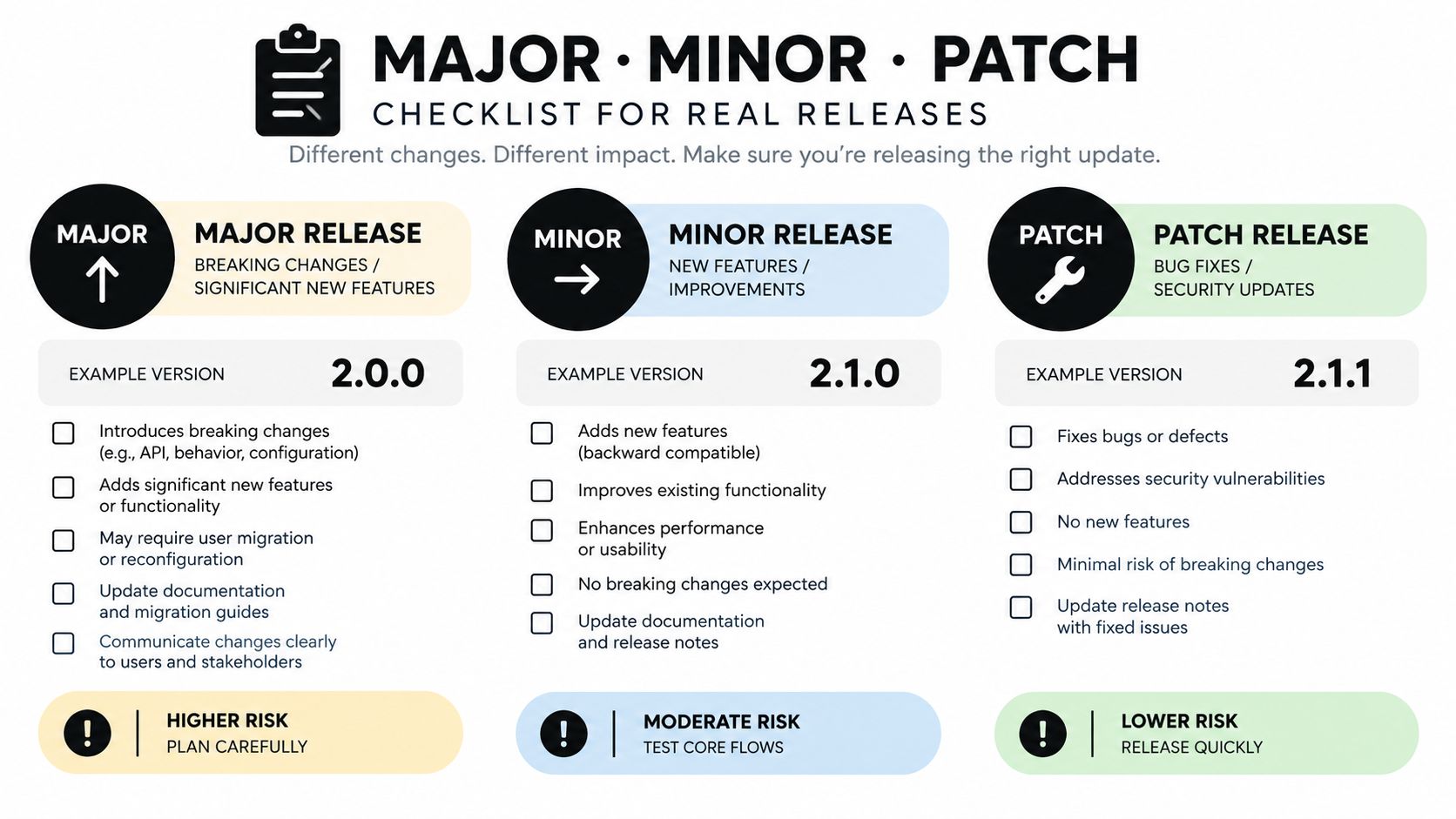
What actually counts as breaking
Teams get into trouble when they treat breakage as a vibe instead of a checklist. If a change forces some consumers to change code, config, assumptions, or runtime expectations, treat it as breaking.
Count these as breaking changes:
- Removed or renamed public fields or endpoints
- Narrower accepted input
- Changed default values with observable behavior
- Raised minimum supported runtime or dependency versions
- New authentication or authorization requirements
- Different behavior for the same successful request
- Security fixes that require consumer-side configuration changes
A deprecated method removed after a published deprecation window is still a major bump. A dependency upgrade that changes runtime behavior for downstream users is still your breaking change, not your dependency's problem.
What does not justify a major bump
Not every scary release needs a MAJOR. Internal refactors don't count if the contract stays intact. Performance regressions are serious, but they are not automatically breaking in SemVer terms unless they violate a documented guarantee. A large feature set can still be a MINOR if it's backward-compatible.
That's why “big release” and “major release” are not synonyms. Marketing shouldn't own version semantics.
The pre-tag check I'd require
Before tagging any SemVer release, run a short review:
- Did we remove, rename, restrict, or re-default anything public? If yes, MAJOR.
- Did we add behavior without breaking existing consumers? If yes, MINOR.
- Did we only fix defects without changing the contract? If yes, PATCH.
- Did a security fix force a config, permission, or environment change? Re-check for MAJOR.
- Did docs and changelog explain the consumer impact in plain language? If not, don't tag yet.
The fastest way to lose trust is shipping a patch that makes users read diffs like lawyers.
Teams that automate prompt, code, or deployment workflows hit the same issue. The version bump logic is easy. The judgment call about compatibility is not. If you want an example of where precise release semantics matter outside traditional libraries, read this piece on how to improve developer productivity and notice how quickly tooling quality falls apart when process signals lose meaning.
Branching Strategies That Support Predictable Releases
Your branching model either supports clean versioning or sabotages it. Many teams don't realize how much release confusion starts in Git, not in the package registry.
I'll give you the blunt version. Trunk-based development is the default for teams shipping weekly or faster. GitFlow still has a place when you maintain long-lived support lines. Release branches work when you need controlled stabilization without dragging around permanent branch bureaucracy.
Branching model vs release characteristics
| Branching Model | Best Release Cadence | Hotfix Path | Versioning Fit | Main Risk |
|---|---|---|---|---|
| Trunk-based | Frequent releases | Patch from main or short-lived release cut | SemVer with automated proposal | Hidden breakage behind weak review |
| GitFlow | Slower, scheduled releases | Hotfix branch back into supported lines | CalVer or structured SemVer lines | Merge overhead and drift |
| Release branches | Mixed cadence with support windows | Patch on release branch, merge forward | Hybrid models and maintained majors | Duplicate version bumps across branches |
Trunk-based for high-velocity teams
If you deploy continuously or close to it, keep one main integration branch, use short-lived feature branches, and hide incomplete work behind flags. Version numbers can then be computed from merged changes, but only if reviewers classify changes correctly.
Branch naming stays simple here. Keep main clean. Cut release/v2.3 only when you need a stabilization window or a backport lane. Otherwise tag from main and move on.
GitFlow for parallel maintenance
GitFlow gets mocked a lot. Some of that criticism is deserved. But if you support multiple maintained lines, coordinate partner releases, or need strict separation between development and hardening, GitFlow still earns its keep.
Use naming that exposes intent:
release/2026.04.xfor a CalVer release trainhotfix/2.3.1for an emergency fix on a maintained SemVer linesupport/v2when a major line has its own maintenance policy
The trap is version drift. Two branches both think they own the next patch number. One backport lands, another branch ships, and suddenly the same version points to different states in different contexts. That's release malpractice.
When to cut a branch and when not to
Cut a release branch only when at least one of these is true:
- You need stabilization while main keeps moving
- You support an older major while developing the next one
- You need hotfixes isolated from unfinished work
If none of those apply, tag directly from main. Extra branches don't make you safer. They just create more places for version state to diverge.
Branches are inventory. Keep only the ones you can justify operationally.
If your team is trying to tighten release throughput without making developers fight the process, this is the same broader problem discussed in developer productivity systems. Friction you add in branching usually comes back later as versioning confusion and hotfix delay.
Changelogs Pre-Releases and Build Metadata
Most changelogs fail because they're written for the team that shipped the code, not for the people consuming it. That's backwards.
A release note that says “various improvements” tells users nothing. A version string without a changelog forces support, security, and downstream developers to reconstruct intent from commits. You're making other people do work your release process should have done.
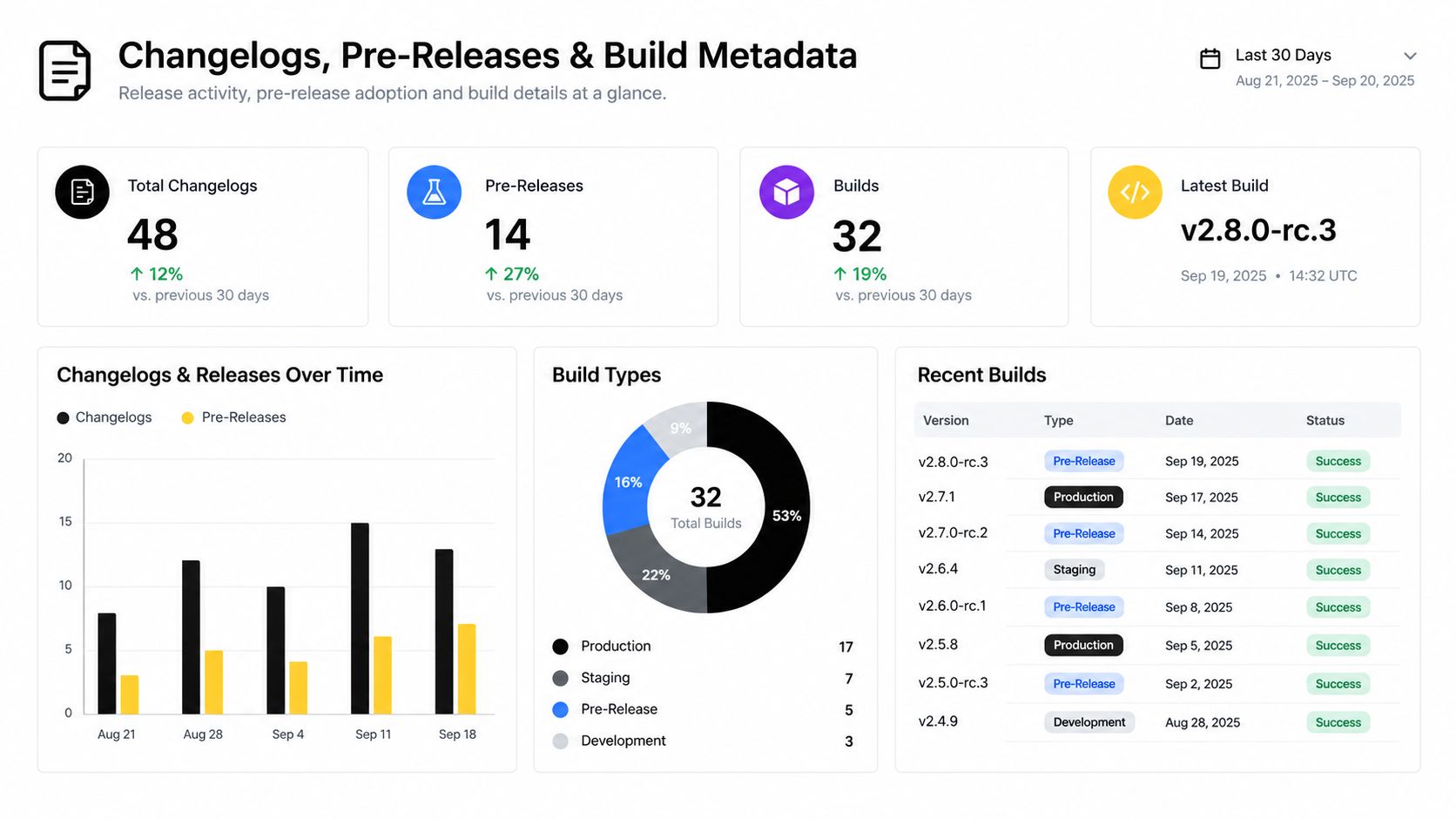
Write changelogs for upgrade decisions
A useful changelog is both human-readable and structured enough for tooling. Keep entries grouped by impact, not by internal team structure.
Use sections like:
- Added for backward-compatible capabilities
- Changed for behavior adjustments users should notice
- Fixed for contract-safe defect corrections
- Deprecated for things on the way out
- Removed for breaking eliminations
- Security for fixes with upgrade urgency or configuration implications
Each entry should point to a ticket, PR, or diff in your own system. More important, each one should answer “does this affect me?”
Pre-releases need discipline
Pre-release labels exist so consumers can distinguish unstable builds from release-ready artifacts. Use them. alpha, beta, and rc should mean something operationally different inside your team.
A practical rule set:
- Alpha means feature work may still move.
- Beta means expected shape is mostly set, but broad validation is still happening.
- RC means you believe this can ship unless a release-blocking issue appears.
Don't publish -SNAPSHOT or ad hoc suffixes to public consumers unless your ecosystem explicitly expects that pattern. Sloppy pre-release labeling creates upgrade ambiguity you then try to patch over with explanations.
Build metadata is for traceability, not compatibility
SemVer allows build metadata labels. Use them for internal traceability. Git revision, build timestamp, pipeline run identifier, or environment-specific references can all help operations and incident response. They should not change dependency resolution meaning.
Empirical release-engineering guidance recommends uniquely marking every build that may leave the development team and preserving the exact source code, application data, and tests used to produce it. That traceability enables reproducible builds and supports version-to-fault analysis later (release versioning patterns and traceability guidance).
Keep the public version stable. Put the forensic detail in build metadata and release records.
If you want your docs process to stop lagging behind your release process, the same discipline applies to technical writing. Maintain release notes per merge, not in a panic before launch. This is one reason version-aware documentation workflows like how to write technical documentation are more practical than generic templates.
CI CD Integration and Immutable Artifacts
Automation should enforce consistency. It should not replace judgment.
That's the biggest mistake I see in CI/CD versioning. Teams wire up auto-bumps, auto-tags, auto-publish, and auto-notes, then act surprised when they produce a flood of meaningless versions nobody trusts. Automation can determine how to bump. Humans still need to decide why.
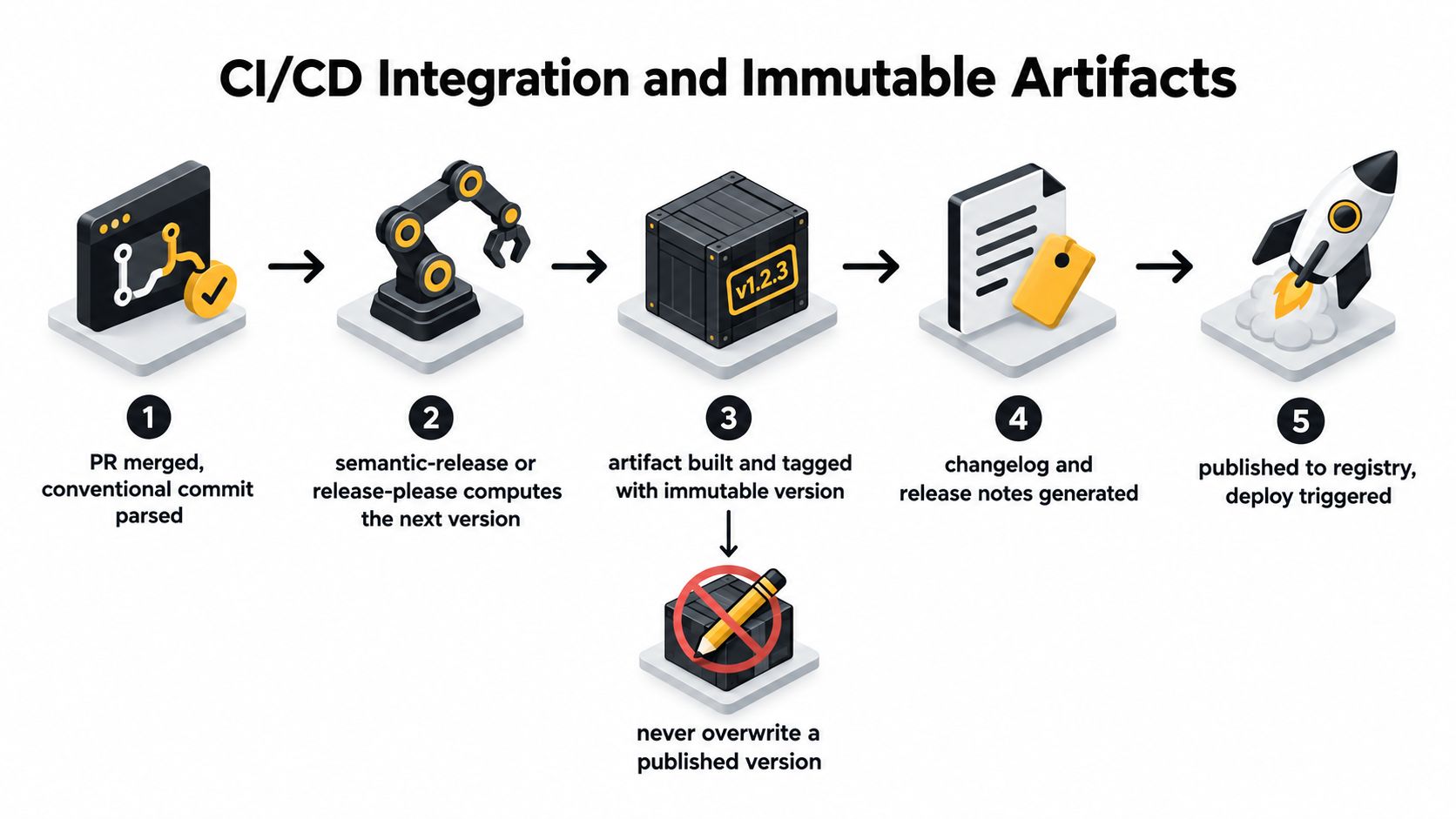
A clean deployment pipeline helps. If you need a practical operations companion for rollout mechanics, environment promotion, and deployment hygiene, this Cloudvara deployment guide pairs well with a strict versioning policy.
What automation should own
Good pipelines handle repeatable mechanics:
- Parse merge intent from commit conventions, labels, or PR titles
- Propose the next version using tools like semantic-release or release-please
- Build once from a known source state
- Attach the version to the artifact, image, package, or release object
- Generate changelog drafts from structured merge metadata
- Publish and promote only after policy checks pass
That part should be automatic. Nobody should hand-edit a version file at the end of a stressful release.
What humans must still review
Humans should approve the parts automation can't interpret safely:
- Is this breaking for consumers?
- Did a dependency or config shift change runtime behavior?
- Did the release notes explain risk and migration clearly?
- Should this ship as a pre-release first?
Most “fully automated versioning” stories fall apart. The scripts are fine. The bump logic is wrong because nobody reviewed the contract impact.
Immutability is non-negotiable
Once 2.4.1 is published, that artifact is done. Don't rebuild it. Don't overwrite it. Don't push a new image to the same tag because “it was only a tiny fix.” If you changed the bits, you changed the release. Publish a new version.
Your registry should reject duplicate uploads for published versions. Your CI pipeline should fail if a tag already exists. Your promotion process should move the same built artifact from test to staging to production, bit for bit.
Here's the operational rule:
- Build artifact once.
- Record provenance and metadata.
- Promote that exact artifact across environments.
- If prod reveals a flaw, ship the next patch. Never re-tag history.
Build metadata belongs inside the pipeline
Internal systems may need 2.4.1+ci.abc123 to trace a package back to a pipeline execution. That's fine. Public consumers often only need 2.4.1. Don't expose internal implementation noise unless your ecosystem gets real value from it.
For teams versioning prompts, model configurations, or release docs alongside code, a centralized workflow tool can help keep the review trail coherent. Prompt Builder is one option that tracks refinements on a timeline, lets teams compare and revert versions, and supports generating and testing prompts without switching tools. That matters when versioned assets are broader than code.
A video overview can help if you're tightening the operational side of this process:
Governance and Migrating Versioning Schemes
A versioning policy without ownership is theater. Someone has to own the rules, approve exceptions, and keep the system from degrading into tribal lore.
That owner is usually a Senior Tech Lead, Release Manager, or platform team. Not because they should manually tag everything, but because someone has to protect the contract.
The minimum policy every team needs
Keep the policy short enough to enforce. I'd require these decisions in writing:
- Bump triggers that define what qualifies for MAJOR, MINOR, PATCH, or a CalVer train increment
- Breaking change declaration rules, including who can approve one
- Pre-release thresholds for alpha, beta, and release candidate labels
- Deprecation windows with clear removal criteria
- Artifact immutability rules after publication
- Documentation sync requirements for release notes, API docs, and migration guides
Store that policy in a versioned repository. Review changes to it like production code. If someone needs an exception, log it publicly in the same place. Hidden process exceptions are where consistency goes to die.
How to migrate schemes without breaking trust
When you change versioning schemes, prefer coexistence over abrupt replacement. Keep old identifiers alive for existing consumers while new artifacts use the new policy. That gives automation, docs, and customer-facing teams time to catch up.
A practical migration pattern looks like this:
- Declare the new policy and who it affects first
- Map old identifiers to new ones once, clearly
- Keep compatibility support for existing consumers
- Publish migration guidance with examples
- Sunset legacy usage based on actual observed usage, not wishful calendar dates
The worst migration mistake is pretending version labels are self-explanatory. They aren't. If a team moves from ad hoc dates to CalVer, spell out the equivalence. If a SemVer product graduates out of 0.x, document what stability promise starts at 1.0.0.
Version your docs with the thing they describe
Stale docs destroy trust faster than stale code. If release v2 changes the API, branch strategy, or deployment behavior, your docs need a matching version context. Don't publish one “latest” guide and expect users on older supported lines to guess what still applies.
If users can't find docs for the version they run, your versioning system has already failed them.
Governance, docs, and release mechanics stop being separate concerns. They're one system. Good teams treat versioning policy as part of delivery architecture, not just packaging syntax.
If your team is versioning more than code, including prompts, release notes, documentation, and repeatable AI workflows, Prompt Builder gives you a structured place to generate, test, refine, and manage those assets with revision history. That makes it easier to keep the communication side of releases as disciplined as the build side.