
Support Documentation Best Practices That Actually Work
A larger help center isn't automatically a better help center. In many teams, article count becomes a vanity metric while customers still search with unanswered questions, open tickets for documented issues, and abandon instructions that don't match the product in front of them. Support documentation best practices start with operational evidence, not with a feature inventory.
The useful question isn't “Which features haven't we documented?” It's “Which customer contacts could we prevent, shorten, or resolve without an agent?” That shift changes what you write, where you put it, how you measure it, and who remains responsible after publication.
Table of Contents
- Why Most Documentation Strategies Start in the Wrong Place
- Structuring Articles and Templates That Scale
- Writing Style and UX That Reduce Cognitive Load
- Taxonomy, Search, and Finding the Questions Users Actually Ask
- Tooling, Versioning, Localization, and Analytics Workflows
- Maintenance, Ownership, and Governance Over Time
- KPIs, Self-Service Outcomes, and a 30-Day Action Checklist
Why Most Documentation Strategies Start in the Wrong Place
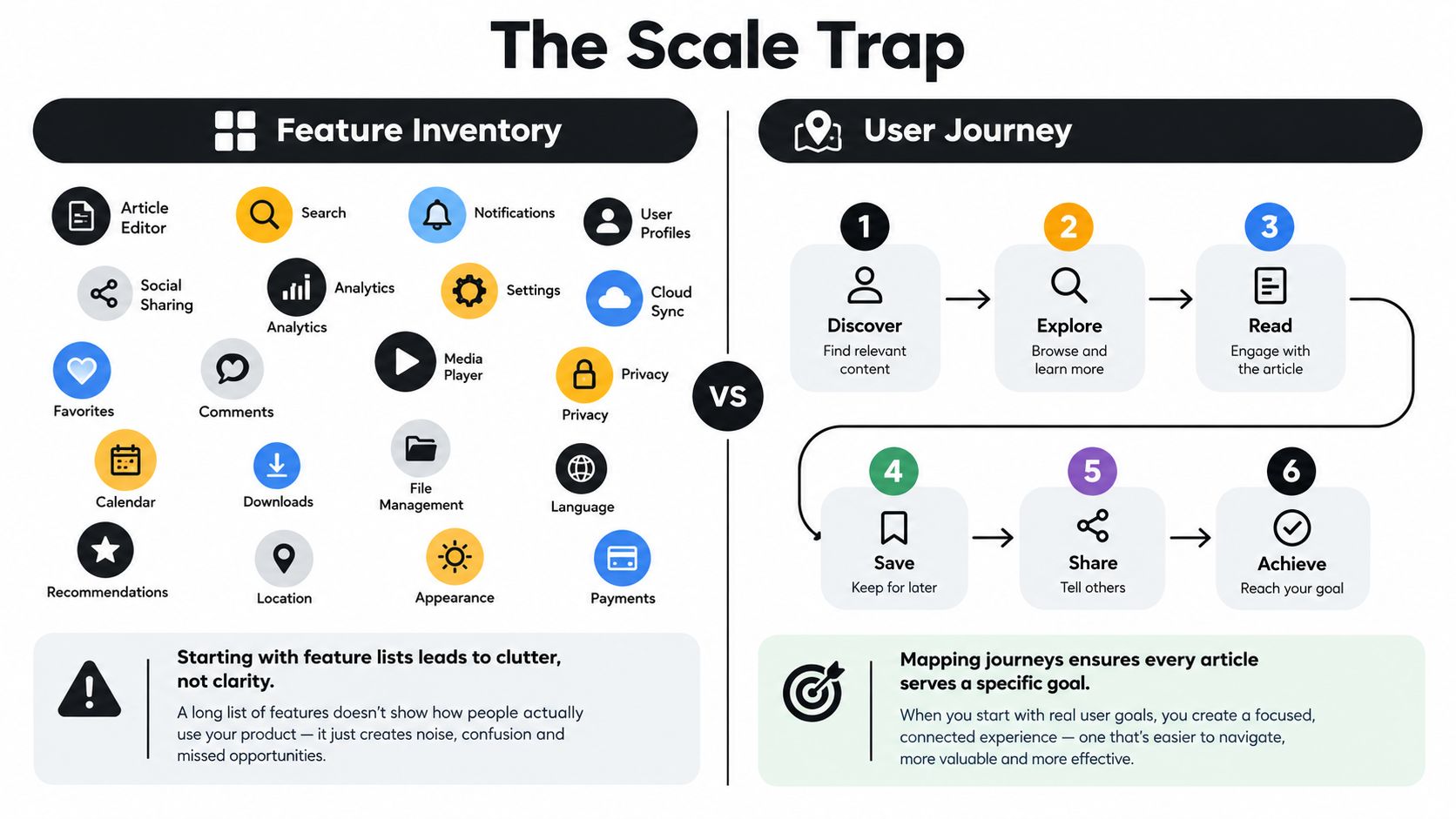
Feature-led documentation feels productive. A product manager hands over a release list, a writer creates one article per capability, and the help center fills with pages that look complete in an internal audit. The problem appears later, when customers search for a symptom, an outcome, or the exact wording of an error and find nothing useful.
Start with support tickets, live-chat transcripts, escalations, call notes, and unanswered presales questions. Cluster them by contact reason rather than by the internal name of a feature. “How do I stop duplicate notifications?” is a customer problem. “Notification preferences” is a product label. The first should shape the article title and troubleshooting path, while the second might appear as a supporting term.
Practical rule: Treat every recurring contact as evidence of a documentation decision, not merely as a request for another article.
Feature lists decay quickly because interfaces, terminology, permissions, and workflows change. A page written around a renamed button can become an orphan even though the underlying customer task still exists. Contact-led documentation has a stronger anchor because it follows what people are trying to accomplish, including the vocabulary they use when they're confused.
Turn contacts into a writing queue
Create a simple intake record for each recurring question:
- User intent: What was the customer trying to do?
- Observed language: What words did they search or type into chat?
- Failure point: Where did the task break down?
- Existing answer: Is the answer absent, inaccurate, or difficult to find?
- Operational value: Would a clearer answer prevent contact, reduce escalation, or help an agent resolve the issue?
Capture the diagnostic context too. Guidance on documenting IT support issues recommends preserving screenshots, logs, timestamps, error text, and the reasoning behind each step while the problem is fresh. That record helps writers produce a useful troubleshooting article instead of a vague summary.
This approach reframes documentation as an operational lever. A widely cited support-content benchmark places mature teams' ticket-deflection ambitions around 30% to 50%, with effective self-service programs often targeting roughly 58%, as described in customer support knowledge-base guidance. The exact result depends on product complexity, audience, search quality, and measurement design, but the direction is clear: article clarity and discoverability can influence support demand.
Structuring Articles and Templates That Scale
A template only creates value when it helps both the reader and the writer. It should make the next action obvious, not force every problem into an identical essay.
Build around the user's task
Use a title shaped like verb + object + qualifier:
- Export invoices for a specific date range
- Reset a locked team member's access
- Troubleshoot failed calendar synchronization
- Change notification rules for one workspace
This format gives users a destination and gives search systems meaningful terms. Add a short “Who this is for” or “What this solves” statement when the task could be confused with a related workflow.
A dependable how-to article usually follows this order:
- Context: State the outcome and the conditions under which the procedure applies.
- Prerequisites: List permissions, account states, files, integrations, or decisions the reader needs before starting.
- Steps: Use numbered instructions, one action per step.
- Expected result: Describe what the user should see when the task succeeds.
- Troubleshooting: Connect symptoms to likely causes and corrective actions.
- Related links: Offer the next logical task, not a random list of nearby pages.
Use consistent components for warnings, notes, before-and-after states, and expandable troubleshooting details. Keep the structure enforceable with required fields and editorial checks, but don't make authors complete decorative metadata that nobody uses.
A knowledge-base article template can help teams standardize the starting point. The important test is whether the template makes omissions visible during review.
Choose information architecture deliberately
Organize landing pages by user role or job to be done when people arrive with different responsibilities or goals. An administrator may need access controls, while an end user needs a quick task guide. Organize by product module when users already understand the product structure and routinely browse within it.
Avoid mixing both models without signposts. Category descriptions should explain the jobs covered, the audience, and the boundaries of the section. Those descriptions prevent related articles from becoming isolated clusters that users and search engines struggle to interpret.
Split an article when it serves different audiences, permissions, or decision paths. Merge pages when each one answers only a fragment of the same task and forces users to move between them. Length isn't the deciding factor. Completion is. A long procedure can work if the path is linear and scannable, while a short page can fail if it hides prerequisites or branches.
Templates also benefit from real operational testing. Ask a support agent to use the draft without author context. If they have to infer what a button means, where a prerequisite belongs, or which result confirms success, the template has failed its purpose.
Writing Style and UX That Reduce Cognitive Load
Users rarely read support articles for pleasure. They scan for the sentence that tells them what to do next, often while they're already frustrated. Plain language reduces the work required to understand the page, and guidance on using plain language for cognitive accessibility emphasizes short sentences, clear headings, common words, and procedures broken into manageable segments.
Write one idea per sentence. Start instructions with a verb. Address the reader as “you,” name the interface element, and avoid pronouns that force the user to guess what “it” refers to.
Rewrite for action
| Weak Phrasing | Better Phrasing | Why It Works |
|---|---|---|
| The settings can be accessed by navigating to the menu where they are located. | Open Settings. | It removes passive language and names the action. |
| Once the relevant information has been entered, the user should proceed by clicking the button. | Enter the required details, then select Save. | It puts actions in sequence and identifies the control. |
| In the event that you are unable to log in, it may be necessary to reset your password. | If you can't sign in, reset your password. | It states the condition and response directly. |
| You should now be able to see the updated information. | Confirm that the updated information appears. | It gives the reader a testable result. |
Use descriptive H2s that work as a scan path, such as “Check your account permissions” or “Resolve a missing export.” Keep paragraphs short and use numbered lists for procedures. Tables work well when users must choose between options, because they expose the differences without burying them in prose.
Screenshots are useful when the interface is difficult to describe accurately, when a control is visually obscure, or when the reader must confirm a particular state. They're counterproductive when they merely repeat a sentence. Every screenshot also creates maintenance work, so crop it tightly, add useful alternative text, and update it when the interface changes.
Don't bury the answer beneath welcome copy, brand personality, or reassurance. A concise explanation can build confidence after the user understands the task. Before that point, it delays resolution. More examples of direct, structured writing appear in this guide to how to write technical documentation.
Taxonomy, Search, and Finding the Questions Users Actually Ask
Taxonomy is often designed in a meeting, then treated as permanent. That's backwards. Your categories, labels, synonyms, and breadcrumbs should respond to the language customers use when they need help.
Begin with internal search logs. Export the queries that return no results, the queries that produce poor clicks, and the searches that repeatedly lead to an agent contact. Then cluster support transcripts by intent, not just by keyword. “Can't connect,” “sync stopped,” and “integration isn't updating” may describe one workflow even though they use different language.
A 2026 discussion of finding unanswered questions in knowledge bases highlights zero-result searches, repeated chat questions, low-confidence AI answers, and agent handoffs as useful gap signals. These signals reveal something page views cannot: the questions your current article inventory never addresses.
Read the vocabulary gap
Your internal category might be called “Identity and access management.” Customers might search for “locked out,” “add a teammate,” or “change login email.” Keep the formal category if it supports navigation, but add customer vocabulary to titles, summaries, headings, synonyms, and search metadata where appropriate.
Use breadcrumbs to show hierarchy, but don't make hierarchy do all the work. Search should handle misspellings and common variants, while the page itself should answer the intent behind the query. A category with many thin pages may need consolidation. A broad category with several unrelated tasks may need to be split by user goal.
| Signal Source | What It Reveals | Action It Triggers |
|---|---|---|
| Zero-result searches | Missing terminology or missing content | Create an article, add synonyms, or revise category labels |
| Repeated chat questions | High-friction tasks in customers' own words | Rewrite the answer around the observed intent |
| Transcript clusters | Related symptoms that may share one cause | Build a decision tree or troubleshooting hub |
| Agent handoffs | Where self-service fails to provide confidence | Add prerequisites, escalation criteria, or examples |
| Search-result exits | Queries that find pages but not resolution | Improve titles, summaries, links, or task sequencing |
Audit search quality with a fixed sample of real queries. Check whether the top result matches the user's intent, whether the title reflects their wording, and whether the first screen shows a credible next action. Record the reason for each failure. “Bad search” is too broad to produce an editorial task.
Taxonomy needs an owner and a change log. When query patterns shift, update the vocabulary and navigation instead of protecting a structure that only makes sense to the team that created it.
Tooling, Versioning, Localization, and Analytics Workflows
Documentation tools matter because they shape daily behavior. A platform that makes review, publishing, rollback, and feedback cumbersome will push authors toward shortcuts, regardless of how many features it advertises.
Align content with product releases
Treat documentation changes as release work. Draft updates in a branch or staging environment, attach them to the product change, and require technical review before publication. A screenshot that no longer matches the interface should block release, not become a cleanup task for later.
Version history should let the team identify who changed an instruction, compare revisions, and restore a working version when a release introduces a defect. For products with materially different workflows, expose the relevant product version rather than forcing every reader into a single blended page.
Localization needs its own workflow. Assign a locale owner, freeze source strings before translation, and review translated screenshots separately. Machine translation may help with a first draft, but it can mishandle interface labels, idioms, permissions language, and region-specific terminology. A translated article that gives the wrong button name is not a successful localization.
Turn analytics into editorial work
Each metric should change a decision:
- Page views help identify reach, but high traffic can mean the page is popular or that users keep returning because it fails.
- On-page search reveals the terms readers still need after opening an article.
- Helpful votes and ratings provide a direct quality signal, especially when negative feedback includes an explanation.
- Exit-to-ticket behavior shows where readers leave self-service and request human help.
Avoid dashboards that stop at reporting. Route meaningful signals into an authoring queue with an owner, a reason, and a next action. If a zero-result query doesn't create a taxonomy or content task, the analytics workflow is incomplete.
A prompt library such as Prompt Builder can support repeatable editorial work by saving, organizing, refining, and versioning prompts used for transcript clustering or article review. It should complement human validation, not replace technical ownership or release approval.
Maintenance, Ownership, and Governance Over Time
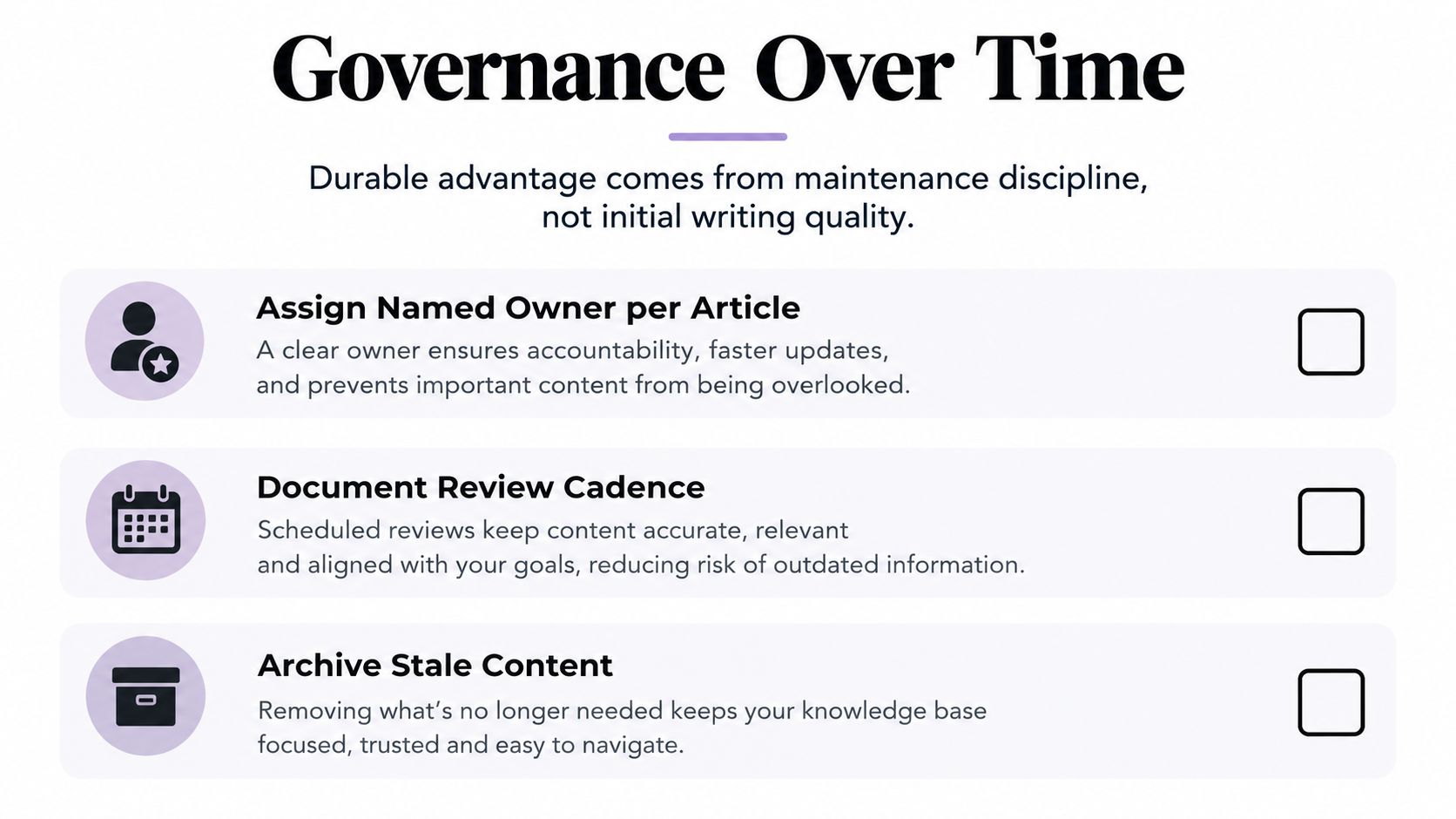
The durable advantage in support documentation isn't the quality of the first draft. It's the team's ability to notice when that draft stops being true.
Every article or article cluster needs a named owner. The owner doesn't have to write every revision, but they must know which product team can confirm accuracy, which support lead can report recurring failures, and which reviewer approves sensitive changes. “The documentation team owns it” is usually too vague when the content depends on product behavior, billing rules, security controls, or legal language.
Make review part of the product cycle
Tie review to change events, not only to calendar reminders. A UI change should trigger a screenshot and procedure review. A permission change should trigger an access article review. A policy change should trigger approval from the relevant specialist.
Research on documentation quality and maintenance reinforces the importance of update discipline, ownership, and evaluation rather than treating documentation as a one-time creation task. In another documented implementation, revised templates, a checklist, a decision tree, a documentation guide, and peer feedback reduced note-writing time from 48 minutes to 34 minutes, while template adoption increased from 37% to 100% over 10 months. The clinical example is specific, but the operational lesson transfers: standardization and feedback can make correct documentation easier to produce.
Use a review record that captures:
- Owner: The person accountable for accuracy.
- Technical approver: The person who confirms product behavior.
- Last meaningful review: Not merely the last spelling edit.
- Trigger conditions: Releases, policy changes, integrations, or recurring ticket patterns.
- Disposition: Keep, revise, merge, redirect, or archive.
Archive stale content instead of deleting it without traceability. Redirect old URLs when possible, mark retired workflows clearly, and remove obsolete pages from search results. Otherwise, outdated instructions can continue attracting users and undermine trust.
Keep audits manageable
A quarterly audit doesn't require rereading the entire library. Start with articles tied to high-volume contacts, low helpfulness, repeated search exits, recent product changes, and known escalations. Sample the content, verify the critical path, and assign specific follow-up work.
Governance also needs cross-functional boundaries. Product teams approve behavior, support teams surface recurring gaps, legal or security teams review sensitive guidance, localization owners validate regional versions, and documentation leads enforce structure and clarity. The knowledge base improves when these responsibilities are visible in the workflow.
KPIs, Self-Service Outcomes, and a 30-Day Action Checklist
Documentation metrics are useful only when they connect an editorial choice to a customer outcome. Four measures provide a practical starting set:
- Ticket deflection rate: The share of help interactions resolved through documentation rather than becoming tickets. Read it with satisfaction and repeat-contact signals, because a customer may abandon a page without opening a ticket.
- Self-service success rate: The share of search sessions that lead to a useful resolution. Define the resolution event clearly, such as a helpful vote, completed task, or absence of an immediate follow-up search.
- Article helpfulness: Votes, ratings, and written feedback that indicate whether a page solved the reader's problem.
- Zero-result search rate: The share of internal searches that return no useful result. Segment it by intent so a single obscure query doesn't distort the editorial queue.
The definition of success metrics is useful when your team needs to establish consistent measurement language. Baselines should be set by content category, because a setup guide, billing explanation, and incident troubleshooting page have different user expectations.
SnapDial's self-service portal benefits offers additional context for connecting self-service design with support operations. The key is to read metrics together. A higher deflection rate with falling helpfulness may indicate that users are giving up rather than succeeding. A lower zero-result rate with poor search-to-resolution performance may mean the system finds pages that still fail to answer the question.
A practical 30-day reset
-
Days 1 to 7, audit demand. Export support contacts, search queries, zero-result terms, and agent escalations. Cluster the evidence by customer intent and identify the pages connected to the most consequential gaps.
-
Days 8 to 14, repair the weakest content. Rewrite the highest-friction articles using task-based titles, explicit prerequisites, numbered steps, expected results, and symptom-led troubleshooting. Merge duplicate pages and archive guidance that no longer describes the product.
-
Days 15 to 21, fix discovery. Add customer vocabulary to titles and headings, create synonyms for common variants, revise category descriptions, and test representative searches from the perspective of a new user.
-
Days 22 to 30, install accountability. Assign owners to priority articles, define review triggers, connect documentation checks to release work, and create a recurring report that turns metric changes into named editorial tasks.
A team lead can assign these actions immediately. The outcome to aim for isn't a fuller library. It's a help center that answers real questions, makes the next action clear, and stays trustworthy after the product changes.
Prompt Builder helps support and documentation teams generate, refine, test, and organize reusable AI prompts for research, review, and content workflows. Visit Prompt Builder to create a repeatable prompt process for turning support evidence into clearer, better-maintained documentation.
Related Posts
Customer Support Documentation: A 2026 Guide
August 18, 2026
10 Customer Support Best Practices That Work
September 28, 2026