
What Is SQL Prompt and How Does It Work
Most advice on what is SQL prompt starts in the wrong place. It acts like there's one obvious definition, then jumps straight into autocomplete tips or AI demos. That's why so many analysts and developers leave more confused than when they started.
In practice, SQL prompt means at least three different things. If you don't separate them first, the rest of the conversation gets muddy fast. Once those meanings are clear, the LLM version becomes much easier to use well, and much easier to distrust when you should.
Table of Contents
- The Three Meanings of SQL Prompt Most Guides Mix Up
- How LLMs Turn a Prompt Into Executable SQL
- The Core Elements of a Reliable SQL Prompt
- Real Prompt Examples That Generate Working Queries
- Risks and Verification Steps Before You Trust the Output
- Best Practices for Writing SQL Prompts That Hold Up
- Putting It All Together With the Right Tooling
The Three Meanings of SQL Prompt Most Guides Mix Up
The phrase SQL Prompt can refer to a product, a command-line behavior, or an AI instruction. Those aren't small differences. They live in different tools, serve different users, and produce different outputs.
The first meaning is Redgate SQL Prompt, an add-in for writing SQL code. Redgate describes it as an add-in for writing, formatting, navigating, and refactoring SQL code in SQL Server tools at the SQL Prompt product page. This is the meaning many SQL Server developers already know.
The second meaning is database prompt variables or placeholders. This is the old-school command-line meaning. A script asks for a value at runtime, such as a date or customer ID, and the database client substitutes it before execution.
The third meaning is the one most AI discussions are really talking about. It's a natural-language prompt that asks a model to generate SQL. You type something like “show monthly churn by segment for the last full year,” and the model returns a query string.
Three Meanings of SQL Prompt Compared
| Meaning | Primary User | What It Produces | Where It Runs |
|---|---|---|---|
| Redgate SQL Prompt add-in | SQL Server developer, DBA | Completions, formatting, snippets, refactoring help | Inside SSMS or Visual Studio |
| Prompt variables or placeholders | CLI user, DBA, script author | Runtime value substitution | In command-line database clients and scripts |
| LLM text-to-SQL prompt | Analyst, developer, data team | Generated SQL query text | In an LLM app, assistant, or text-to-SQL workflow |
A small historical detail helps explain why the first meaning matters. Redgate introduced a dedicated SQL History feature in 2019, replacing Tab History, and its current documentation says the history view keeps the selected query with timestamps for each version and uses a default retention period of 7 days in SQL Prompt's history workflow in Redgate's SQL History overview. That tells you SQL Prompt is part of an editing and iteration workflow, not just a keyword suggester.
Practical rule: If someone says “SQL prompt,” ask one question first. “Do you mean the Redgate tool, runtime placeholders, or AI prompts that generate SQL?”
That single clarification saves a lot of wasted explanation.
How LLMs Turn a Prompt Into Executable SQL
When people ask what SQL prompt means in AI, they usually imagine a simple translation: English in, SQL out. The pipeline is a bit more structured than that.
A usable system usually does four things. It builds the prompt, interprets the request against schema context, generates SQL tokens, and then sends the result to a database connector or review layer.
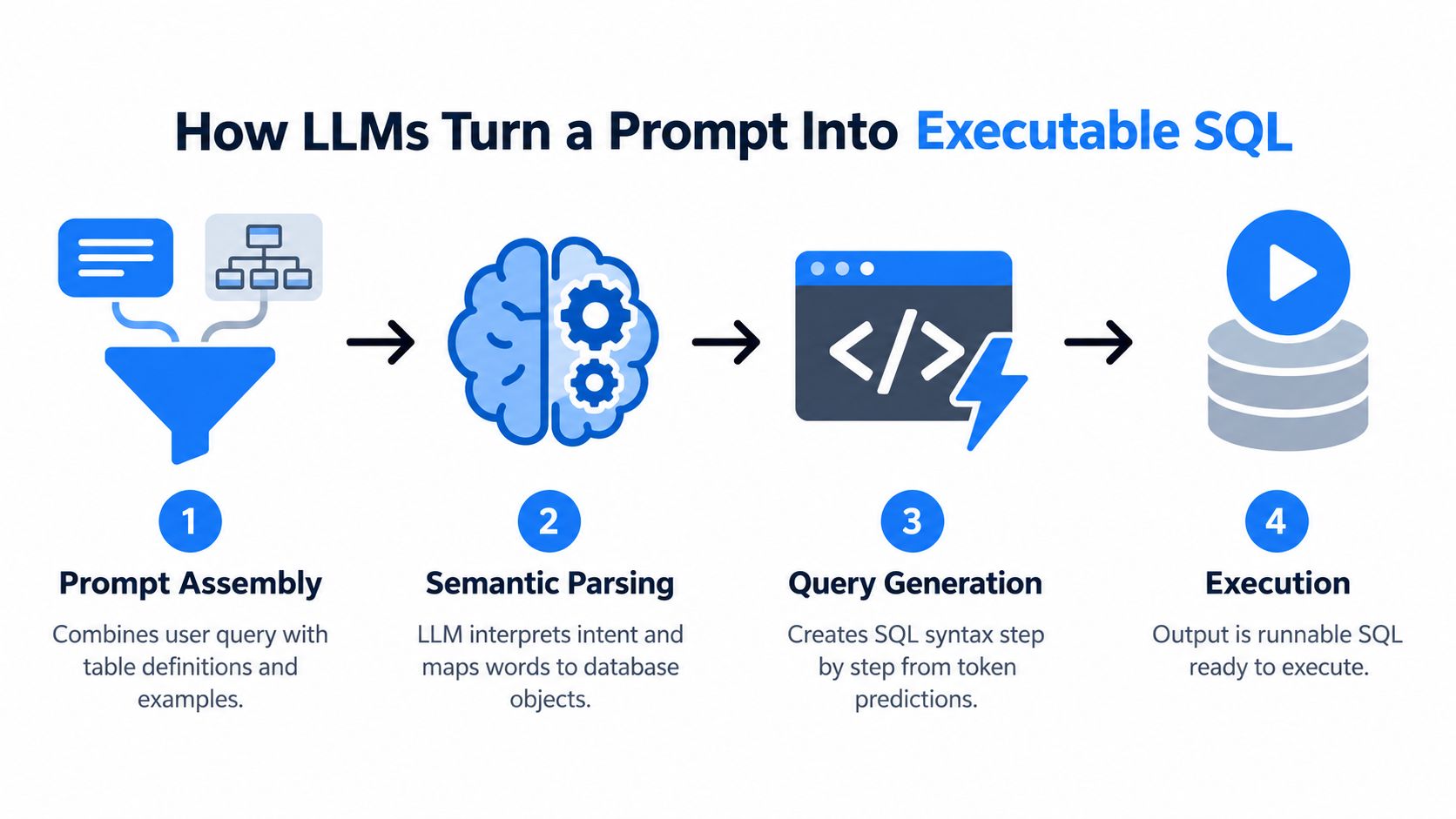
Prompt assembly matters more than most people expect
A model can't reliably query tables it hasn't been told about. Strong systems assemble a prompt from several parts:
- User request such as “monthly churn by segment”
- Schema context including tables, columns, and relationships
- Dialect hint like PostgreSQL, SQL Server, or BigQuery
- Examples or reference SQL when the business logic is nuanced
This is why retrieval-augmented generation shows up so often in production text-to-SQL stacks. Instead of hoping the model guesses the schema, the application pulls current metadata and injects it into the prompt. Tools like LangChain, Vanna, and function-calling workflows in modern model APIs often use this pattern.
If your team is also thinking about where generated answers surface, broader AI visibility concerns start to overlap. The same discipline that improves query generation also helps with options for AI search visibility, especially when systems need grounded, structured context instead of loose prose.
The model predicts SQL, then the system cleans up after it
Inside the model, the process is still token prediction. The LLM sees a prompt with context and generates the most likely next tokens, which may become SELECT, a table alias, a JOIN, and so on. That sounds simple, but correctness depends heavily on how specific the prompt is.
One reason this became a serious engineering topic is that text-to-SQL stopped being judged on toy examples. The Spider benchmark introduced in 2018 includes 10,181 questions across 200 databases and was designed to test SQL generation across unseen schemas, which pushed prompt quality and schema grounding into a measurable evaluation problem in the Spider benchmark paper.
Some systems add a self-correction loop after initial generation. If the SQL fails syntax checks or references missing columns, the application feeds the error back into the model and asks for a repair. That's better than blind trust, but it's still not the same as understanding the business logic.
A generated query can be syntactically valid and still answer the wrong question.
If you want to see how schema details can be turned into a more structured workflow, this walkthrough on a SQL query generator is a useful example of how teams move from plain-language requests to reusable query prompts.
The Core Elements of a Reliable SQL Prompt
A reliable SQL prompt reads less like a casual question and more like a compact specification. That's the mental shift needed.
Independent guidance on prompt engineering for SQL consistently points to the same idea: reduce ambiguity by naming the schema context, desired result, filters, grouping, joins, NULL handling, and SQL dialect, because leaving those out increases the chance of wrong joins, bad aggregation grain, or syntax mismatches in Newtum's SQL prompt engineering guide.
A realistic scenario
Suppose an analyst wants a churn report for a subscription business. A vague request sounds reasonable:
“Show churn by segment for the last year.”
A model can produce something from that. The problem is that it has to fill in too many blanks on its own. What counts as churn? Which table is authoritative? Is “last year” the previous calendar year or the last 12 full months? Should users with missing segment values be excluded or labeled?
Use this version instead:
-
Business question
“Return monthly churned subscriber counts by customer segment for the last 12 full months.” -
Tables and joins
“Usesubscriptions,customers, andchurn_events. Joinsubscriptions.customer_id = customers.customer_idandsubscriptions.subscription_id = churn_events.subscription_id.” -
Filters and exact values
“Count only records wherechurn_events.event_type = 'voluntary_churn'and exclude test accounts wherecustomers.account_type = 'test'.” -
Aggregation rules
“Group by calendar month ofchurn_events.churn_dateandcustomers.segment. Treat NULL segment values as'unknown'.” -
Output format
“Return columnschurn_month,segment,churned_subscribers, ordered bychurn_monthascending andsegmentascending.”
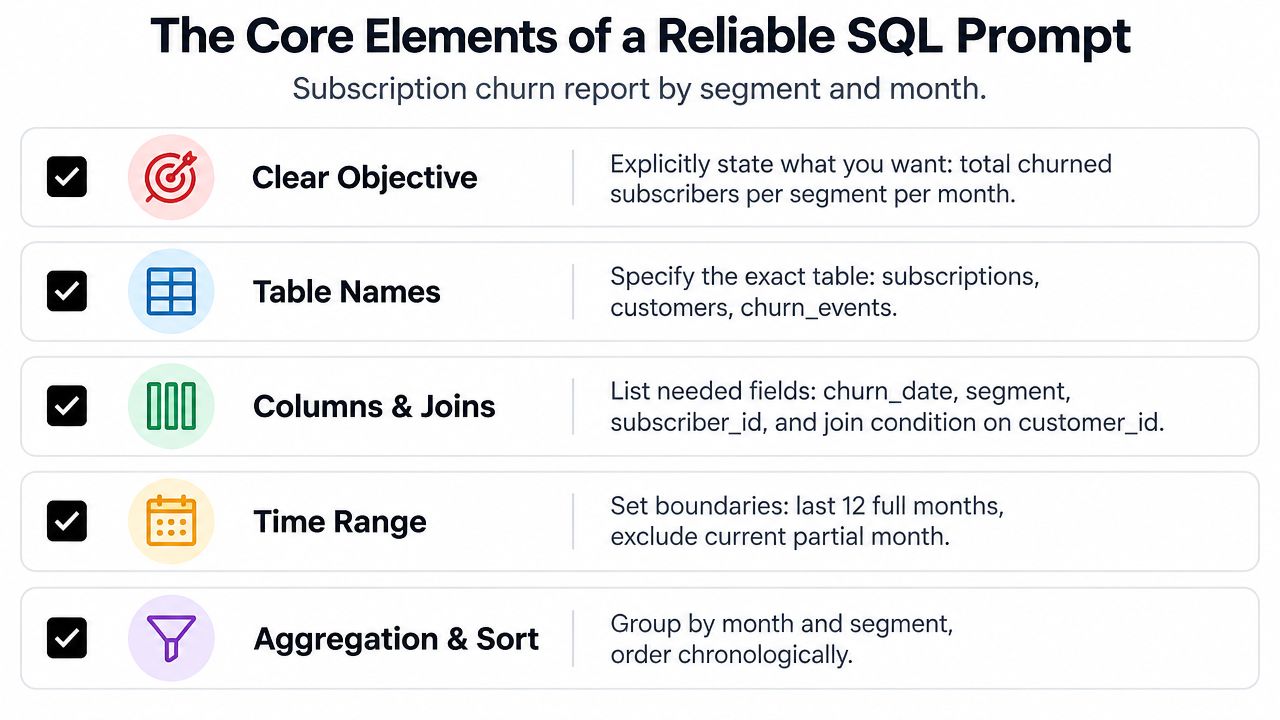
That's more verbose, but it's also far safer. You're giving the model fewer chances to make silent assumptions.
Why reusable prompts outperform one-off questions
In production-style SQL prompting, experienced teams treat the prompt as a reusable specification. That usually means including DDL or column definitions, a crisp task statement, edge-case rules, and a verification step such as expected row counts or a cross-check query in this production-oriented text-to-SQL prompting article.
That advice sounds formal until you've been burned by a query that looked right and wasn't. Then it feels normal.
Here's a good working checklist:
- State the business intent in one sentence. Avoid stacking three analysis requests into one paragraph.
- Name the exact tables and key joins. Don't make the model infer your warehouse design.
- Specify filters with real column names. “Recent” and “active” are business words, not database instructions.
- Define grouping grain and edge cases. Month, week, account, order, user. Those choices change the answer.
- Describe the output shape. Names, ordering, limits, and whether you want one query or multiple CTEs.
A short demo makes this easier to visualize:
Real Prompt Examples That Generate Working Queries
The fastest way to understand SQL prompting is to compare a weak request and a refined request for the same task. In each case below, the difference isn't model intelligence. It's prompt quality.
Weak vs. Strong SQL Prompt Examples
| Business Question | Weak Prompt (and resulting SQL issue) | Refined Prompt (and resulting SQL) |
|---|---|---|
| Top customers by revenue | Weak prompt: “Show top customers by revenue.” Issue: The model may guess the revenue table, include refunds incorrectly, or omit the date window. | Refined prompt: “In PostgreSQL, using orders(order_id, customer_id, order_date, status) and order_items(order_id, line_amount), return the top 10 customers by total booked revenue for the last full quarter. Count only orders where status = 'completed'. Output customer_id and total_revenue, sorted descending.” Resulting SQL: SELECT o.customer_id, SUM(oi.line_amount) AS total_revenue FROM orders o JOIN order_items oi ON o.order_id = oi.order_id WHERE o.status = 'completed' AND o.order_date >= ... GROUP BY o.customer_id ORDER BY total_revenue DESC LIMIT 10; |
| Monthly churn counts | Weak prompt: “How many users churned each month?” Issue: “User” might map to the wrong entity, and churn definition may be invented. | Refined prompt: “In BigQuery SQL, use churn_events(subscription_id, churn_date, event_type) and subscriptions(subscription_id, subscriber_id). Return monthly distinct churned subscribers for the last 12 full months. Count only event_type = 'voluntary_churn'. Output churn_month and churned_subscribers.” Resulting SQL: SELECT DATE_TRUNC(churn_date, MONTH) AS churn_month, COUNT(DISTINCT s.subscriber_id) AS churned_subscribers FROM churn_events c JOIN subscriptions s ON c.subscription_id = s.subscription_id WHERE c.event_type = 'voluntary_churn' AND churn_date >= ... GROUP BY churn_month ORDER BY churn_month; |
| Cohort retention | Weak prompt: “Build a retention table by cohort.” Issue: The model may choose signup date, first purchase date, or first session date without telling you. | Refined prompt: “For Snowflake, define cohort month as DATE_TRUNC('month', users.signup_date). A retained user is any user with at least one record in sessions(user_id, session_date) in the month being measured. Use users(user_id, signup_date). Return cohort month, activity month, and retained user count.” Resulting SQL: A query using cohort CTEs, month truncation, and a join from users to session activity at the requested grain. |
Why the refined versions work
The strong prompts pin down four things the weak ones leave open:
- Entity choice such as customer, subscriber, account, or user
- Business definition such as booked revenue or voluntary churn
- Time boundaries such as last full quarter or last 12 full months
- Dialect rules so date functions match the target engine
“Generate SQL” is too broad to be a useful request. “Generate PostgreSQL for these tables, these filters, and this output” is specific enough to debug.
A good prompt also tells the model what not to do. If you don't want SELECT *, say so. If you want explicit joins instead of implicit joins, ask for them. The model usually follows the strongest constraint in the room.
Risks and Verification Steps Before You Trust the Output
Prompted SQL can look polished and still be dangerous. That's the part most demos skip.
Recent research and product behavior both point in the same direction. AI-assisted SQL generation is improving, but raw prompting alone still isn't reliable enough. The SQLPrompt research line focuses on prompt design plus execution-based consistency decoding and error filtering, and mainstream tooling now includes optional AI assistance for writing and explaining queries inside SQL tools in the SQLPrompt paper. That's a strong hint that generation needs verification wrapped around it.
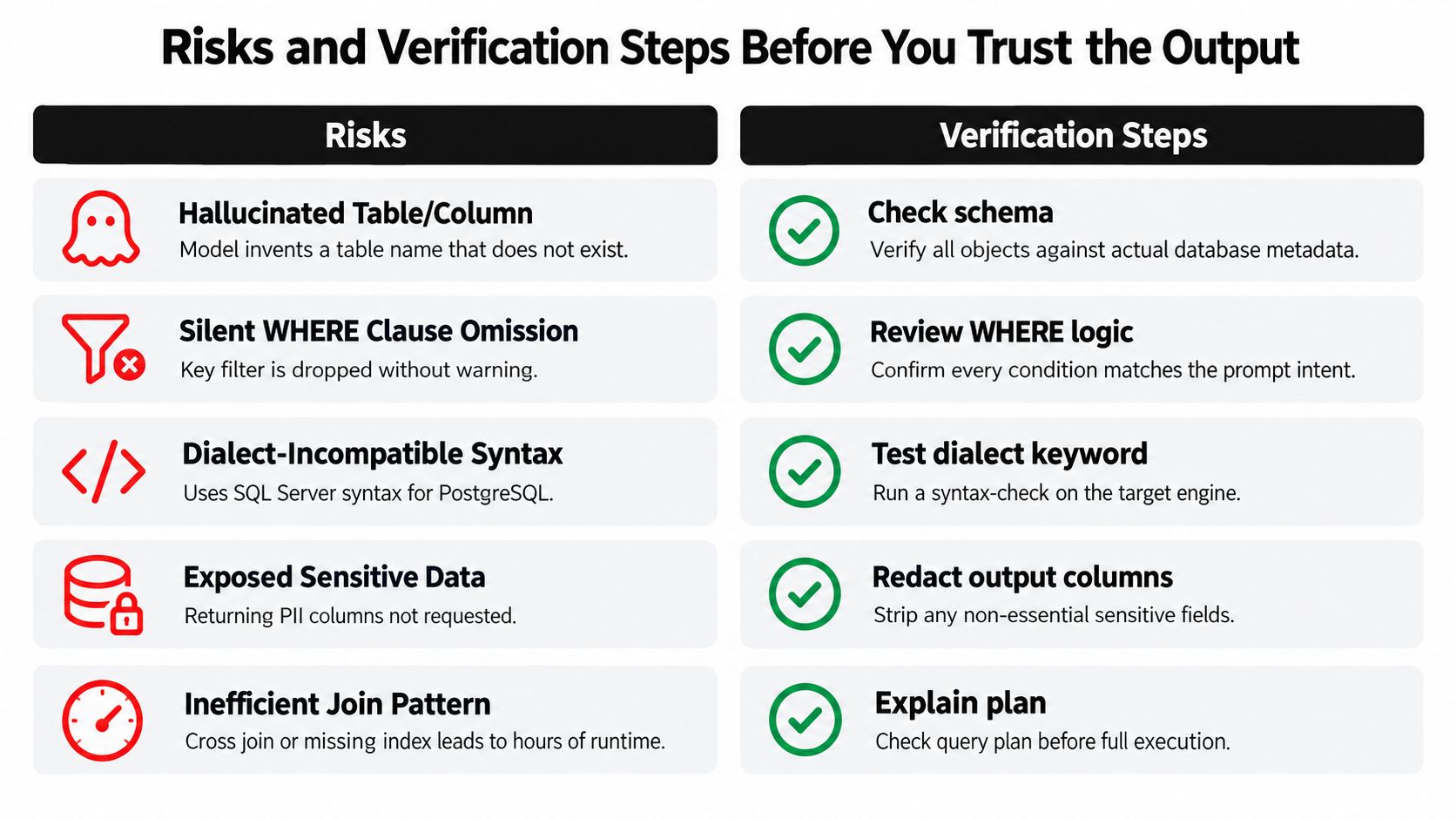
Common failure modes
Some errors are obvious. Others are subtle enough to make it into a dashboard.
-
Hallucinated objects
The model references a table or column that sounds plausible but doesn't exist. -
Missing filters
A keyWHEREcondition drops out, so the query returns valid rows for the wrong population. -
Dialect mismatch
The syntax works in SQL Server but fails in PostgreSQL, or vice versa. -
Bad join patterns
A missing join key creates duplicate rows or a Cartesian explosion. -
Sensitive data exposure
The model includes columns that weren't requested, including personal or financial data.
There's also a less discussed risk: prompt safety. If your text-to-SQL system accepts user input and schema instructions in the same workflow, you need to think about adversarial instructions and untrusted context. This explainer on prompt injection is worth reading if your team is building internal assistants on top of live data.
A verification routine that catches most problems
You don't need a giant review process for every exploratory query. You do need a routine.
-
Cross-check the schema
Confirm every table, column, and join path exists in the actual metadata. -
Read the WHERE clause line by line
Make sure the query answers the business question you asked, not a nearby one. -
Run EXPLAIN before full execution
Check for large scans, accidental cross joins, and strange join order choices. -
Sanity check row counts
If a churn query returns more rows than your subscriber base suggests, stop there. -
Inspect sample rows
Pull a small result set and verify values by hand. -
Use peer review for shared queries
If the output feeds reporting, billing, or customer-facing metrics, get another person to read it.
This is not optional when the query touches finance, healthcare, or user-level analytics.
The model's job is to draft. Your job is to verify intent, safety, and execution reality.
Best Practices for Writing SQL Prompts That Hold Up
Strong SQL prompts have a tone you can recognize. They're precise, constrained, and easy to reuse. They don't read like brainstorming.
A checklist you can apply today
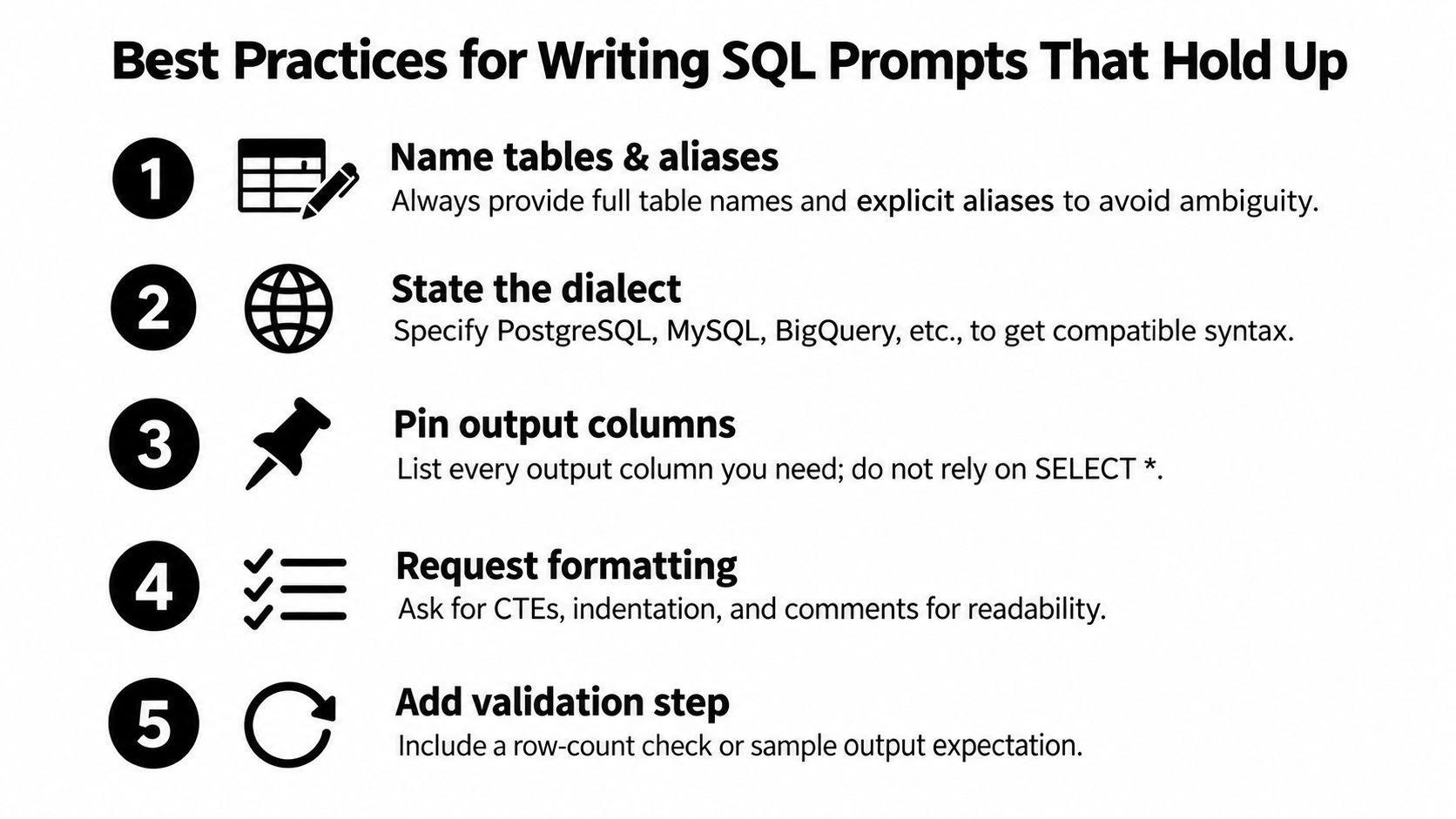
-
Name tables and aliases explicitly
Writeorders oandcustomers cif that's how you want the query structured. It reduces ambiguity and makes follow-up edits easier. -
State the SQL dialect upfront
PostgreSQL, MySQL, SQL Server, Snowflake, and BigQuery all differ in date handling, string functions, and limit syntax. -
Pin the output columns
List the exact columns you want returned. Don't leave room forSELECT *unless you want every field. -
Request readable formatting
Ask for CTEs, comments, indentation, and explicit join conditions. You're not just generating SQL. You're generating SQL someone has to read. -
Add a validation instruction
Ask the model to include a quick cross-check query, expected grain, or assumptions list.
Habits that separate casual use from dependable use
Treat business definitions as first-class prompt inputs. If your company defines an active user as a user with a paid event in the last billing cycle, include that. Don't assume the model shares your internal vocabulary.
Break large tasks into rounds. Start with a schema-aware draft, then tighten the filters, then ask for an explanation of each join. You'll usually get a better result from three focused prompts than from one overloaded paragraph.
A few more habits help a lot:
- Provide sample values carefully so the model can map human language to coded fields
- Ask the model to state assumptions so hidden guesses become visible
- Use row limits during exploration to reduce risk and cost
- Never paste credentials or sensitive row-level data into a public LLM tool
For teams that want to standardize this work, a prompt review process helps. A lightweight prompt testing framework is useful when multiple people reuse the same SQL-generation prompt across recurring reports or apps.
Treat the prompt like code. Store it, review it, revise it, and retire bad versions.
That mindset is what keeps one helpful experiment from turning into a recurring analytics bug.
Putting It All Together With the Right Tooling
Once you separate the meanings of SQL prompt, the tooling makes more sense. You're not shopping for one magic product. You're choosing support for different parts of the workflow.
A developer writing SQL Server code by hand may want Redgate SQL Prompt for editing, formatting, and history. An analyst exploring a warehouse may want a chat-style text-to-SQL assistant. A platform team building recurring internal workflows may need schema-aware generation plus validation and prompt management.
SQL Prompt Tooling Options Compared
| Tool Category | Best For | Key Limitation |
|---|---|---|
| Database IDE with SQL assistance | Developers writing and editing queries directly | Usually tied to a specific database workflow |
| Native LLM chat interface | Quick exploration and ad hoc drafts | Weak schema grounding unless you provide context manually |
| Schema-aware text-to-SQL API or app | Repeated SQL generation against known databases | Still needs review, validation, and dialect controls |
| Prompt workspace and management tool | Teams reusing prompts across models and tasks | Requires setup discipline to be useful |
Tool choice usually comes down to three questions:
- How complex are the queries? Simple selects tolerate lighter tooling. Multi-join business logic doesn't.
- How sensitive is the data? Public chat tools may be fine for toy schemas and not fine at all for real customer data.
- How many people need repeatable results? One analyst can get by with notes. A team benefits from saved prompts, examples, and review conventions.
If you need one place to draft, refine, test, and save SQL-generation prompts across different models, Prompt Builder is one option alongside IDE add-ins and chat tools. It's designed for prompt workflows rather than database execution, which makes it a practical fit when the main problem is improving prompt quality and reuse before a query ever hits production data.
The key idea is simple. Use editing tools for writing SQL. Use text-to-SQL tools for drafting from intent. Use prompt management when the prompt itself becomes a reusable asset.
If you're building repeatable SQL-generation workflows, Prompt Builder gives you a place to generate, refine, test, and organize prompts instead of leaving them scattered across chat threads. That's useful when “what is SQL prompt” stops being a definition question and becomes an operational one: how your team writes better prompts, checks assumptions, and reuses what already works.