
Checking Test Examples: A Practical Guide to Validating Them
You've got a test suite that's green, the dashboard looks calm, and something still feels off. A few examples pass because they're asserting the wrong thing, a dataset row looks plausible but encodes the wrong answer, and an AI eval prompt produces a neat score even though it never checked the user-visible behavior you care about.
That's the trap with checking test examples. The discipline is the same whether you're validating a unit test, a labeled example in a dataset, or a prompt-response pair in an eval harness, the question is always whether the example proves what the team thinks it proves. Passing is only useful when the example is honest.
Table of Contents
- What Checking Test Examples Really Means
- The Quality Criteria Every Test Example Must Meet
- A Practical Workflow for Checking a Test Example
- Designing Examples That Are Honest, Not Just Detailed
- Validating Examples Across Devices and AI Workflows
- A Real Story of a Passing Suite That Was Still Wrong
- Your Test Example Validation Checklist
What Checking Test Examples Really Means
A bad test example usually looks rigorous at first glance. It compiles, the fixture loads, the assertion passes, and the CI badge turns green. Then a production bug slips through because the example was checking a detail the system didn't depend on, or because it was so tightly written that it only passed for one narrow path.
The same failure shows up in evaluation datasets and AI grading. A row can be perfectly formatted and still label the wrong behavior. A prompt can look complete and still lead the model toward the answer. A scorer can produce a tidy result while ignoring the actual user-facing output.
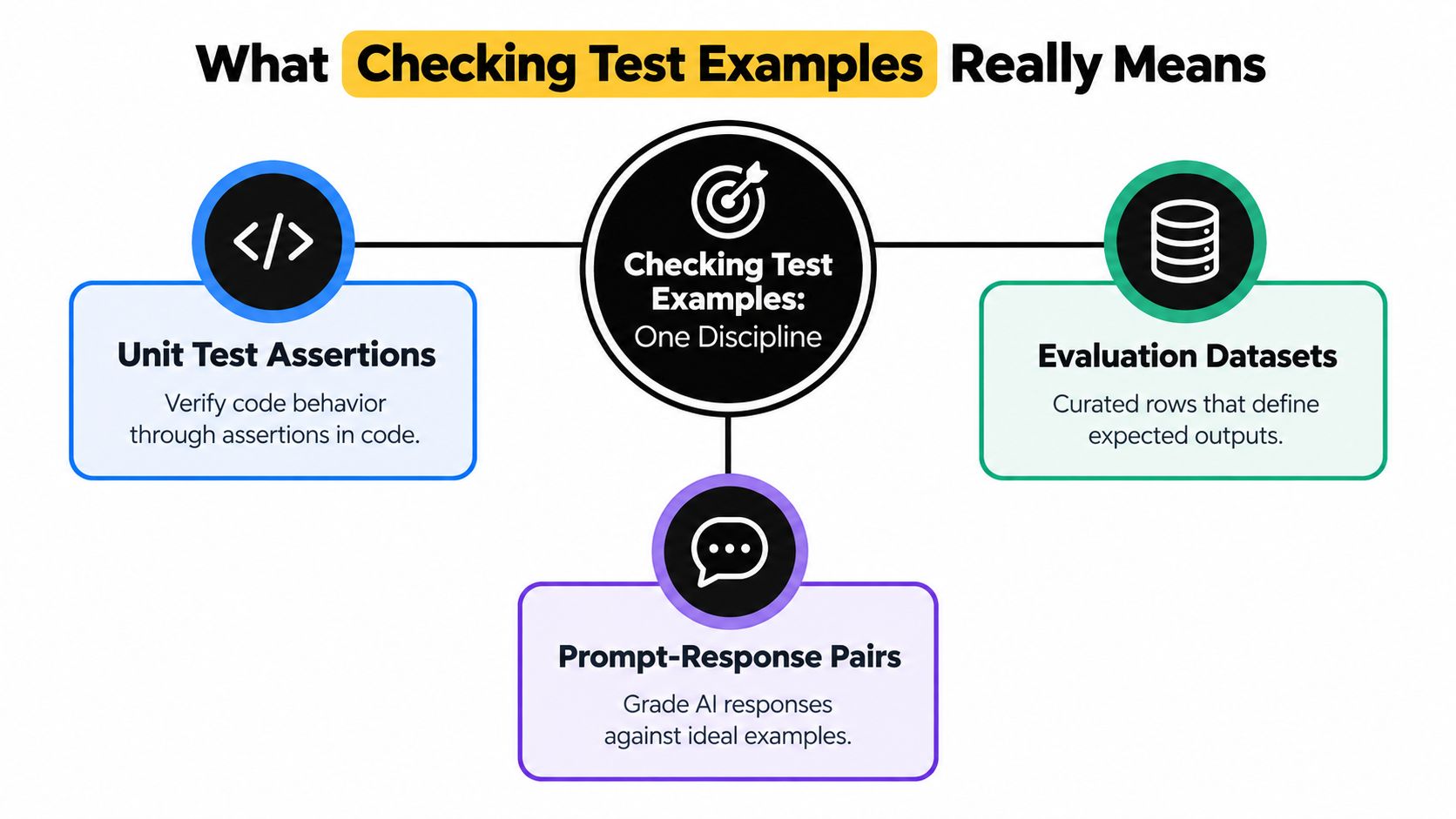
One discipline, three surfaces
A unit test asks, “Does this code behave the way we expect?” A dataset example asks, “Does this labeled case really represent the category or outcome we need?” An AI eval asks, “Does this prompt and rubric measure the behavior we care about, not just something nearby?”
Practical rule: if the example would still pass after the real bug came back, it isn't validating anything meaningful.
The shared failure modes are easy to recognize once you start looking for them. Tautological assertions prove the setup mirrors the output, memorized fixtures only exercise one known path, leading examples hand the answer to the model or user, and context-blind graders score the surface form instead of the actual behavior. In other words, every surface can look “tested” while still missing the invariant.
The useful question is simple. Does this example test the behavior, or does it only test the author's expectation of the behavior?
The Quality Criteria Every Test Example Must Meet
A test example earns trust only when it passes two checks. Formal correctness covers valid syntax, matching schemas and types, acceptable input shape, and a runnable setup. Behavioral correctness asks whether the example represents a plausible use case, exposes a regression, and remains meaningful as the surrounding system changes. A parser can accept an example that proves almost nothing.
That distinction matters across unit tests, dataset rows, and AI evaluation cases. A neat example may survive review because its structure looks precise, while failing to detect the product drift that users would notice. Good checking therefore examines what the case represents, which assumptions it encodes, and whether its result would change under the failure being tested.
| Quality Layer | What It Checks | Risk If Ignored | Quick Verification |
|---|---|---|---|
| Formal Correctness | Syntax, schema, types, input shape | The example will not run or cannot be parsed | Open it in the runner, linter, or validator |
| Behavioral Correctness | Plausible behavior and meaningful failure detection | The example passes without proving anything | Remove the feature and confirm it fails |
| Representational Balance | Whether examples cover the actual spread of cases | The dataset overfits to one pattern or group | Compare the example with real traffic or cases |
| Prompt Independence | Whether the test depends on hidden hints | The model is coached instead of evaluated | Remove leading clues and run it again |
Representation also requires a bias check. Ask which users, devices, inputs, accents, languages, or failure conditions are absent. A unit test can ignore a mobile-only path, a dataset can underrepresent a user group, and an AI eval can reward a writing style unrelated to task quality. The example should expose those boundaries rather than define one narrow case as normal.
Keep the test separate from the behavior it tests. In prompt systems, prompt guardrail patterns offer related guidance on preventing setup from steering the result. If the example smuggles in the answer, it rehearses the expected behavior instead of measuring it.
Check determinism last. An example that passes only when data is frozen, execution order is lucky, or the environment happens to cooperate produces a misleading signal. Control the variables that should be controlled, while preserving the device and context differences the product must handle.
A Practical Workflow for Checking a Test Example
A test can pass while the defect it was meant to catch sits untouched. The workflow below is designed to expose that gap across unit tests, dataset examples, and AI evaluation cases. Start with intent, remove distracting setup, and finish with a failure message another practitioner can use.
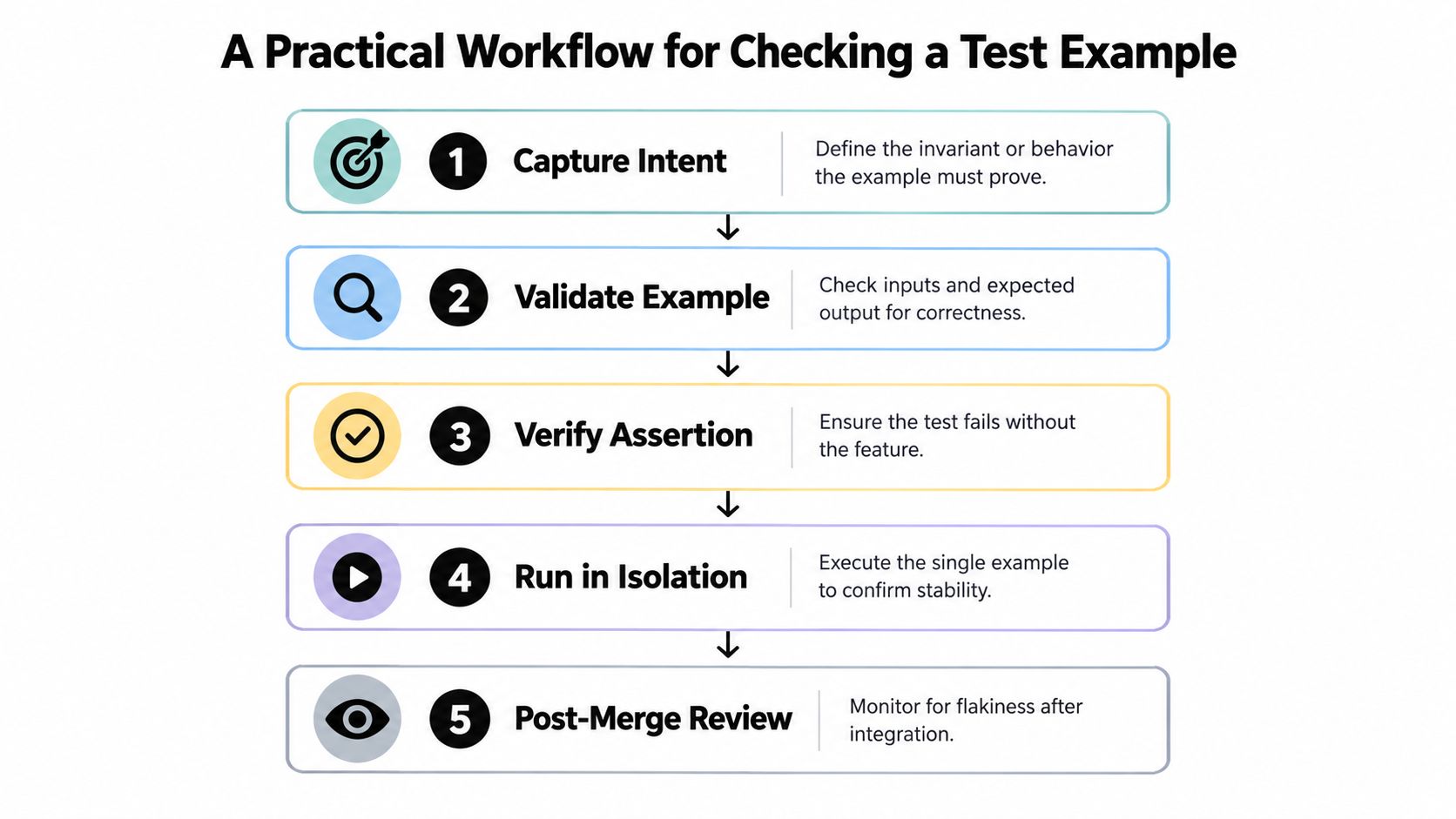
Step 1 through step 3
Write the invariant in plain language first. A reviewer who did not author the example should be able to restate the expected behavior. If that is difficult, the example is too vague. Build only the scaffolding needed to express the invariant, since excess setup can hide the defect or coach an AI system toward the expected answer.
Run the example in isolation, then deliberately change the system under test so the expected behavior should fail. This mutation-style check quickly separates a working test from one that merely produces a green result. Apply the same test to a labeled row or prompt evaluation case: remove the capability being measured and confirm that the score or outcome changes.
Step 4 and step 5
Read the failure output as a future maintainer would. It should identify the broken behavior, relevant input, and context, whether it comes from a JUnit case, a dataset row, or a prompt evaluation trace. If the message requires the original author to interpret it, the example still needs work.
If the failure message needs the author in the room, the example isn't done yet.
Finish with periodic re-review. APIs drift, labels age, model behavior changes, and device-specific paths can fall out of coverage. Recheck whether the example still represents the users, inputs, environments, and failure conditions the product must handle. Teams working with prompts can keep a versioned workspace, including tools like Prompt Builder, to test and revise prompt logic alongside the wider system.
Designing Examples That Are Honest, Not Just Detailed
Longer examples feel safer because they contain more context. In practice, extra detail often makes the test easier to pass for the wrong reason. A test that only works because it gives away the answer, buries the signal under setup, or nails down a brittle string is not stronger, it's just harder to read.
Where detailed examples go wrong
A leading prompt is the clearest form of dishonesty. It tells the model what to say instead of checking whether the model can infer it. Overloaded fixtures do the same thing in code, they hide the behavior inside layers of irrelevant setup. Brittle specificity is subtler, the assertion is so exact that it passes for one wording and fails for valid alternatives.
The cleaner pattern is “realistic but minimal.” For a login flow, that means the smallest input set that still exercises the actual branch, not a page full of unrelated data. For a classification prompt, that means enough context to make the category visible, not a paragraph that hints at the answer in three different ways.
The rule I use
If removing a sentence wouldn't change whether a reasonable human would still produce the expected result, remove it.
That rule keeps the example honest. It also makes reviews faster, because reviewers can see what the example is proving instead of reading through decoration. The same principle shows up in technical docs and prompt-writing guidance, and it's worth comparing with technical documentation structure tips when your examples double as instructions.
Validating Examples Across Devices and AI Workflows
A test example that works on your laptop can still fail for real users. Mobile layouts change the visible structure, tablets shift interaction patterns, and AI-assisted flows introduce non-deterministic outputs that don't behave like fixed strings. If you ignore device context, you're checking a lab condition, not a user condition.
Make device class part of the example
Parameterize by device class instead of assuming desktop defaults. A date parser, for example, might be stable in one runtime but behave differently when memory pressure, rendering constraints, or input handling change across devices. The point isn't to simulate every handset, it's to make sure the example tells you when the behavior depends on platform assumptions.
For visual or responsive cases, assert on stable properties rather than exact strings or pixel-perfect text. Exact matching is brittle when the same intent can be expressed in different layouts. If the important property is that the user sees the right action or content, test that property directly.
| Surface | Example Risk | Validation Check |
|---|---|---|
| Unit tests | Assumes one runtime or viewport | Run the case with device- or environment-specific parameters |
| Responsive UI | Exact output differs across screens | Assert on visible properties, not brittle text alone |
| AI-assisted flows | Output varies even when behavior is correct | Pair example checks with property-based or fuzz checks |
Use multiple kinds of checks together
AI workflows need a wider lens than one golden example. Example-based tests are still useful, but they should sit alongside property-based or fuzz checks that explore variation. That's where prompt quality, output relevance, and task success can be compared without pretending the system has one fixed answer.
The easiest mistake is to test the prompt the way you would test a pure function. That works for narrow cases, but not when the same user request can produce different valid outputs. A test only works if it works for the person holding the device, not just for the developer who wrote it. For teams that need to keep prompts and workflows aligned across surfaces, cross-platform compatibility guidance is a useful adjacent read.
A Real Story of a Passing Suite That Was Still Wrong
A checkout suite stayed green for weeks while a real regression shipped to customers. The assertions checked totals in cents, so the numeric math looked fine, but the bug lived in currency formatting for a regional locale. The tests passed because they were watching the wrong layer of the experience.
The same blind spot showed up in the recommendation eval. The dataset examples all came from one traffic segment, so the model looked stable even though it was failing on other users. The scorer made things worse, because it used a regex that ignored the actual visible answer and only checked for a shape that looked close enough.
That combination is common. A green suite, a narrow sample, and an automated scorer can create a strong illusion of reliability. They don't have to be malicious to be misleading, they just have to agree with each other in the same wrong direction.
The fix was simple in hindsight. The team changed the assertion to the user-visible property, sampled examples across real traffic segments, and stopped treating the automated scorer as the only oracle. Once they did that, the failures became obvious much earlier, and the examples started catching the regressions they were supposed to catch.
Your Test Example Validation Checklist
The fastest way to check an example is to run a short, disciplined list before it reaches review. Keep it lightweight enough to use every day, but strict enough to catch examples that only look meaningful on paper.
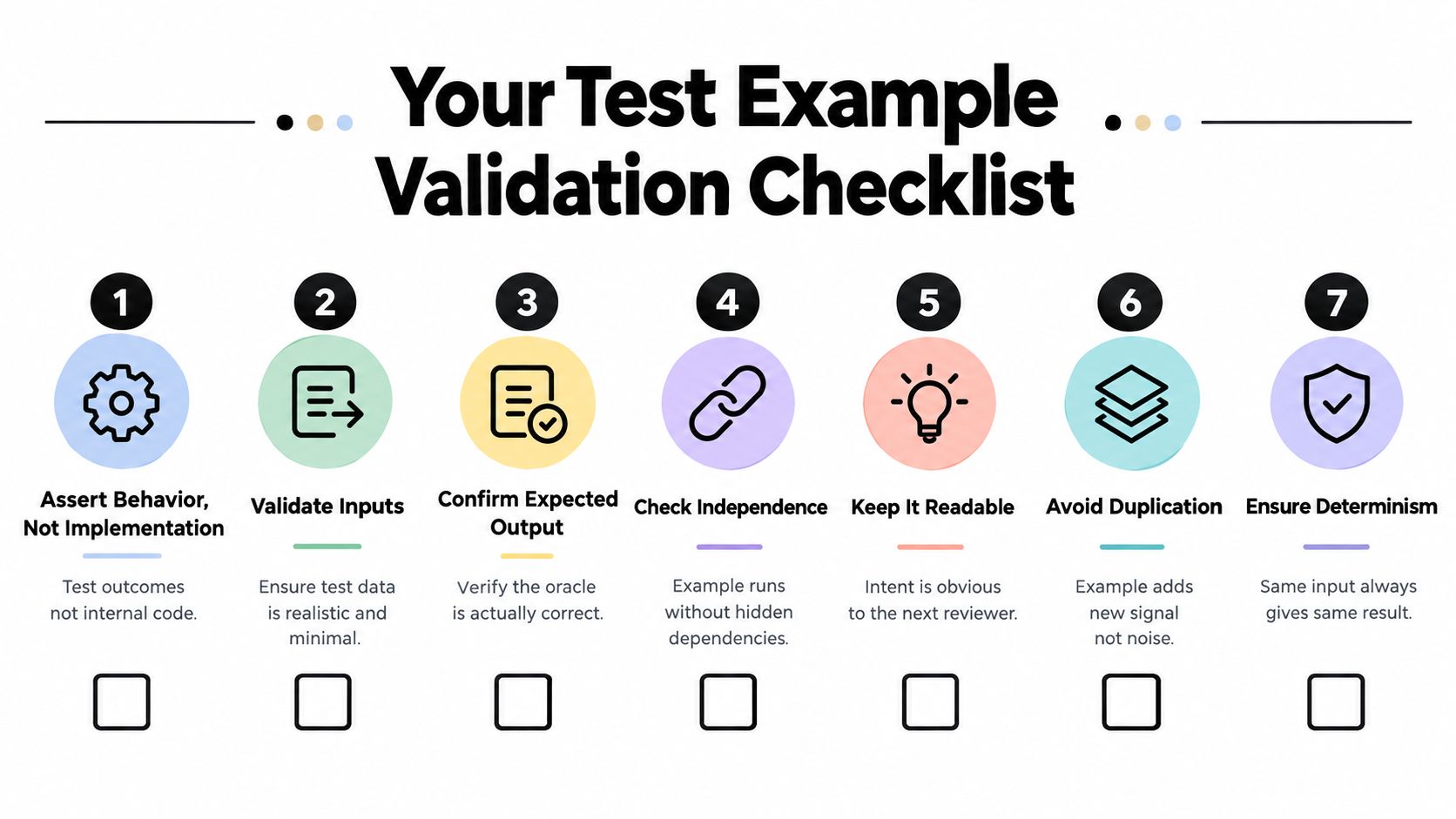
The seven checks
- Assert behavior, not implementation: Confirm the example checks the outcome users or downstream systems care about, not just an internal detail.
- Validate inputs: Keep the input realistic and minimal, with no extra clues that make the example easier than real life.
- Confirm expected output: Verify the oracle by hand so you know the “correct” answer is correct.
- Check independence: Make sure the example doesn't rely on hidden state, other examples, or execution order.
- Keep it readable: A future reviewer should understand the intent without asking you to explain it.
- Avoid duplication: The example should add new signal, not repeat an existing case with a different label.
- Ensure determinism: The same input should produce the same result, or the variance should be explicit and tested as a range.
Use that list as a pre-commit gate, not an audit ritual. If an example fails one of these checks, fix it before it becomes part of the official record. If it's for AI evaluation work, keep the prompt, labels, and revisions in one place so you can revisit the exact same example after a model update. That's where a dedicated workspace helps, because you can version prompts, test variants, and compare outputs without losing the thread.
If you're tightening up prompts, evals, or test suites, visit Prompt Builder and use it to draft, test, and refine examples in one place. It's built for prompt iteration, evaluation, and reuse, which makes it easier to keep test examples honest as your code, data, and model behavior change.