
Prompt Engineering for Business: 2026 Guide
Your team has already built an unofficial AI system. A useful prompt sits in a sales manager's Slack thread, a support workflow depends on a template in someone's personal document, and a marketing prompt produces different results after a model update. Nobody knows which version is approved, who owns it, or what happens when the output is wrong.
That's prompt engineering problem in business. It isn't a shortage of clever wording. It's the absence of repeatable infrastructure around prompts, models, data, evaluation, and human decisions. The companies that create durable value will treat prompts as managed workflow components, not disposable chat instructions.
Table of Contents
- Why Prompt Engineering Is Now a Business Operating System
- Choosing Business Use Cases Worth Prompting
- Designing Prompt Workflows That Hold Up at Scale
- Model Selection and Tuning for Real Workloads
- Governance, Versioning, and Evaluation as One Lifecycle
- Measuring ROI Beyond Model Output Quality
- Rollout Checklist, Team Roles, and Copy-Paste Prompt Recipes
Why Prompt Engineering Is Now a Business Operating System
Prompt engineering has crossed from individual experimentation into formal business planning. McKinsey reported that 7% of respondents whose organizations had adopted AI were already hiring for prompt engineering roles by March 2024, while Adobe found that 27% of small business owners considered prompt engineering a very important skill, 52% would train otherwise strong candidates who lacked it, and 36% were more likely to hire someone with the skill. McKinsey's explanation of prompt engineering connects the practice to workforce planning, not just personal productivity.
The market signals point in the same direction. One industry report valued the global prompt engineering market at USD 222.1 million in 2023, projected USD 893.7 million in 2026 and USD 2.0608 billion by 2030, with a projected 32.8% CAGR from 2024 to 2030. A separate estimate placed the category at US$332.4 million in 2024 and US$1.7 billion by 2030. These estimates differ, but both indicate that prompt quality, optimization, and management are becoming budgeted capabilities in enterprise AI. Grand View Research's prompt engineering market report also puts North America at 34.0% of global market share in 2023.
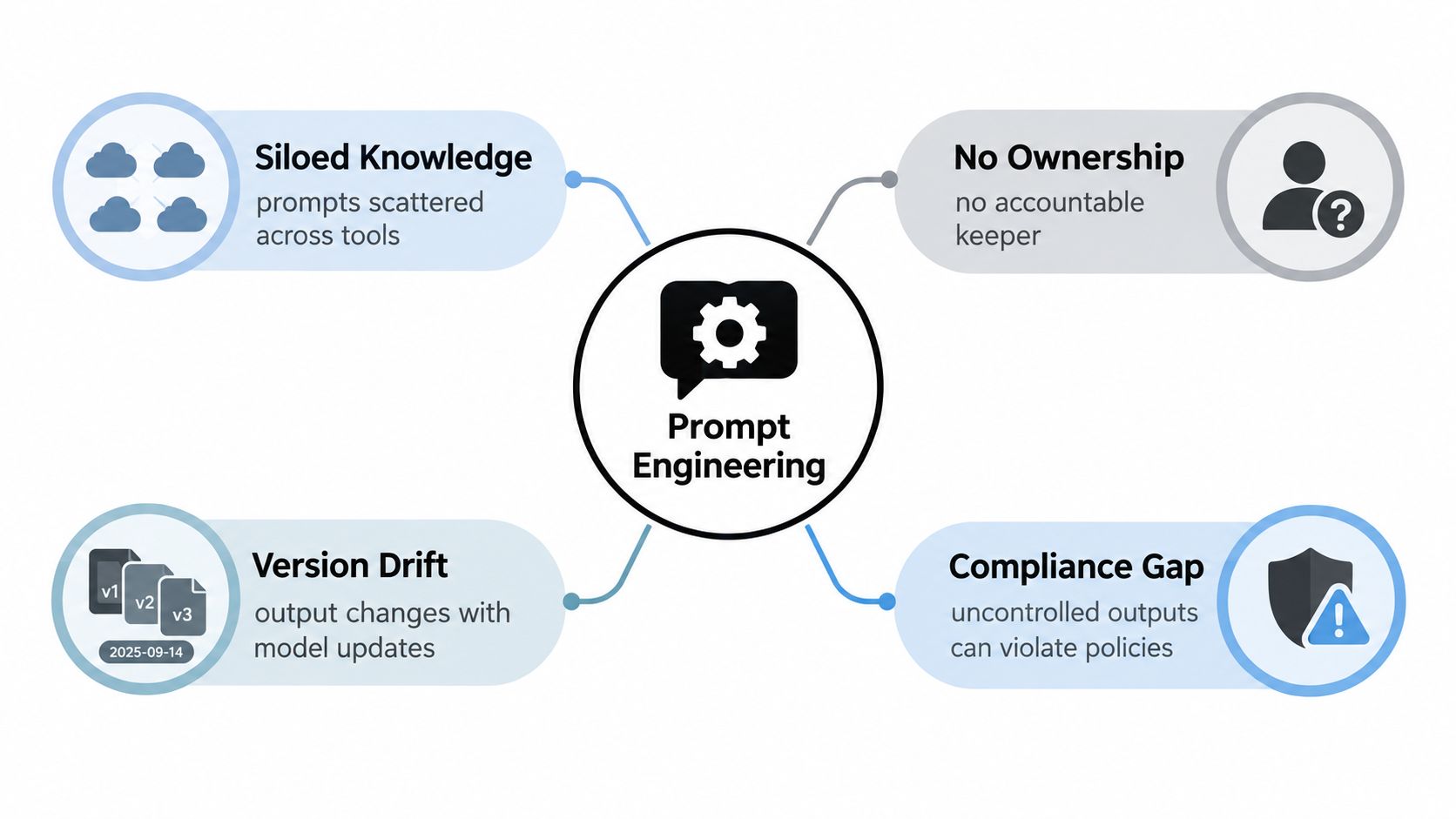
Replace prompt folklore with operating controls
A business-grade prompt system needs five controls:
- Ownership: Assign a business owner who defines acceptable output and an operational owner who maintains the workflow.
- A repository: Store prompts, model settings, input schemas, examples, and release notes together.
- Evaluation: Test changes against representative cases before users receive them.
- Governance: Define permitted data, refusal behavior, escalation rules, and approval rights.
- Observation: Track failures, user corrections, cost, latency, and workflow outcomes after release.
A prompt without these controls remains a personal shortcut. A prompt with them becomes a reusable component that can support sales, support, marketing, analysis, or internal knowledge work. Teams building broader AI programs can also review this guide to AI for marketing and product innovation, especially when prompt workflows connect campaign production with product decisions.
For sales teams, the same principle applies to outbound automation. A workflow must define targeting, personalization boundaries, approval steps, and failure handling, rather than generating more messages. Teams evaluating that use case can pair prompt governance with a practical resource on LinkedIn automation for sales teams. The recommendation is simple: stop asking who wrote the best prompt and start asking who owns the system that makes the prompt safe and useful.
Choosing Business Use Cases Worth Prompting
Not every repetitive task deserves an LLM. A workflow should earn investment by combining meaningful business impact with a controllable risk profile and a result you can measure.
Start with a working session involving the process owner, a technical lead, a compliance representative, and the people who perform the task today. List candidate workflows, then score each dimension from 1 to 5. Keep the scoring visible. A defensible shortlist is more valuable than a long brainstorm list.
Use the rubric before you choose the tool
| Dimension | What to Score (1-5) | Weight | Notes |
|---|---|---|---|
| Business impact | Time, revenue, service, or risk value | High | Prioritize work that affects a meaningful operating metric |
| Repetition and volume | How often the task occurs | Medium | Repeated work creates more opportunities to learn |
| Feasibility | Input quality, integration effort, and workflow clarity | High | Structured inputs usually produce a cleaner pilot |
| Risk | Privacy, compliance, brand, and decision consequences | High | A high-risk use case needs stronger controls |
| Evaluation clarity | Ability to define a good result | High | Avoid workflows where reviewers can't agree on quality |
| Latency tolerance | How quickly the answer is needed | Medium | Real-time tasks impose tighter model and architecture choices |
A support team might prioritize ticket triage because the inputs are identifiable, the categories can be defined, and human review can remain in the loop. A revenue team might test RFP drafting if approved source material is available and reviewers can verify every claim. Policy question answering can work when retrieval is bounded to current internal documents.
Creative brainstorming often belongs lower on the list. It may be useful, but if nobody can agree on what “better” means, the team can't establish a reliable baseline or prove that prompt work changed the business result.
Build a one-page portfolio map
For every shortlisted use case, record the process owner, users, source data, prohibited data, downstream action, review point, baseline metric, and acceptance criteria. Then rank candidates by impact, feasibility, and risk instead of by executive enthusiasm.
Some workflows need a reusable starting point before they need orchestration. For example, HR teams can adapt copy-paste onboarding templates from Productivity Radar while still applying the same approval and data-handling rules. Templates accelerate discovery, but they aren't a substitute for a signed-off workflow design.
Choose one pilot with a clear owner and a narrow boundary. If the team can't explain what enters the system, what comes out, who checks it, and which metric should move, the use case isn't ready.
Designing Prompt Workflows That Hold Up at Scale
A prompt is a demo. A workflow is the product.
The reliable pattern is a sequence of controlled components: structured input, bounded retrieval, system rules, processing logic, output validation, and human review before a consequential action. Each component should have an owner and a version. Freeform prose belongs inside the system only where it adds necessary context.
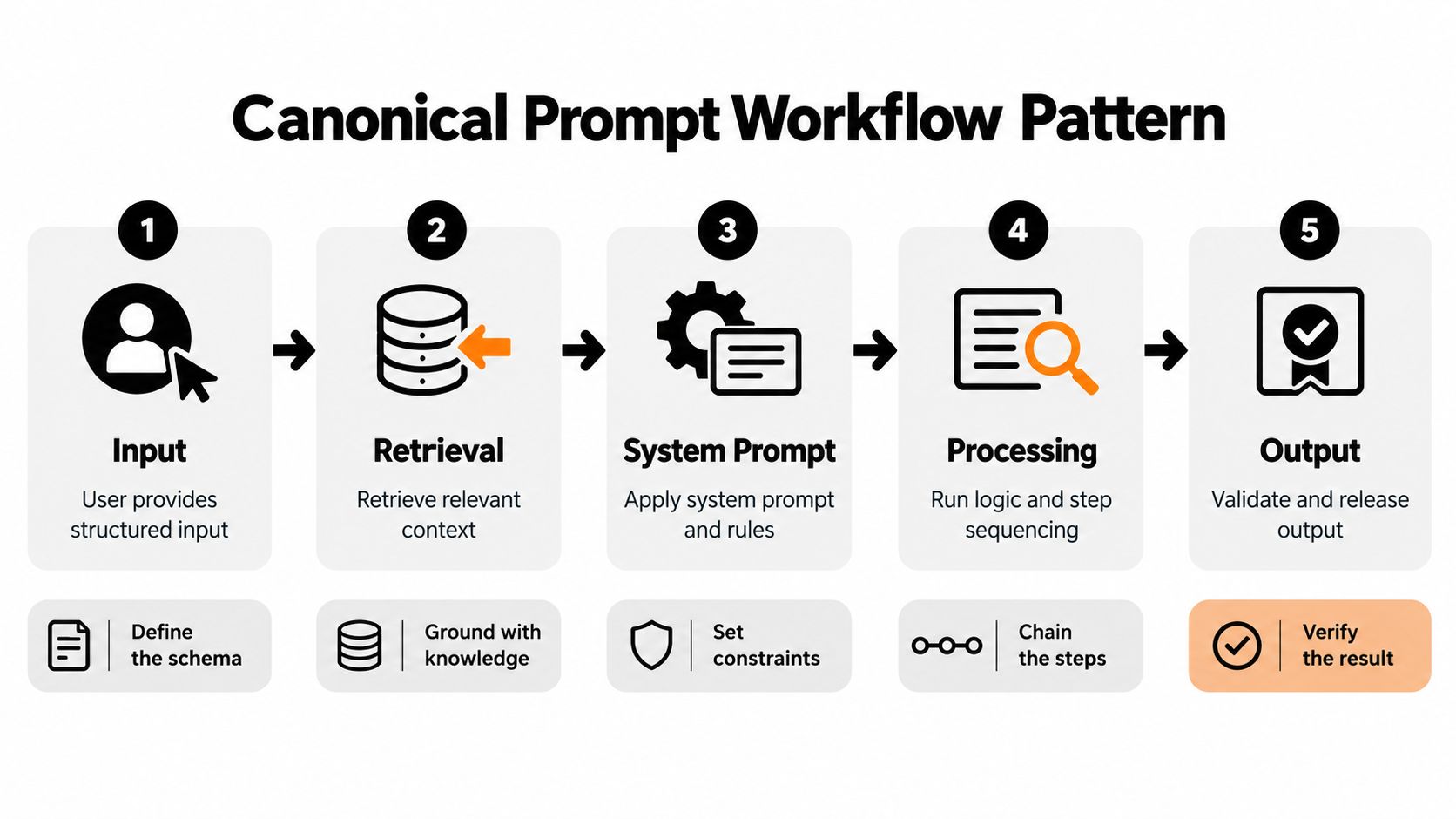
Build five control points
-
Normalize the input. Convert the user request into a defined structure. Capture fields such as task type, customer segment, source document, language, and urgency. Reject missing or unsupported values before calling a model.
-
Retrieve only approved context. Search the relevant knowledge base, filter by permissions and document status, and pass bounded excerpts to the model. Retrieval should support the answer, not expand access to unrelated information.
-
Apply system rules. Define role, scope, tone, prohibited behavior, citation requirements, and escalation conditions. Keep these instructions separate from user-provided content so the workflow can distinguish policy from data.
-
Sequence the work. Use separate steps for extraction, reasoning, transformation, and drafting when those tasks have different quality requirements. Tool calls should be explicit, with defined arguments and failure responses.
-
Validate and release. Enforce the output schema, check required fields, detect unsupported claims, and route high-risk results to a human. A failed validator should trigger a repair or escalation path, not an automatic release.
Consider contract summarization. The user uploads an approved document, the system extracts metadata, retrieval supplies relevant clauses, and the model returns structured fields for obligations, dates, exceptions, and unresolved questions. A legal reviewer checks the result before it enters a contract database or informs a renewal decision.
Cache stable document representations where appropriate, log the prompt version and model version, and retain the reviewer's corrections for evaluation. Don't let the workflow continue when retrieval fails or the output misses a required field. That is how a convenient assistant becomes an operational liability.
Teams that need a reusable place to organize these assets can examine a prompt database. The important design choice is not the storage product. It's making every production prompt discoverable, attributable, testable, and replaceable.
Model Selection and Tuning for Real Workloads
Model selection should begin with the workflow, not a leaderboard. The relevant questions are cost per 1K tokens, p95 latency, control surface, reliability, data handling, and risk class. A model that wins a benchmark but fails your schema or exceeds the workflow's latency tolerance isn't the right model.
| Model Tier | Best Workload | Cost per 1K Tokens | p95 Latency | Control Surface | Risk Class |
|---|---|---|---|---|---|
| Small or distilled | High-volume classification, routing, extraction | Lowest practical option | Usually easiest to control | Narrow, efficient | Low |
| General-purpose | Drafting, summarization, standard analysis | Balanced | Moderate | Broad | Low to medium |
| Frontier | Ambiguous reasoning, complex synthesis, high-value review assistance | Highest practical option | Often less predictable | Broadest reasoning capability | Medium to high |
| Specialized or fine-tuned | Stable domain patterns with strong examples | Depends on hosting and usage | Depends on deployment | High for the target task | Defined by workflow |
Use tiered routing. Send predictable, low-risk tasks to smaller models. Reserve more capable models for ambiguous inputs, difficult reasoning, or cases that the first model flags for escalation. This approach reduces unnecessary spend and makes the high-risk path easier to monitor.
Prompt redesign isn't always the answer. Use retrieval when the weakness is missing or changing knowledge. Use embeddings when semantic search is the bottleneck. Consider fine-tuning only when the task is stable, examples are representative, and the expected quality gain justifies the added maintenance and deployment surface. Use a hybrid when no single technique addresses the full problem.
Follow a tuning decision tree
- Prompt-only: Use when the task is clear and the model already knows the needed general capability.
- Few-shot prompting: Use when examples clarify the desired style, classification boundary, or output shape.
- Retrieval-augmented generation: Use when answers depend on private, current, or domain-specific material.
- Fine-tuning: Use when repeated examples reveal a stable behavior that prompts and retrieval can't reliably produce.
- Hybrid workflow: Use when the process combines private knowledge, strict formatting, tools, and human review.
Structured outputs are a practical control surface. Define a JSON schema, validate it in application code, and use function calling when the model must invoke a system action. Don't confuse a well-formed object with a correct answer. Schema compliance proves that the output can be processed, not that its content is safe or accurate.
For a deeper treatment of the options, teams can consult model tuning techniques. Make the final choice with a side-by-side evaluation on your workload, then record the reason so the next team doesn't repeat the same comparison.
Governance, Versioning, and Evaluation as One Lifecycle
Prompt governance fails when it arrives after deployment. Put it into the development path from the first draft.
Register the prompt, chain, input schema, retrieval configuration, model identifier, safety rules, and evaluation set as one release package. Pin the model version used for evaluation, because a prompt can appear to improve or degrade because the underlying model changed.
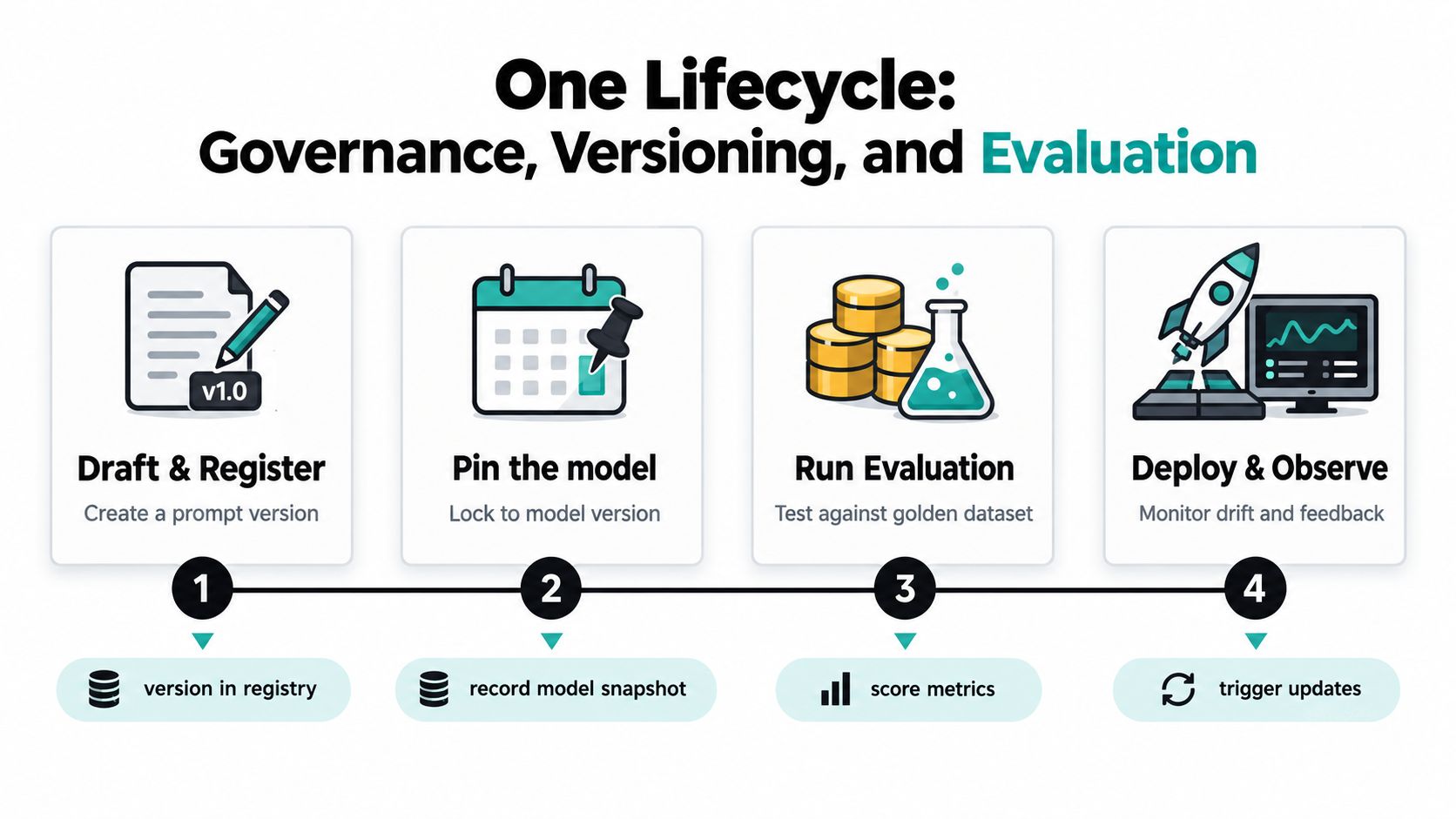
Assign decision rights
The prompt author proposes changes. The business owner defines acceptable outcomes. Engineering owns integration, access, observability, and rollback. Legal or compliance reviews data use and policy-sensitive behavior. A prompt operations lead, where the organization has one, coordinates evaluation, release notes, and retirement.
The process should make disagreement visible. If marketing wants a persuasive answer but legal requires conservative claims, the workflow needs a rule and an escalation path, not an informal compromise buried in a prompt.
Evaluate against reality
A useful evaluation suite includes representative inputs, difficult edge cases, known failure cases, and adversarial content. The systematic survey of prompt engineering techniques emphasizes controls such as task decomposition, role specification, output-format constraints, and evaluation-driven iteration. The survey of prompting techniques supports treating prompting as an experimental discipline rather than a one-shot writing task.
For software and enterprise workflows, evaluate correctness, reliability, reproducibility, maintainability, cost, and human effort. Research on prompt regression testing and realistic benchmarks makes the case for versioned test suites and segment-level comparisons. A change that improves average quality but harms a sensitive customer segment is a regression, not a win.
Use deterministic checks where possible. Validate required fields, allowed values, source references, and policy conditions in code. Calibrate LLM-as-judge evaluations against human review, then maintain a human spot-audit for cases where automated scoring can miss business nuance.
Release rule: If a prompt change can't be reproduced, evaluated, approved, and rolled back, it isn't ready for production.
Redact sensitive personal information before model calls, sanitize inputs that may contain instructions, define refusal behavior, and log enough metadata to investigate failures without retaining unnecessary content. Promote changes through development, test, and production environments. Every release should show what changed, which model was pinned, how the evaluation set performed, and who approved deployment.
Measuring ROI Beyond Model Output Quality
A high-quality answer is not a business outcome. It's an input to one.
Teams waste time optimizing evaluation scores while the surrounding workflow remains slow, manual, or poorly adopted. ROI should measure the delta in workflow performance, such as minutes saved per task, deflection, first-contact resolution, conversion, avoided error cost, or cycle time.
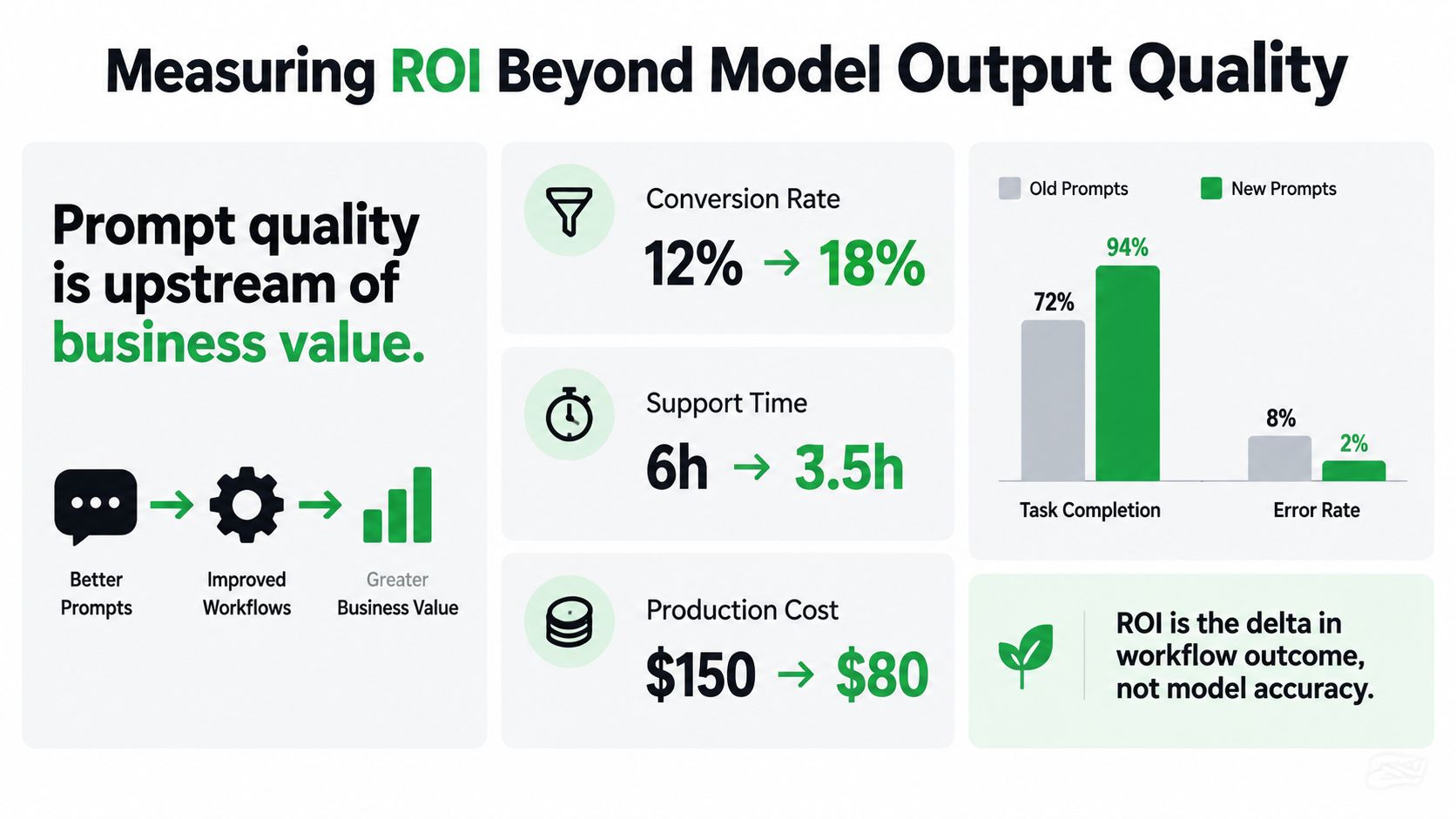
Establish the baseline first
Document how the process works before automation. Record who performs each step, how long it takes, where rework occurs, which errors matter, and what percentage of outputs require correction. Use the same definitions after launch.
For example, a support workflow might track time to first response, escalation rate, resolution quality, and reviewer edits. A sales workflow might track research time, approved-message throughput, meeting conversion, and compliance exceptions. A document workflow might track extraction completion, correction effort, and time from receipt to system entry.
Choose an attribution method that matches the process:
- Holdout comparison: Keep a comparable group on the existing process while the pilot runs.
- Controlled rollout: Release by team, region, queue, or workflow segment and compare outcomes over the same operating period.
- Time study: Measure task duration across representative cases, including review and correction.
- Before-and-after analysis: Use only when no stronger comparison is practical, and document other process changes that could affect the result.
Report the economics leaders need
A one-page ROI memo should contain the use case, baseline, intervention, adoption, workflow outcome, quality guardrails, operating cost, human review burden, and recommendation. Separate model quality from business value. A prompt can score well in testing and still fail because users ignore it, reviewers spend too long correcting it, or the workflow doesn't reach the downstream system.
The memo should also state what happens next. Scale when the result is repeatable and the risk controls hold. Redesign when quality improves but cycle time doesn't. Stop when the workflow produces no meaningful operational change. Clear stopping rules protect teams from polishing an AI feature that nobody needs.
Rollout Checklist, Team Roles, and Copy-Paste Prompt Recipes
Start small and make the first release boring. A narrow workflow with a clear owner will teach the team more than a company-wide launch built on untested assumptions.
Week-one readiness checklist
Before production access, confirm:
- Approved use case: The process owner has defined the task, users, boundaries, and downstream action.
- Baseline metrics: The team has recorded current time, quality, rework, and risk indicators.
- Named owner: One person can approve prompt changes and retire the workflow.
- Evaluation set: The test cases include normal, difficult, and prohibited inputs.
- Data policy: The workflow defines what can enter the model and how sensitive data is handled.
- Output contract: Required fields, refusal behavior, and escalation conditions are documented.
- Rollback path: The team can disable the AI step and return to the prior process.
- Review queue: A human checks outputs before high-impact actions.
RACI that prevents orphaned prompts
Product owns the business outcome and acceptance criteria. Engineering is responsible for integration, logging, access, and rollback. Legal or compliance is consulted on regulated data, customer communications, and policy boundaries. The prompt operations lead, if assigned, coordinates registry hygiene, evaluations, release notes, and feedback. The frontline team is consulted during design and informed about changes.
Three recipes for controlled pilots
Meeting summarization
- Intent: Turn approved meeting notes into decisions and follow-up work.
- Inputs: Meeting transcript, participants, date, project, and known action-item owners.
- Output schema:
decisions,action_items,open_questions,risks, andsource_snippets. - Guardrails: Don't infer commitments that aren't supported by the transcript. Mark uncertain ownership for review.
- Evaluation cases: Clear decisions, conflicting statements, missing owners, and sensitive discussion.
RFP drafting
- Intent: Draft a response from approved company material.
- Inputs: Question, approved evidence, product scope, customer context, and response constraints.
- Output schema:
answer,evidence,assumptions,missing_information, andreview_required. - Guardrails: Don't invent capabilities, certifications, customers, or performance claims. Escalate unsupported answers.
- Evaluation cases: Fully supported questions, partially supported questions, prohibited claims, and conflicting source documents.
Structured data extraction
- Intent: Extract defined fields from an uploaded business document.
- Inputs: Document text, document type, field definitions, and confidence requirements.
- Output schema: Field value, source location, confidence label, and exception reason.
- Guardrails: Return null when evidence is absent. Preserve source wording where interpretation could change meaning.
- Evaluation cases: Missing fields, duplicate values, unusual formatting, and contradictory clauses.
Prompt Builder can support this operating model by generating, refining, testing, and saving prompts, with model-targeted workflows for systems such as ChatGPT, Gemini, Claude, Llama, Mistral, DeepSeek, Perplexity, Grok, and Cohere. Use it as one workspace option for prompt iteration and reuse, while keeping ownership, evaluation, and release decisions with your team.
Pilot one workflow, measure the actual operating result, review failures with the people who use the system, and expand only after the controls work. That sequence turns prompt engineering for business from scattered experimentation into a capability the organization can manage.
Prompt Builder gives your team one place to generate, refine, test, and organize prompts across major AI models, with reusable versions and a searchable Library for established workflows. Visit Prompt Builder to turn your first approved business use case into a controlled, repeatable prompt workflow.
Related Posts
10 Compare and Contrast Prompts That Work
September 29, 2026
How to Use a Product Description Generator That Converts
September 3, 2026