
10 Compare and Contrast Prompts That Work
A weak compare-and-contrast prompt produces a flat list of similarities and differences. A strong one tells the model which criteria matter, what evidence to use, who will read the answer, what format to follow, and which decision the comparison should support. That distinction has deep roots in academic writing. The UNC Writing Center's comparison guide presents comparison as an analytical method built around questions such as who, what, where, when, why, and how, while Purdue OWL's prompt-paper guidance recommends selecting three or four defined elements rather than comparing everything at once.
The same logic now applies to AI workflows. The 10 templates below cover model selection, business domains, prompting methods, output formats, instruction length, creativity, personas, constraints, information freshness, and audience adaptation. Each example gives you a real task, a reusable prompt, the strategic contrast behind it, and adjustments you can validate in Prompt Builder.
Use the same workflow every time: define the contrast, provide evidence, specify the structure, test the result, and save the strongest version. Prompt Builder can generate model-tuned variants, test them in chat, optimize existing wording, and organize reusable prompts in its Library. The objective isn't to ask for “a comparison.” It's to design a comparison that helps someone choose, verify, or act.
Table of Contents
- 1. Feature Comparison Between Single and Multi-Model Prompts
- 2. Use Case Contrast Between Marketing and Technical Prompts
- 3. Iteration Comparison Between Zero-Shot and Few-Shot Prompting
- 4. Output Format Contrast Between Structured and Freeform Responses
- 5. Prompt Length Comparison Between Concise and Detailed Instructions
- 6. Temperature and Creativity Contrast Between Deterministic and Generative Prompts
- 7. Persona-Based Contrast Between Role-Playing and Neutral Instructions
- 8. Constraint Strictness Comparison Between Open and Heavily Constrained Prompts
- 9. Training Data and Context Window Contrast Between Recency and Knowledge Cutoff
- 10. Audience and Tone Adaptation Between Single and Multi-Audience Prompts
- 10-Point Prompt Comparison Matrix
- Turn One Comparison Prompt Into a Reusable Testing System
1. Feature Comparison Between Single and Multi-Model Prompts
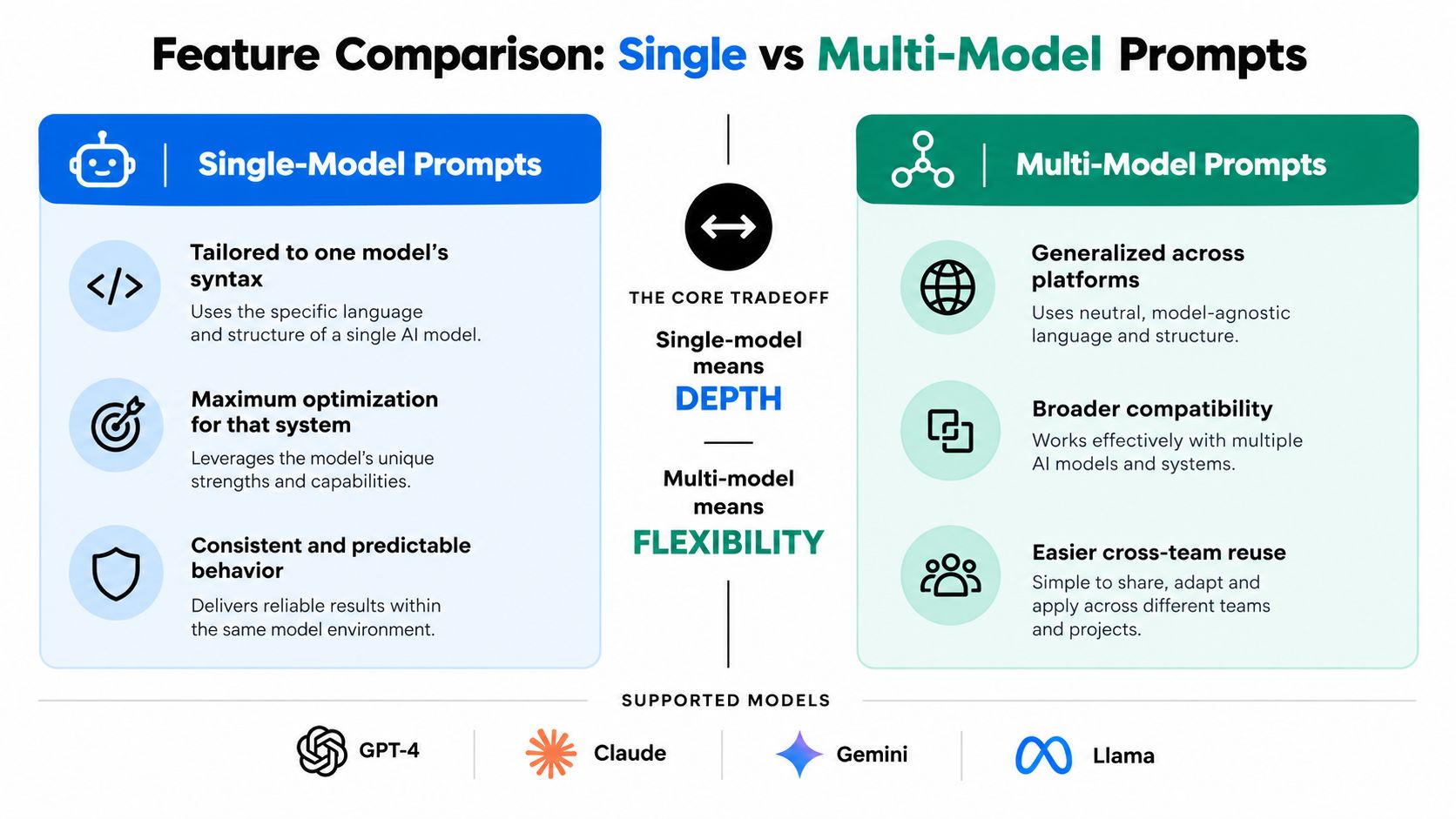
A single-model prompt is tuned for one system's behavior. A multi-model prompt keeps the instruction portable across systems such as ChatGPT, Claude, Gemini, or Llama. The trade-off is straightforward: specialization can improve fit, while portability can simplify operations.
For example, a marketing team might compare product descriptions from ChatGPT, Claude, and Gemini. A developer might run the same code-generation brief through GPT and Llama before choosing a workflow. A support manager could compare how different models handle an upset customer while keeping the source ticket unchanged.
Copy-ready prompt
Compare how the same product-description task performs in ChatGPT, Claude, and Gemini. Use the identical product brief and evaluate each output against these criteria: factual accuracy, brand-voice fit, benefit clarity, structure, unsupported claims, and editing effort. Present one row per model, then recommend the best model for a fast first draft and the best model for a final editorial pass. Keep the evidence from the product brief constant and separate observed output differences from assumptions about each model.
Don't change the model, prompt, source brief, and evaluation criteria at the same time. Prompt Builder's multi-model testing can help you run the instruction side by side, after which you can record quality, speed, and cost in your own comparison sheet.
A model-specific variant may use terminology or formatting that suits one system. A general version is easier to reuse, but it may leave performance on the table. Save both versions in the Library, label them by task and model, and retest them when your team changes its model mix.
For creative workflows, the distinction can be especially visible. A comparison of Gemini and Veo for creative control shows why the same level of prescriptiveness may not produce the same creative result across tools. Treat that as a reason to test, not as a reason to assume one model always wins.
2. Use Case Contrast Between Marketing and Technical Prompts
Marketing prompts optimize for persuasion, audience awareness, differentiation, and brand voice. Technical prompts optimize for precision, valid syntax, explicit assumptions, and testable output. The underlying comparison is useful because teams often reuse a successful prompt pattern in the wrong domain.
A product marketer may ask for launch copy, while a developer asks for a SQL query against a known schema. Both prompts need context, but the context isn't interchangeable. A marketing brief can tolerate several strong creative directions. A database query needs to respect table names, relationships, and output requirements.
Copy-ready prompt
Compare these two prompts for the same product launch workflow: one asks for a LinkedIn announcement, and the other asks for a SQL query that reports campaign performance. Evaluate each prompt for domain fit, required context, ambiguity, risk of unsupported output, and ease of review. Rewrite each prompt for its intended user. For the LinkedIn version, require audience, tone, proof points, and a call to action. For the SQL version, require the schema, date logic, joins, output columns, and assumptions. Return the analysis as concise bullet points followed by two improved prompts.
Start with a relevant template from a prompt collection, then adapt it to your actual workflow. The guide to prompt engineering for marketing is useful when the task involves positioning, voice, or campaign copy, but technical work needs a different control layer.
Practical rule: A domain prompt should state what counts as a good answer in that domain, not just describe the topic.
Store domain-specific versions in separate Library folders such as Marketing, Technical, Support, and Research. Prompt Optimizer can help identify missing constraints, but a human still needs to decide whether the output should persuade a buyer, execute a query, or explain a system accurately.
3. Iteration Comparison Between Zero-Shot and Few-Shot Prompting
Zero-shot prompting gives the model an instruction without examples. Few-shot prompting includes examples of the desired input and output. Zero-shot is usually the cleaner starting point because it requires less preparation. Few-shot becomes valuable when style, classification boundaries, or edge-case handling matter more than brevity.
A support team might use zero-shot prompting for a simple password-reset question, then add examples for escalations involving billing, privacy, or account access. A content team can ask for a headline without examples, but brand voice becomes easier to reproduce when the prompt includes approved headlines and rejected patterns.
Copy-ready prompt
Compare a zero-shot and few-shot version of this customer-support classification task. The model must label each ticket as Billing, Technical, Account Access, or Escalation and provide one-sentence reasoning. In the zero-shot version, use only the rules below. In the few-shot version, add the supplied examples after the rules. Evaluate both versions for label consistency, edge-case handling, explanation quality, prompt clarity, and token efficiency. Recommend which version to use for routine tickets and which version to use for ambiguous tickets. Do not invent test results. Mark any conclusion that requires live validation.
Keep the source tickets constant and run both prompts against the same set. Prompt Builder's chat makes side-by-side testing practical, while the Library can preserve the examples that help instead of allowing the prompt to accumulate every historical case.
The trade-off isn't just quality versus cost. Poor examples can teach the wrong boundary, create contradictory instructions, or make the model imitate irrelevant wording. Choose examples that represent the distinctions the model must make.
Research on structured prompting reinforces the value of deliberate prompt construction. A controlled study reported a mean rubric score of 7.50 out of 8 for checklist-improved prompts, compared with 5.67 for raw prompts and 6.67 for clarifying-question prompts. The study's findings also reported a favorable quality-effort trade-off for the checklist version, which supports testing prompt structure rather than assuming that more examples alone will solve inconsistency.
4. Output Format Contrast Between Structured and Freeform Responses
The right output format depends on what happens after generation. Structured responses support automation and validation. Freeform responses support nuance, explanation, and creative exploration. Asking for a paragraph when another system needs fields creates unnecessary cleanup.
An SEO team may need keyword research returned as JSON for a workflow, but a creative brief may be more useful as prose. A product manager might request CSV for feature comparison, while a roadmap explanation needs narrative context. Support teams often need structured troubleshooting steps internally and a natural, empathetic reply externally.
Copy-ready prompt
Compare structured and freeform outputs for this SEO research task. Use the same keyword set and source notes. For the structured version, return valid JSON with the fields keyword, intent, audience, content angle, evidence, and confidence. For the freeform version, write a short editorial brief organized by search intent. Evaluate machine readability, completeness, nuance, review effort, and failure points. If a field lacks evidence, return null instead of guessing. Recommend the format for an automated workflow and the format for a strategist's review.
Structured prompts need a schema, allowed values, and fallback behavior. If the output will feed software, specify whether the model must return only JSON, how it should represent missing information, and whether extra keys are forbidden. Prompt Builder's constraint tools can help refine these requirements.
For human readers, strict formatting can make an answer feel mechanical. For systems, freeform prose can make parsing fragile. The bullet-point formatting guide can help when the right compromise is a readable structure rather than raw machine output.
5. Prompt Length Comparison Between Concise and Detailed Instructions
Short prompts reduce drafting time and make experimentation easy. Detailed prompts reduce ambiguity by defining the audience, inputs, criteria, examples, and boundaries. Neither is automatically better. Use the shortest prompt that produces an acceptable result, then add detail where the model repeatedly misses the brief.
A social media manager may need a quick post from a known campaign brief. A data analyst needs table names, relationships, date definitions, and expected columns before asking for SQL. A content team can use a short headline prompt, but an essay outline benefits from explicit structure and evidence rules.
Copy-ready prompt
Compare these concise and detailed prompts for generating a product announcement. Evaluate each for clarity, brand-voice consistency, factual safety, output usefulness, revision effort, and prompt complexity. Keep the product facts and target audience constant. The concise version should contain only the task, audience, and tone. The detailed version should add approved claims, prohibited claims, structure, length range, call-to-action requirements, and an example. Identify which requirements materially improve the output and which wording can be removed without changing the result.
Don't treat word count as a quality target. Extra instructions can conflict, bury the main task, or constrain a model into awkward prose. On the other hand, a prompt that says only “write an SEO article about software” leaves too many decisions unresolved.
Use Prompt Builder's token counter to observe how the prompt changes as you add context. Test concise and detailed variants in chat, then save the version that meets your acceptance criteria with the least unnecessary instruction. Prompt Optimizer can help trim repetition, but don't remove a constraint merely because it looks verbose. Remove it only after testing whether the output still meets the requirement.
6. Temperature and Creativity Contrast Between Deterministic and Generative Prompts
Some tasks need repeatable handling. Others need a range of possibilities. A customer-service policy response, data extraction task, or compliance summary should favor stable interpretation and controlled wording. Brainstorming, campaign concepts, and exploratory writing benefit from room to vary.
The prompt should reflect that difference. A low-variation customer-support instruction can require approved policy language and a clear escalation rule. A creative prompt can ask for divergent directions, unusual associations, and alternatives that don't repeat the first idea.
Copy-ready prompt
Compare deterministic and generative versions of this marketing task. The deterministic version must produce a compliant product description using only the supplied facts, with no new claims and a fixed structure. The generative version must produce several distinct campaign concepts using the same facts, while labeling any strategic assumption. Evaluate factual control, idea diversity, brand fit, review effort, and suitability for production. Recommend which version should generate final copy and which should generate early-stage concepts.
Test settings with real workflow inputs rather than isolated toy examples. A creative response that looks impressive can still fail because it invents a benefit. A deterministic response can remain accurate but too repetitive for ideation.
Prompt wording matters as much as the setting. For production work, specify evidence boundaries, prohibited claims, output length, and escalation behavior. For brainstorming, specify the number of directions only when you genuinely need a defined set, and ask the model to explain the distinction between concepts so variations don't become superficial rewrites.
7. Persona-Based Contrast Between Role-Playing and Neutral Instructions
A persona can establish tone quickly. “You are a friendly support agent” gives the model a behavioral frame, but it doesn't replace operational instructions. Neutral prompts can be more direct and easier to audit, especially when the task involves coding, data processing, or factual extraction.
Compare the two approaches with the same support ticket. The persona version may sound warmer. The neutral version may follow the required response structure more reliably. The result depends on whether the persona adds useful context or merely decorates the prompt.
Copy-ready prompt
Compare two versions of this customer-support response prompt. Version A assigns the role “friendly support agent.” Version B uses neutral instructions without a persona. Both versions must acknowledge the customer's issue, state only the approved policy, provide the next step, and escalate when the account status is unknown. Evaluate tone, policy adherence, unsupported assumptions, clarity, and editing effort. Explain whether the persona contributes measurable value in live testing. If it doesn't, remove it.
Keep personas minimal and specific. “Expert data analyst” may establish a useful orientation. A long fictional biography rarely improves a task and can distract from the actual constraints.
A role can shape voice, but only explicit rules can define what the system must not claim.
For accuracy-critical workflows, neutral instructions are often easier to inspect. If you do use a persona, pair it with evidence limits, audience details, response rules, and escalation conditions. Run the same prompt with and without the role assignment, compare outputs against a fixed rubric, and save the better variant with a clear Library label.
8. Constraint Strictness Comparison Between Open and Heavily Constrained Prompts
Constraints should reduce repeatable failures, not just make a prompt longer. An open brief gives the model room to interpret. A heavily constrained brief improves predictability, but excessive rules can produce rigid, repetitive, or incomplete responses.
Compare “write about AI” with a brief that defines the audience, purpose, structure, target terms, evidence requirements, tone, and prohibited claims. The constrained version fits a publishing or review process more reliably. The open version supports angle discovery when the team has not decided what the article should argue.
Copy-ready prompt
Compare an open and constrained prompt for an SEO article about an AI product. The open version should specify only the topic and reader. The constrained version should specify search intent, audience, thesis, heading structure, evidence rules, internal-link requirements, tone, reading level, and call to action. Evaluate usefulness, originality, instruction compliance, factual risk, and revision effort. Identify which constraints affect the business outcome and which unnecessarily narrow the response. Return a revised prompt containing only the required constraints.
Test the two versions with the same topic, source material, and evaluation rubric. Review whether the output covers the intended search intent, follows the requested structure, avoids unsupported product claims, and needs less editing. Prompt Builder can help adjust instruction strength and compare variants, but the rubric should determine which version is usable.
Add a rule only after identifying a recurring failure. If the model omits the call to action, add a CTA requirement. If it invents product capabilities, set a source boundary. If it uses the wrong structure, specify the required headings or fields. Each added rule increases control while narrowing the range of acceptable outputs.
Record why every retained constraint exists. A Library entry with its rationale is easier for another writer, marketer, or analyst to maintain than a prompt filled with unexplained preferences. Selecting a small set of defined evaluation elements and building the judgment from them keeps constrained prompts auditable.
Compare outputs against explicit dimensions, not a vague impression that one “looks better.” Keep the leaner prompt when both versions meet the rubric. Retain heavier constraints when they prevent a documented failure or protect a required review condition.
9. Training Data and Context Window Contrast Between Recency and Knowledge Cutoff
A prompt can rely on stable source material or require current information. Those are different operating conditions, not minor wording variations. Static product documentation, historical analysis, and established procedures can often use supplied context. Current pricing, availability, system status, and news require a freshness plan.
Copy-ready prompt
Compare two approaches for answering a product-availability question. Approach A uses only the supplied product catalog and documentation. Approach B uses the same material plus a current data source identified in the input. Evaluate freshness, evidence traceability, failure risk, response speed, and maintenance effort. The model must state the source date, distinguish documented facts from current observations, and refuse to infer availability when the required information is missing. Recommend the simpler approach when current data isn't necessary.
Don't add web search to every prompt. Real-time retrieval introduces source selection, freshness checks, access issues, and additional review. First decide whether the answer changes when information becomes newer.
For current-events work, pair the prompt with an approved search, feed, or database and tell the model how to handle conflicting timestamps. For stable work, provide authoritative context directly and add a refresh reminder to the prompt metadata. The guide to prompts and circumstances is relevant when the answer depends on conditions outside the instruction itself.
A useful test compares the same prompt with deliberately dated and current inputs. If the output doesn't clearly distinguish them, the prompt needs stronger source and date rules. Save freshness requirements alongside the prompt so future users don't mistake a static template for a live research workflow.
10. Audience and Tone Adaptation Between Single and Multi-Audience Prompts
A single-audience prompt can speak directly to one reader. A multi-audience prompt reduces the number of prompt variants your team maintains, but it may produce language that's too general for everyone. The choice affects relevance, terminology, examples, objections, and the action you want the reader to take.
A sales team might need separate prompts for a CTO, CFO, and business buyer. A social media manager may write for LinkedIn executives and TikTok users with different expectations. Support documentation for an experienced administrator shouldn't read like a first-use tutorial.
Copy-ready prompt
Compare a single-audience and multi-audience version of this product explanation. The single-audience version targets technical buyers who care about integration, security, and implementation effort. The multi-audience version must adapt the explanation for technical buyers, finance leaders, and nontechnical operators while preserving the supplied facts. Evaluate relevance, terminology, tone consistency, decision usefulness, and revision effort. Return the single-audience version, then three labeled audience adaptations from the multi-audience prompt. Do not add claims that aren't present in the source brief.
Start with the narrowest audience that matters most. If the output must serve several groups, name each audience and define the information priority for each one. “Write for everyone” isn't a usable audience specification.
Use audience and tone presets as a starting point for social content, then store audience-specific versions in the Library with clear tags. Ask representatives from each segment to review the outputs. A flexible prompt is successful only if each audience receives a useful answer, not merely the same answer with different vocabulary.
10-Point Prompt Comparison Matrix
| Prompt Comparison | Implementation Complexity 🔄 | Resource Requirements ⚡ | Expected Outcomes ⭐📊 | Ideal Use Cases 📊 | Key Advantages 💡 |
|---|---|---|---|---|---|
| Feature Comparison: Single vs. Multi-Model Prompts | High, test multiple models, handle syntax/quirks 🔄 | Moderate–High, multi-model access, token & time costs ⚡ | Identifies best model; output quality varies by model ⭐📊 | Model selection, cost/performance benchmarking | Reveals model strengths; enables cost optimization 💡 |
| Use Case Contrast: Marketing vs. Technical Prompts | Low–Medium, build domain templates and rules 🔄 | Low, domain experts for templates; ongoing maintenance ⚡ | Domain-appropriate outputs; fewer iterations ⭐📊 | Marketing copy vs. technical docs; onboarding | Speeds creation; clarifies domain expectations 💡 |
| Iteration Comparison: Zero-Shot vs. Few-Shot Prompting | Low (zero-shot) → Medium–High (few-shot example curation) 🔄 | Few-shot: higher token + curation cost; zero-shot: minimal ⚡ | Few-shot → higher accuracy and consistency; zero-shot → faster but variable ⭐📊 | Quick FAQs vs. complex/critical tasks; A/B testing | Balances speed vs. quality; optimizes cost-quality tradeoff 💡 |
| Output Format Contrast: Structured vs. Freeform Responses | Medium, define schema for structured; freer for freeform 🔄 | Structured: parsing/integration effort; freeform: lighter tooling ⚡ | Structured → machine-readable/automable; freeform → human-friendly ⭐📊 | Data pipelines/APIs vs. creative briefs, UX copy | Enables automation (structured) or creativity (freeform) 💡 |
| Prompt Length Comparison: Concise vs. Detailed Instructions | Concise: simple; Detailed: higher setup and edge-case handling 🔄 | Detailed: higher token usage and authoring time; concise: cheaper ⚡ | Concise → faster/cheaper; Detailed → fewer retries, more consistent ⭐📊 | Rapid iteration vs. complex/high-stakes tasks | Finds minimal viable prompt length; optimizes tokens vs. quality 💡 |
| Temperature & Creativity Contrast: Deterministic vs. Generative Prompts | Low, adjust temperature and validate behavior with tests 🔄 | Minimal compute change; may need extra eval runs for tuning ⚡ | Low-temp → consistent/repeatable; high-temp → diverse/creative outputs ⭐📊 | Customer support/data extraction vs. brainstorming/ideation | Controls randomness to match creativity vs. consistency needs 💡 |
| Persona-Based Contrast: Role-Playing vs. Neutral Instructions | Low–Medium, craft concise personas and manage variants 🔄 | Moderate, testing variants and token/maintenance cost ⚡ | Persona → stronger tone/voice; Neutral → clearer, less hallucination ⭐📊 | Customer-facing copy vs. accuracy-critical tasks | Improves perceived expertise (persona) or factuality (neutral) 💡 |
| Constraint Strictness Comparison: Open vs. Heavily-Constrained Prompts | Medium–High, define/enforce constraints and edge cases 🔄 | Higher token cost and monitoring for constraint compliance ⚡ | More constraints → predictable/repeatable; less flexibility ⭐📊 | Compliance-heavy content, automation pipelines vs. exploratory tasks | Enables reliable scaling and fewer retries when constrained 💡 |
| Training Data & Context Window Contrast: Recency vs. Knowledge Cutoff | High if integrating web search/APIs; low for static prompts 🔄 | Recency: external APIs, latency, maintenance; longer context → cost ⚡ | Recency-aware → up-to-date facts; static → stable but may be outdated ⭐📊 | Real-time pricing/news vs. historical analyses/reports | Clarifies when external data is necessary; trade-offs in cost/latency 💡 |
| Audience & Tone Adaptation: Single-Audience vs. Multi-Audience Prompts | Medium, maintain variants or conditional logic; tagging needed 🔄 | Moderate, testing with segments; library management ⚡ | Single-audience → higher relevance; Multi → broader reuse ⭐📊 | Segmented marketing, targeted campaigns vs. broad templates | Maximizes engagement (single) or efficiency/reuse (multi) 💡 |
Turn One Comparison Prompt Into a Reusable Testing System
A comparison prompt becomes useful when it helps you make a repeatable decision. Start with the smallest comparison that can answer the question. If you're choosing between two prompt versions, keep the source material, model, output format, and evaluation criteria constant. Change one variable at a time, or you won't know what caused the difference.
Define the rubric before testing. Depending on the task, criteria might include factual accuracy, audience fit, completeness, structure, constraint compliance, unsupported claims, editing effort, and machine readability. A marketing team may prioritize persuasion and brand voice. A developer may prioritize valid syntax and assumptions. A support team may prioritize policy adherence and escalation behavior.
Keep the test inputs realistic. A headline prompt should use actual campaign facts. A SQL prompt should use a real schema with representative questions. A support prompt should include routine and ambiguous tickets. Synthetic examples can hide the failure modes that matter in production.
Inspect more than the prose. Check whether the model followed the requested format, used only the supplied evidence, respected length and audience requirements, and handled missing information with transparency. A polished answer that violates one critical constraint isn't a winning variant.
Structured prompt testing can produce meaningful differences. One comparative experiment found that a comparisons prompt raised average training accuracy from 0.746 ± 0.008 to 0.815 ± 0.008, while higher-relative-value option selection in transfer testing rose from 61% to 91% under the comparisons prompt. The experiment report is evidence that comparison framing can change model behavior, not a guarantee that every business prompt will produce the same result.
Use the following operating sequence:
- Define the decision: State what the comparison should help someone choose, approve, revise, or reject.
- Fix the evidence: Give every variant the same source material and mark what the model must not infer.
- Name the criteria: Choose a small set of observable dimensions rather than asking which output is “best.”
- Test one change: Compare zero-shot with few-shot, structured with freeform, or concise with detailed, but don't alter everything simultaneously.
- Review failures: Record missing fields, unsupported claims, irrelevant detail, tone problems, and formatting errors.
- Label the winner: Save the model, task, audience, input assumptions, and date with the prompt.
- Retest intentionally: Re-run the prompt when the model, source data, audience, or business requirement changes.
Choose prompt structure according to the job. Use format when another system will parse the answer. Use audience when relevance and tone determine usefulness. Use examples when consistency matters. Use constraints when predictable compliance matters. Use recency requirements when the answer can change with current information. Use model comparison when you need evidence for a platform decision, not when you merely want to collect multiple outputs.
Prompt Builder fits this workflow by letting you generate or refine a prompt for a selected model, test it in chat, optimize existing wording, and save reusable versions in the Library. Generate a model-specific variant, run it against the outputs your team produces, inspect it against a fixed rubric, and preserve the strongest version with a label that tells the next user exactly when to use it.
Prompt Builder helps you generate, refine, test, and manage compare-and-contrast prompts across models, with model-tuned wording, built-in chat iteration, optimization tools, and a searchable Library for winning variants. Visit Prompt Builder to turn your next comparison into a tested, reusable workflow instead of a one-off instruction.
Related Posts
Generative AI Prompts: How to Write and Optimize Them
September 25, 2026
Prompt Automation Explained How to Scale AI Workflows
September 16, 2026