
Prompt Automation Explained How to Scale AI Workflows
A marketing manager starts Monday by copying a campaign brief into ChatGPT, rewriting the instructions for Claude, checking the output manually, and pasting the final version into a project board. A support lead does something similar with every ticket, while a developer keeps a private collection of prompts for code review, test generation, and debugging. The work feels efficient until volume rises, inputs become unpredictable, or a model changes its behavior.
Manual prompting breaks because the prompt lives inside a conversation rather than inside a dependable process. People forget which version worked, variables get missed, outputs arrive in different formats, and a small model change can force the team to start tuning from scratch. The problem isn't that people can't write good prompts. The problem is that one-off prompting doesn't provide repeatability, testing, or recovery.
Prompt automation turns a prompt into an operating component. It can fill a template with current data, trigger a model call when an event occurs, route the result through validation, send difficult cases to another model, and preserve the version that produced the result. That shift resembles the wider move from individual productivity tricks to structured process automation benefits, where the system carries repetitive coordination work instead of asking people to remember every step.
The practice emerged alongside large language models after GPT-3's release in 2020, when few-shot and instruction-based prompting became widely used to steer outputs without retraining. Industry tracking places the global prompt engineering market at $0.85 billion in 2024, with independent research reporting $1.13 billion in 2025 and $1.49 billion in 2026, reflecting the movement from ad hoc prompting toward repeatable workflows (market history and figures).
This guide treats prompt automation as infrastructure. You'll learn how templates, routing, tool calls, retrieval, testing, version control, and cross-model adaptation fit together, then apply those ideas to marketing, data, support, and development. By the end, you'll have a practical way to design one workflow, measure its quality and cost, and operate it safely after launch.
Table of Contents
- What Prompt Automation Really Means
- Core Automation Patterns and Architectures Explained
- Real World Use Cases Across Marketing Data Support and Development
- Tooling and Integration Strategies That Actually Work
- Best Practices for Reliable Secure and Maintainable Automation
- Measuring ROI and Metrics That Prove Value
What Prompt Automation Really Means
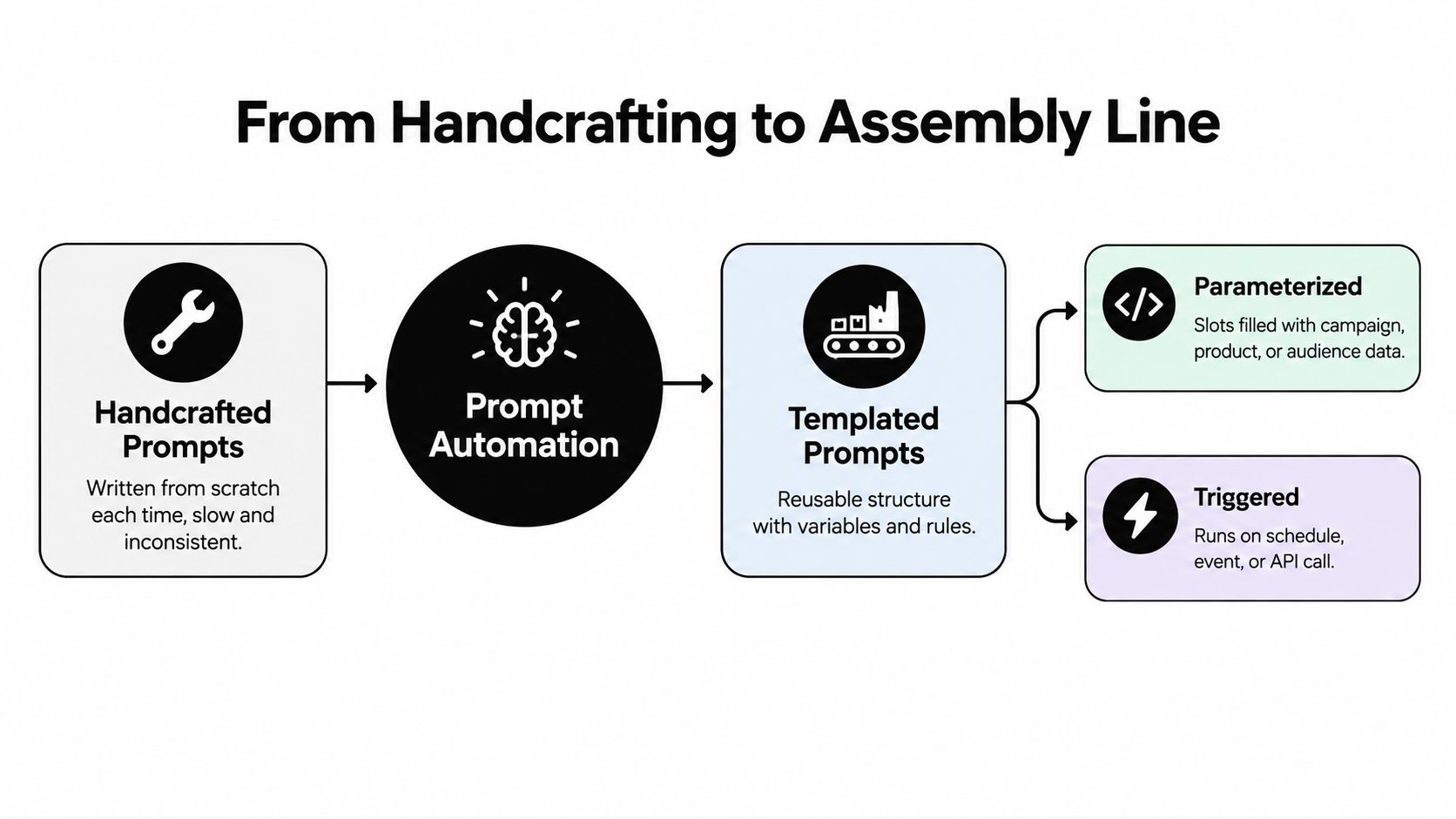
Think of a bakery rather than a chef working alone. A chef can adjust every loaf by hand, but a bakery needs a recipe, measured ingredients, production steps, quality checks, and a way to repeat the result when another employee takes over. Prompt automation applies the bakery model to AI instructions.
A handcrafted prompt usually contains a fixed request and some context typed by a person. A templated prompt separates the stable instructions from changing inputs:
- Stable rules: Define the role, task, boundaries, and required response format.
- Variables: Insert campaign details, customer text, product data, or repository changes.
- Trigger: Start the workflow after a webhook, schedule, form submission, ticket update, or API call.
- Checks: Validate the response before a person or another system uses it.
You might keep this structure for a support classifier:
Classify the ticket using the approved categories. Customer message: {{ticket_text}}. Return valid JSON with category, urgency, rationale, and suggested next action.
The words stay mostly the same. The ticket changes. A service supplies the value for {{ticket_text}}, calls a selected model, checks whether the response follows the JSON schema, and routes exceptions for review.
Three related practices
Prompt engineering focuses on designing instructions that help a model perform a task. It includes techniques such as examples, decomposition, role framing, constraints, and output formatting. Readers who want a deeper grounding can review these prompt engineering techniques explained before building a larger system.
Prompt management focuses on storing, naming, organizing, and updating prompts. A shared library prevents the team from relying on scattered chats and private documents, but storage alone doesn't execute anything.
Prompt automation connects the prompt to data and events. It decides when to run, which context to include, which model or tool to call, how to validate the result, and what to do when the output fails.
A team is already doing light automation when it uses a saved template, a spreadsheet merge, or a button that sends structured input to a model. Full automation adds repeatable execution and operational controls. The prompt becomes a versioned component in an AI orchestration stack, alongside routing, retrieval, tool access, state, and evaluation.
Practical rule: If a prompt matters enough to reuse, it matters enough to name, version, test, and monitor.
The distinction matters because better wording only solves one part of the problem. A polished instruction can still fail when a customer sends an unusual message, retrieved context contains conflicting information, or a model returns text where an application expects structured data.
Core Automation Patterns and Architectures Explained
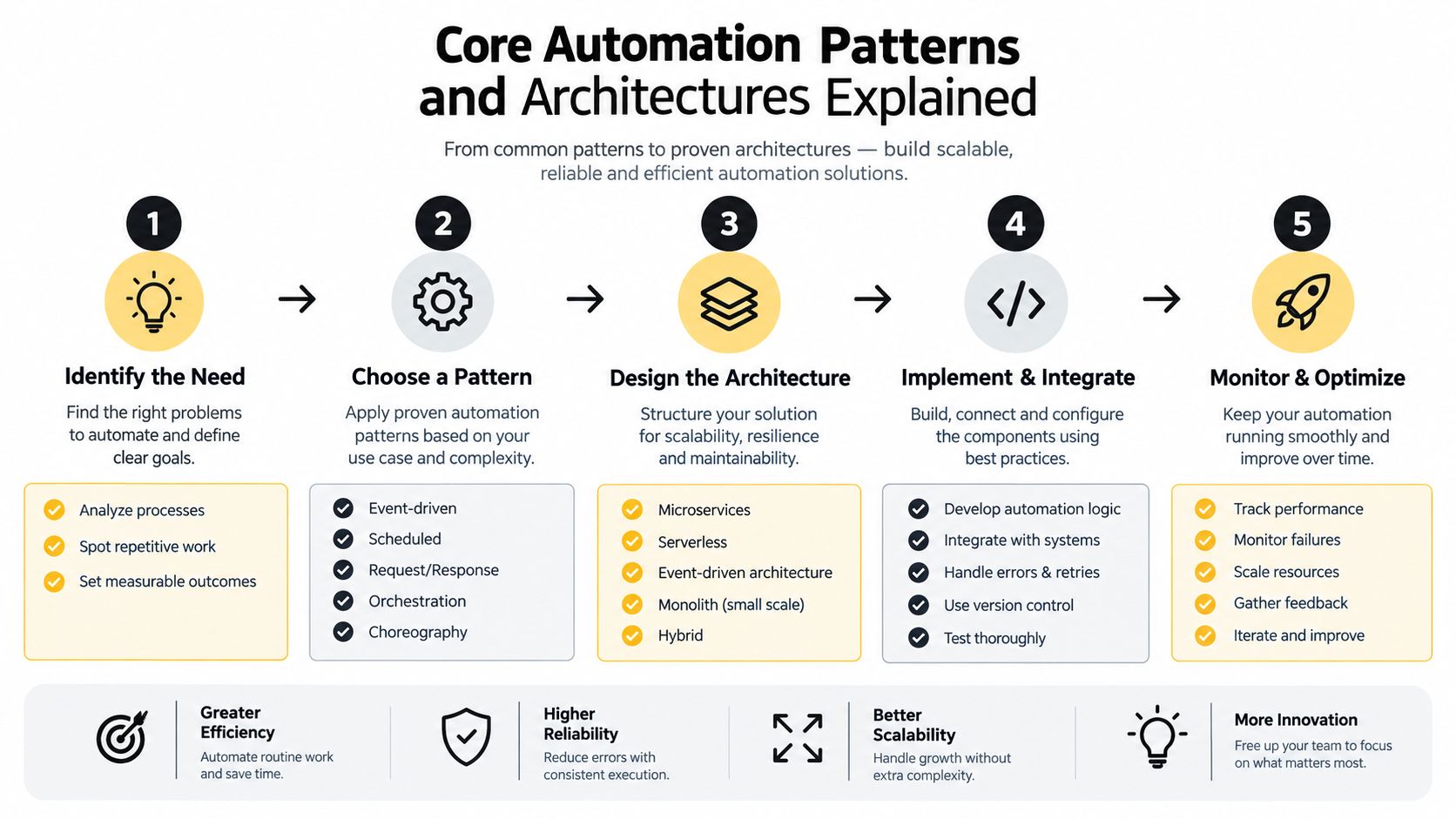
Most production workflows combine a small set of patterns. Start with the simplest pattern that meets the requirement, then add control only where the workflow needs it.
Templates and variables
A template holds the repeatable logic. Variables supply the changing content. This pattern works well for campaign drafts, ticket summaries, product descriptions, SQL explanations, and internal reports.
Keep variables explicit. Instead of placing raw data wherever it fits, define fields such as audience, offer, brand_voice, source_text, and output_schema. Explicit fields make missing context visible and let the workflow reject incomplete requests before calling a model.
Chains and staged workflows
A chain breaks a broad task into smaller operations. A marketing flow might extract product facts, draft message variants, check claims against approved facts, and format the final copy for a channel. A data flow might identify the user's question, generate SQL, run a read-only query, summarize the result, and attach the query for review.
Chaining improves control, but each step can introduce a new failure. Pass only the context the next step needs, preserve the original input, and make every handoff typed or schema-checked.
Routing, retrieval, and tools
Conditional routing sends different inputs down different paths. A simple support question might use a fast model, while a policy-sensitive request goes to a stronger model or a human reviewer. Routing can also depend on language, product line, confidence, or the presence of restricted content.
Retrieval augmentation supplies relevant documents at execution time. Tool calling lets the model request an action such as looking up an account or querying an approved database. Neither makes the model authoritative. The system still needs permission boundaries, source selection, and validation around every tool.
Schedules, events, and feedback
A scheduled prompt can create a morning digest or review new records on a recurring cadence. An event-triggered flow can run when a form arrives, a ticket changes status, or a pull request opens.
Automated feedback closes the loop. Store the input, prompt version, model, retrieved context, output, validation result, and reviewer decision. Researchers have framed prompt optimization as a search and learning problem, and an evaluation across 47 task types found that one optimized system prompt performed on par with prompts tuned separately for each task. Combining system-level and task-level optimization improved results further (system-prompt optimization study).
A simple orchestration flow
Event → input normalization → prompt template → retrieval or tool call → model route → schema validation → evaluator → approval or retry → stored result
You can keep this flow inside an application, an automation platform, or a small service. The important design decision is to make context handoff and schema fidelity visible, rather than hiding them inside a long prompt. A searchable prompt database can support the management layer, but it shouldn't replace execution controls.
Real World Use Cases Across Marketing Data Support and Development
The same architecture changes shape depending on the work. Marketing usually needs voice and channel adaptation. Data workflows need executable syntax and traceability. Support needs classification and escalation. Development needs repository context, security awareness, and tests.
Four workflows side by side
Marketing: A new product record triggers a flow. The system retrieves approved features, audience notes, and brand rules, then generates a campaign brief and channel-specific drafts. A validator checks required claims, forbidden language, and output fields before a marketer approves the work.
Data: A stakeholder submits a question through a form. The workflow identifies the relevant tables, supplies schema context, asks for read-only SQL, runs a syntax and permission check, and returns the query with a plain-language summary. The human still owns the interpretation of business meaning.
Support: A ticket event starts classification. The prompt receives the message, account tier, product area, and policy excerpts. The output includes a category, urgency, suggested response, and escalation flag in a fixed schema, so the help desk can route the ticket without parsing free-form prose.
Development: A pull request triggers code review. The workflow gathers the diff, repository conventions, test results, and security rules. One model proposes findings, a second pass checks severity and evidence, and the system creates a review comment only when the finding meets the configured standard.
A comparison makes the shared structure clearer:
| Function | Trigger Example | Automated Prompt Flow | Output |
|---|---|---|---|
| Marketing | Product or campaign update | Retrieve approved facts, draft, adapt by channel, validate claims | Brief and channel-ready drafts |
| Data | Submitted business question | Select schema, generate read-only SQL, validate, summarize | Query, explanation, and review status |
| Support | New or updated ticket | Classify, retrieve policy, draft response, route exceptions | Structured triage record |
| Development | Pull request opened | Inspect diff, apply conventions, check tests and security, review | Findings with evidence and severity |
A workflow shouldn't assume that one model is ideal for every step. A fast model may handle classification, while another handles long-context synthesis or code reasoning. Store the prompt contract separately from the model-specific adapter so the same task can move across providers without changing the expected output.
The following video can help teams visualize how prompt-based workflows become repeatable operations:
The practical test is reuse. If the workflow works only for one campaign, one dataset, or one developer's repository, it's an assisted task. If it accepts consistent inputs, produces a checked output, and records what happened, it has become an automation.
Tooling and Integration Strategies That Actually Work
Choose tools by the control you need, not by the length of their feature list. A prompt library solves discoverability. An optimizer helps search for better instructions. An orchestration platform coordinates steps, data, tools, and failure paths.
Select the smallest useful layer
Start with a central library when the main problem is duplication. Give each prompt an owner, purpose, input contract, output schema, model compatibility notes, and revision history. A library becomes operationally valuable when people can search it and understand which version is safe to reuse.
Add an optimizer when manual prompt iteration consumes time and you have an evaluation signal. The signal might be a rubric, a schema validator, a test set, or a reviewer label. Optimization without evaluation merely generates different wording.
Use orchestration when the task needs branching, retrieval, APIs, webhooks, retries, approvals, or state. A workflow builder can expose these controls visually, while a custom service may offer stronger testing and deployment discipline. The right choice depends on your team's engineering capacity, data sensitivity, and tolerance for platform constraints.
A current view of AI products and workflows can be useful when comparing categories, and the latest from 1chat offers broader context for that. Treat vendor descriptions as starting points, then test the actual behavior with your inputs.
Build a model adapter, not a model-specific maze
Gemini, Claude, ChatGPT, Llama, Mistral, DeepSeek, Perplexity, Grok, and Cohere can differ in instruction hierarchy, context handling, tool formats, and structured-output behavior. Keep a model-neutral task specification, then create adapters for each provider.
The adapter should handle:
- Instruction structure: Translate system, developer, and user guidance into the provider's supported format.
- Constraints: Apply length, safety, tool, and refusal rules in a consistent way.
- Output parsing: Convert provider-specific responses into your internal schema.
- Fallback routing: Send failures to an approved alternative without losing the original context.
- Evaluation: Compare results against the same task criteria, not against superficial wording similarity.
For teams that want generation, refinement, testing, and searchable reuse in one workflow, Prompt Builder provides model-tuned prompt creation, an optimizer, a built-in assistant, and a Library for saving and organizing versions. It can fit the library and prompt-development layer before a team connects execution to its wider application stack. For broader implementation decisions, review AI workflow automation tools alongside your own security and integration requirements.
Best Practices for Reliable Secure and Maintainable Automation
A prompt can work perfectly in a demo and still be unsafe in production. Production inputs are incomplete, contradictory, multilingual, and occasionally hostile. Model updates can alter formatting or interpretation, while a newly connected tool can expand the consequences of an incorrect instruction.
Treat prompts like application code. Store them in version control, assign owners, record changes, and make rollback easy. Keep a small evaluation set that represents normal inputs and known edge cases. Run it whenever the prompt, model, retrieval source, parser, or tool permission changes.
Test the output, not just the wording
A useful test suite checks more than whether the answer sounds good:
- Schema validity: Confirm required fields exist and have the expected types.
- Grounding: Check whether claims are supported by supplied documents or records.
- Task accuracy: Compare classifications, calculations, SQL, or code findings against labeled expectations.
- Boundary behavior: Include empty fields, long inputs, conflicting instructions, and unusual formatting.
- Human acceptance: Record reviewer decisions and feed recurring corrections back into the test set.
One 2026 analysis reported that 61% of teams skip rigorous prompt testing, which highlights the operational gap between experimentation and dependable deployment (analysis of prompt workflow mistakes). The number isn't a substitute for your own baseline, but it identifies the habit to correct first.
Control drift and security exposure
Set up monitoring for refusal changes, schema failures, retry frequency, latency, token consumption, and reviewer overrides. When results deteriorate, compare the current run with the prior prompt and model version before changing the instructions again.
Tool-enabled agents create another boundary. Retrieved text, ticket content, web pages, and documents can contain instructions that should be treated as data, not authority. Separate untrusted content from system rules, restrict tools by allowlist, require confirmation for consequential actions, and log every tool call.
Security boundary: A model may suggest an action, but application code should decide whether that action is permitted.
Use staged deployment for important changes. Run a new prompt against recorded inputs, compare it with the current version, send a controlled share of live work through it, and keep a rollback path. A human review step remains appropriate for legal, financial, medical, security, or customer-impacting decisions.
Measuring ROI and Metrics That Prove Value
Prompt automation earns support when the team can connect model behavior to operational outcomes. Begin with a manual baseline for the workflow you want to automate. Record how people complete the task, which checks they perform, how often they retry, and what errors require correction.
Then track four categories:
- Quality: Accuracy, rubric score, schema pass rate, groundedness, reviewer acceptance, and successful task completion.
- Speed: Time from trigger to usable result, human review time, and time spent repairing failures.
- Cost: Token cost per task, model-call count, retrieval and tool costs, and cost of retries.
- Risk: Escalation rate, unsupported claims, policy violations, security findings, and harmful or unauthorized tool actions.
Use one metric as the primary outcome and keep the others as guardrails. For example, a support team might optimize accepted triage decisions while watching escalation accuracy and schema failures. A development team might prioritize valid findings while monitoring false positives, test coverage, and security regressions.
Automated optimization has produced measurable task-specific gains. The OPRO method reported that LLM-optimized prompts outperformed human-designed prompts by up to 8% on GSM8K and up to 50% on Big-Bench Hard (OPRO research). The same source also documents a secure-code benchmarking result in which prompt-prefix techniques reduced vulnerabilities by up to 56% on GPT-4o and GPT-4o-mini. These figures belong to specific evaluations, so use them as evidence that optimization can matter, not as a promise for every workflow.
Your own report should show the baseline, the prompt and model versions tested, the evaluation method, and the trade-offs. Prompt automation is infrastructure when it delivers consistent outputs with fewer retries, visible failure modes, and an accountable path for improvement. Pick one repetitive workflow, define its input and output contracts, run it beside the manual process, and review the results before expanding.
Prompt Builder helps turn plain-language tasks into structured prompts for models such as Gemini, Claude, and ChatGPT, then supports refinement, testing, optimization, and reusable storage in a searchable Library. Visit Prompt Builder to create a controlled prompt workflow and start piloting one repeatable task with fewer manual retries.
Related Posts
10 Brainstorming Prompts for Better AI Ideas
October 3, 2026
Generative AI Prompts: How to Write and Optimize Them
September 25, 2026
10 Compare and Contrast Prompts That Work
September 29, 2026