
Two of the most useful features inside the prompt workspace are Follow-Up Prompt and Improve Your Prompt. They help you go deeper into your task, continue the idea, and build a real workflow instead of stopping at one prompt.
Follow-Up Prompt
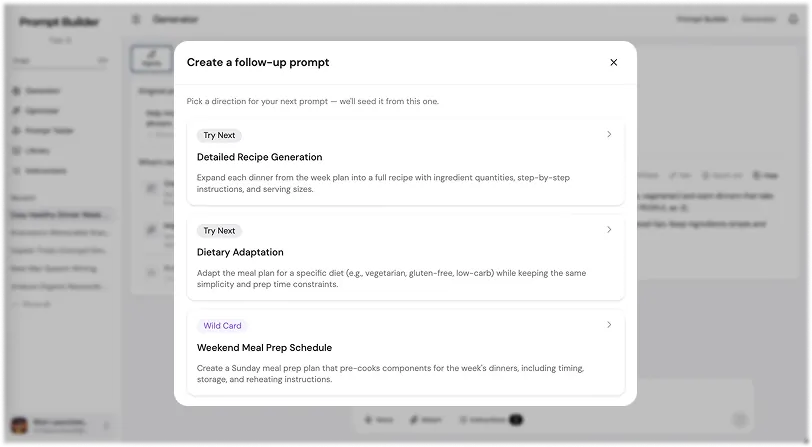
Follow-Up Prompt helps you create the next prompt after your first one. It is useful when your task has several steps and you want to continue working in the same direction. Instead of thinking about what to ask next, you can click Follow-Up and Prompt Builder will help you create the next useful prompt based on your current idea.
For example, let's say you want to create a meal plan for the week. First, you generate a prompt for the weekly meal plan. Then you click Follow-Up and create the next prompt, for example a cooking schedule. After that, you can create another follow-up prompt for a shopping list, and then another one for recipes for each meal. Step by step, one simple idea turns into a full workflow.
This feature works well because most real tasks are not finished with one prompt. Usually, you need to continue, go deeper, break the task into parts, or move from planning to execution. Follow-Up Prompt helps you do that without starting from zero every time.
You can use it for many tasks: content planning, marketing campaigns, product research, customer interviews, study plans, travel planning, business ideas, coding tasks, video scripts, image prompts, automation flows, and more. Any prompt can become the first step of a bigger workflow.
Improve Your Prompt
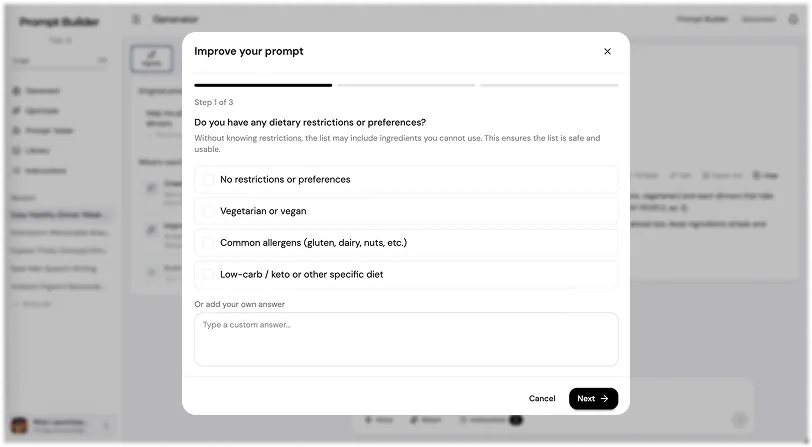
Improve Your Prompt helps you make your current prompt more accurate and more useful. Instead of just rewriting the prompt, Prompt Builder asks you relevant questions about your task. These questions help you clarify the details that the AI model needs to give a better answer.
For example, if you want to create a recipe prompt, Prompt Builder may ask: Do you have any food preferences or diet restrictions? How many people is the meal for? Should the list include common pantry staples like oil, salt, or spices?
You can choose one of the suggested answers or write your own answer. This makes the process faster, but still gives you control. You do not need to know how to write a perfect prompt. You just answer simple questions, and Prompt Builder uses those answers to improve the final prompt.
This feature is useful because weak prompts often miss important details. The user may forget to mention the audience, format, goal, tone, limits, examples, budget, timing, or expected result. Improve Your Prompt helps find these missing details before you send the prompt to the AI model.
The result is a prompt that is more specific, more structured, and easier for the AI to follow. This helps you get better answers, fewer generic outputs, and less need to rewrite the same prompt again and again.
Why These Features Matter
Follow-Up Prompt helps you continue the task and build a workflow. Improve Your Prompt helps you make each prompt stronger before using it. Together, they help you work with AI in a more practical way.
You can start with a simple rough idea, improve it, generate the first prompt, create follow-up prompts, and keep going until you have a full result. This is useful when you do not just need one answer, but want to build a process around your task.
In simple terms: Improve helps you make the prompt better. Follow-Up helps you decide what to do next.
More Walkthroughs
How to Use the Generator in Prompt Builder
The Generator starting screen: choose a Prompt Type, pick an AI model, add your idea by text or voice, attach files, and generate a clear, structured prompt.
Prompt Generator Part 2: Working With Your Prompt
The prompt workspace: review your input, manage context, switch versions, change settings, fill placeholder fields, then edit, export, rate, and save your prompt.
Prompt Library
Your personal workspace to store, organize, test, and reuse prompts: save your best, run them instantly, filter by category, tags, and model, and use the community library.
Optimizer and Prompt Tester
Two sections for working with prompts after you create them: Optimizer improves an existing prompt with guiding questions, and Prompt Tester runs prompts across AI models.
AI Prompt Generator
Turn a rough goal into a model-ready prompt in seconds